
Form 3800 General Business Credit
Last updated:
-by Peter Samuel | TaxZerone
Form 3800 at a Glance
- What Is Form 3800? Form 3800, General Business Credit, is used to claim and calculate the general business credit and determine the amount of credit allowed against tax.
- Who Must File? Taxpayers claiming one or more general business credits generally must complete Form 3800 along with the applicable credit source forms.
- What Is Reported? Form 3800 reports current-year business credits, credit carryforwards and carrybacks, credit limitations, passive activity credits,and the amount of credit allowed for the tax year.
- Supported Tax Returns: Form 3800 may be used with IRS Form 990-T, Form 1041 Form 1065 Form 1120, Form 1120-S and other applicable returns when the taxpayer is claiming eligible general business credits.
- Credit Source Forms: Individual credits are generally calculated on their applicable source forms, such as Form 3468, (Investment Credit), Form 5884 (Work Opportunity Credit), or Form 6765 (Credit for Increasing Research Activities), , and then reported on Form 3800.
What's New in Form 3800:
New Item B:
- Check Item B(i) to confirm if you made an entry in Part III, column (f), as a transferor or transferee of credits under section 6418.
- If "Yes," enter the number of transfer election statements attached to your return in Item B(ii).
Schedule A (Form 3800):
- Use Schedule A (Form 3800) as your transfer election statement.
- Report all required information for each transferred credit on this schedule.
Small Agri-Biodiesel Producer Credit:
- Figure your credit using Form 8864.
- Report the credit on IRS Form 3800, Part III, line 1l.
- For fuel sold or used after June 30, 2025, you can make the section 6418 transfer election.
Table of Contents
What is Form 3800?
Form 3800 is the IRS form used to report the “General Business Credit,” which is a collection of many different business-related tax credits.
Instead of handling each credit in isolation, Form 3800 pulls them together, applies IRS limitation rules, and shows how much credit can actually be used this year against your tax or UBIT.
Who should use Form 3800 with Form 990‑T?
Form 3800 is relevant to tax-exempt organizations that file Form 990‑T and:
- Have unrelated business income that is subject to UBIT, and
- Generate one or more general business credits (for example, through qualifying employment, energy, investment, or similar activities).
If your organization is filing Form 990-T and claiming any eligible general business credit, you generally need Form 3800 to compute and apply those credits correctly.
Why is Form 3800 important for 990‑T filers?
For 990‑T filers, Form 3800 can:
- Help reduce the UBIT liability with allowable credits
- Prevent loss of credits by correctly tracking carrybacks and carryforwards
- Provide a clear, organized summary of all general business credits affecting your 990‑T
In other words, it helps ensure that your organization pays the correct amount of UBIT-no more, no less-while taking full advantage of the credits you are entitled to.
How does Form 3800 work in the 990‑T process?
At a high level, a 990‑T filer will:
- Identify unrelated business activities and compute UBIT on Form 990‑T.
- Determine which activities generate general business credits and complete the related credit forms/schedules.
- Use Form 3800 to combine those credits, apply limitations, and compute the total allowable credit for the year.
- Apply the allowable credit from Form 3800 to reduce the UBIT reported on Form 990‑T, and track any unused credit for other years.
Embrace the Future of Tax Filing – Choose TaxZerone Today!
Make your e-filing process simple by clicking the button below.
Complete Form 3800 with Detailed Line-by-Line Instructions
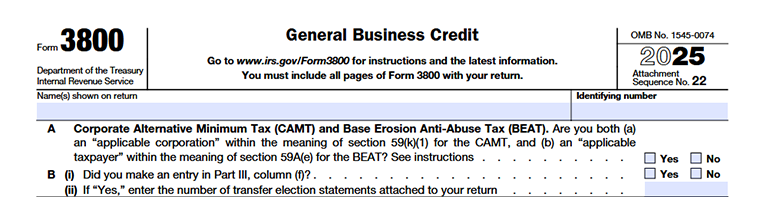
Name(s) Shown on Return
Enter the name of the taxpayer or business exactly as it appears on the tax return.This should match the name used on all supporting forms and schedules.
Identifying Number
Enter the taxpayer's identification number, such as:
- Social Security Number (SSN) for individuals,
- Employer Identification Number (EIN) for businesses and organizations, or
- Other applicable taxpayer identification number.
This number must match the identification number shown on the tax return.
Line A – Corporate Alternative Minimum Tax (CAMT) and BEAT
Check "Yes" if you are both
- An applicable corporation subject to the Corporate Alternative Minimum Tax (CAMT)under section 59(k), and
- An applicable taxpayer subject to the Base Erosion Anti-Abuse Tax (BEAT) under section 59A(e).
Otherwise, check "No."
Line B(i) – Transfer Election Statement
Check "Yes" if you entered an amount in Part III, column (f) for a credit transfer election. Otherwise, check "No."
Line B(ii) – Number of Transfer Election Statements
If you checked "Yes" on Line B(i), enter the number of transfer election statements attached to your return.
Part I -Credits Not Allowed Against Tentative Minimum Tax (TMT)
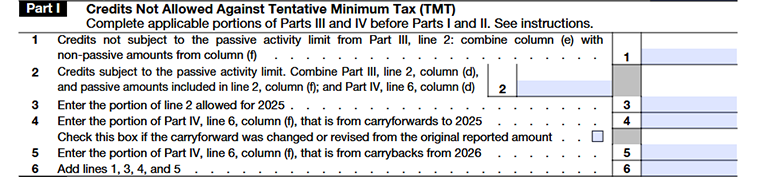
Part I is used to separate credits that are NOT allowed against Tentative Minimum Tax (TMT) and track:
- Non‑passive credits from Part III
- Passive activity credits and their allowed amount
- Non‑passive carryforwards and carrybacks
Users should complete Parts III and IV first, then fill in Part I using the references shown on each line.
Line 1
- Go to Part III, line 2.
- Take the full amount from column (e).
- Add these amounts together and enter the total on Part I, line 1.
Line 2
- In Part III, line 2, find:
- The amount in column (d) (passive credits), and
- The passive portion of column (f).
- In Part IV, line 6, take the amount in column (d) (passive carryovers).
- Add all these passive amounts together.
- Enter the total on Part I, line 2.
Line 3
- Use Form 8582‑CR or Form 8810 (whichever applies to the filer) to calculate how much of the line 2 amount is allowed for 2025.
- Enter that allowed passive credit on Part I, line 3.
- If no passive credit is allowed, enter 0.
- Do not include any specified credits here.
Line 4
- Go to Part IV, line 6, column (f).
- From that amount, identify the non‑passive carryforwards (credits from activities that are not passive).
- Enter that non‑passive carryforward amount on Part I, line 4.
- If the carryforward amount you are entering is different from what you originally reported in a prior year, check the box on line 4 and follow the instructions for attaching the required statement.
Line 5
Complete line 5 only if you are amending your 2025 return to carry back unused credits from 2026.
Line 6
- Add the amounts on lines 1, 3, 4, and 5.
- Enter the total on Part I, line 6.
Part II - Figuring Credit Allowed After Limitations
Section A-Figuring Credit Allowed After Section 38(c)(1) Limitation Based on Amount of Tax
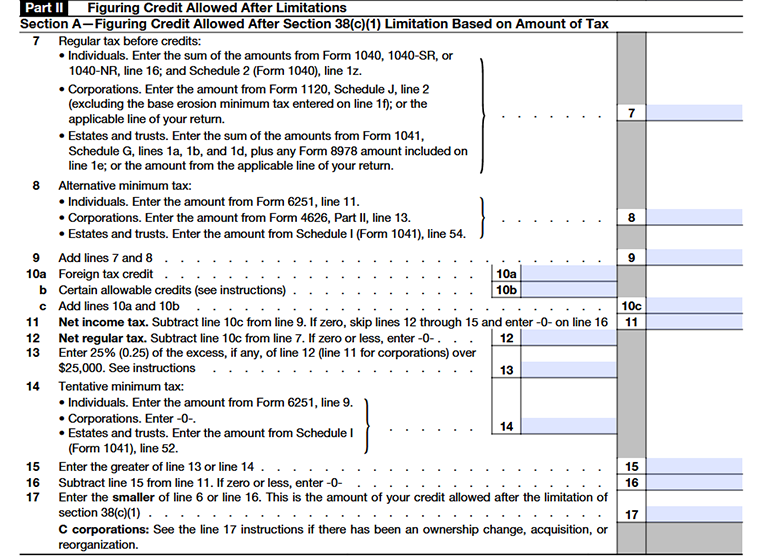
Line 7
What to enter on line 7 depends on the type of filer:
Individuals
For individual filers, line 7 shows your regular tax before credits. Add the amount from Form 1040 / 1040‑SR / 1040‑NR, line 16 to the amount from Schedule 2 (Form 1040), line 1z, and enter that total on Form 3800, Part II, line 7. Exclude any education credit recapture, any tax from Form 8621, and any section 965(i) deferred tax or triggering‑event tax from this calculation.
Corporations
- Go to Form 1120, Schedule J, line 2.
- Ignore (exclude) any amounts that were entered on lines 1c, 1e, and 1f of Schedule J.
- Enter the remaining amount on Form 3800, line 7 (or use the equivalent line on another corporate return if not filing Form 1120).
Estates and trusts
- Go to Form 1041, Schedule G, lines 1a, 1b, and 1d.
- Add these amounts together.
- If any Form 8978 amount is included on line 1e of Schedule G, add that too.
- Enter the total on Form 3800, line 7 (or use the equivalent line if using a different fiduciary return).
Non‑pass‑through partners
- Partners that are not pass‑through entities (such as partnerships or S corporations) use Form 8978 and Schedule A (Form 8978) to compute their tax net of credits, not Form 3800, for that reporting year.
- Any credit carryforwards that result from that Form 8978 calculation are then reported in the next tax year on Form 3800, Parts IV and VI.
Line 8
Individuals: Enter the amount from Form 6251, line 11 on line 8.
Corporations: Enter the amount from Form 4626, Part II, line 13.
Estates and trusts: Enter the amount from Schedule I (Form 1041), line 54.
Line 9
- Add the amounts from line 7 (regular tax before credits) and line 8 (AMT).
- Enter the total on line 9.
Line 10a
Enter your foreign tax credit on line 10a, using the amount from your main tax return or foreign tax credit schedule. This credit is counted before figuring the general business credit limit.
Line 10b
Enter on line 10b the other non–general‑business creditslisted for your filer type in the official instructions. These credits are also taken into account before applying the general business credit limitation.
Line 10c
- Add line 10a (foreign tax credit) and line 10b (other allowable credits from your main return).
- Enter the total on line 10c.
Line 11
- Subtract line 10c from line 9.
- Enter the result on line 11.
If the result is zero or less:
- Enter 0 on line 11.
- Skip lines 12 through 15.
- Enter 0 on line 16.
Line 12
- Subtract line 10c from line 7.
- Enter the result on line 12.
- If the result is zero or less, enter 0.
Line 13
- Look at line 11 (for individuals, estates, trusts) or line 12 (for corporations; see form instructions).
- If that number is more than $25,000, subtract $25,000 and multiply the excess by 25% (0.25).
- Enter this 25% amount on line 13.
- If the applicable line is $25,000 or less, enter 0.
Line 14
Individuals: Enter the amount from Form 6251, line 9 on line 14.
Corporations: Enter 0 (corporate AMT is generally repealed; follow current IRS instructions).
Estates and trusts: Enter the amount from Schedule I (Form 1041), line 52.
Line 15
- Compare line 13 and line 14.
- Enter the larger of the two amounts on line 15.
Line 16
- Subtract line 15 from line 11.
- If the result is greater than zero, enter the result on line 16.
- If the result is zero or less, enter 0.
Line 17 – Special rule for C corporations
Line 17 applies only if a C corporation is limited by the ownership‑change rules.
- If the corporation had a post‑1986 ownership change (section 382), section 383 may limit how much tax can be offset by pre‑change general business credits.
- If the corporation acquired control of another corporation, or its assets in a reorganization, section 384 may limit how much tax on recognized built‑in gains can be offset by pre‑acquisition general business credits.
If either applies:
- Compute the maximum general business credit allowed under section 383 and/or 384.
- Enter that amount on line 17 .
- Attach your calculation and write “Sec. 383” or “Sec. 384” (as appropriate) in the margin next to line 17.
Section B-Figuring Section 38(c)(2) Empowerment Zone and Renewal Community Employment Credit Allowed
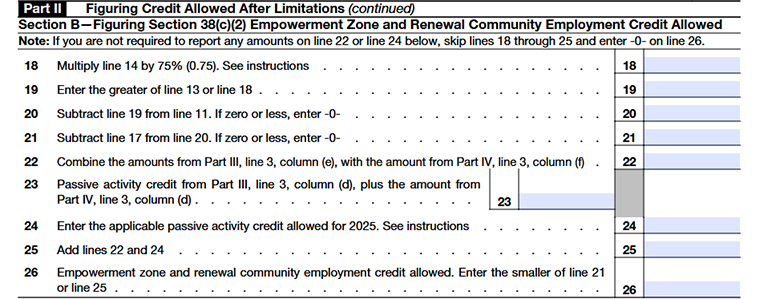
Line 18
Multiply the amount on line 14 by 75% (0.75) and enter the result on line 18.
Line 19
Compare line 13 and line 18. Enter the larger of the two amounts on line 19.
Line 20
Subtract line 19 from line 11. If the result is zero or less, enter 0 on line 20.
Line 21
Subtract line 17 from line 20. If the result is zero or less, enter 0 on line 21.
Line 22
On line 22, enter the non‑passive portion of the empowerment zone and renewal community employment credit:
- Take the amount from Part III, line 3, column (e).
- Add the non‑passive credit amounts from Part IV, line 3, column (f).
- Any carryforward or carryback of this credit (from the relevant schedule) flows into this line.
Line 22
- On line 23, enter the passive activity credit for this same credit:
- Take the amount from Part III, line 3, column (d).
- Add the passive credit amounts from Part IV, line 3, column (d).
- This total represents the part of the credit that is subject to passive activity limits.
Line 24
Use Form 8582‑CR or Form 8810 to figure how much of the passive credit in line 23 is actually allowed this year.
- Enter that allowed amount on line 24.
- If no passive credit is allowed, enter 0.
Line 25
- Add line 22 and line 24.
- Enter the total on line 25.
If you have amounts on both line 23 and line 24, this total includes both non‑passive and passive credit components. In that case, attach a brief statement that shows how much of line 25 is non‑passive and how much is passive.
Line 26
Enter the allowable Empowerment Zone and Renewal Community Employment Credit, limited to the lesser of line 21 or line 25.
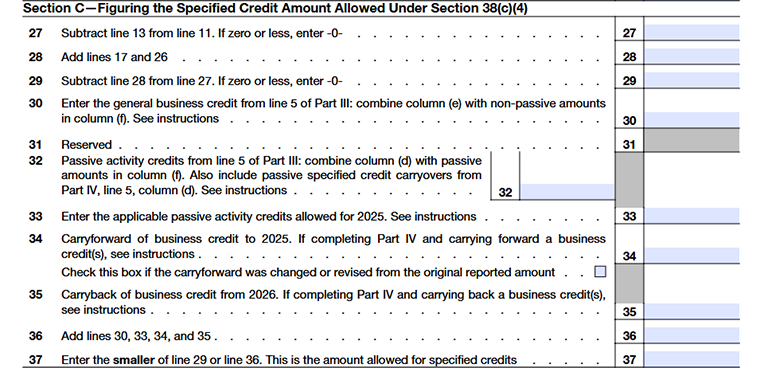
Section C-Figuring the Specified Credit Amount Allowed Under Section 38(c)(4)
Line 31 – General Business Credit
Enter the general business credit amount from Part III, line 5. Add the amount in column (e) to any non-passive credit amounts in column (f) . Do not include passive activity credit amounts from column (f). Refer to the caution provided under Line 1 for additional guidance.
Line 32 – Passive Activity Credits
Enter the total passive activity credits from Part III, line 5. Combine the amount in column (d) with any passive credit amounts in column (f). Exclude non-passive credit amounts reported in column (f). Also include any passive specified credit carryovers from Part IV, column (d), line 5, if applicable.
Line 33 – Passive Activity Credits Allowed Against TMT
Enter the current-year and carryover passive activity credit amount allowed against Tentative Minimum Tax (TMT) as reported on Form 8582-CR or Form 8810. Include only the general business credits reported on Line 32. If no credits are allowed, enter 0.
Line 34 – Credit Carryforwards
Enter the total unused credit carryforwards available for 2025 from Part IV, line 5, column (f).
Check the Box
If any credit amount was revised or adjusted from the amount originally reported, check the box on this line and attach the required statement.
Research Credit Note
If you are claiming the research credit through a sole proprietorship or pass-through entity, calculate the research credit limitation first. Then enter the allowable carry forward amount on Line 34.
Payroll Tax Credit Adjustment
If you elected to claim part of your research credit as a payroll tax credit on Form 6765, reduce your research credit carry forward by the amount elected.
Line 35 – Credit Carrybacks
Enter the carryback amount from Part IV, line 5, column (f). Use this line only when amending your 2025 return to carry back unused credits from 2026.
Research Credit Note
If you are claiming the research credit through a sole proprietorship or pass-through entity, apply the research credit limitation first. Then enter the allowable carryback amount on Line 35.
Line 36 – Total Available Credits
Add the amounts from lines 30, 33, 34, and 35. Enter the total on line 36.
Line 37 – Allowed Specified Credits
Enter the smaller line 29 or line 36. This is the allowable specified credit amount.
Section D-Credits Allowed After Limitations

Line 38 – Unused Credit Amount
- Enter the amount on Line 38 as instructed.
- If the total of Part II, line 38 and Part III, line 6, column (j) is less than the combined total of Part I, lines 1, 3, and 4 and Part II, lines 30, 33, and 34 (excluding carrybacks), you may have unused credits available for carryback or carryforward. Refer to the Carryback and Carryforward of Unused Credit instructions for additional guidance.
Part III -Current Year General Business Credits (GBCs)
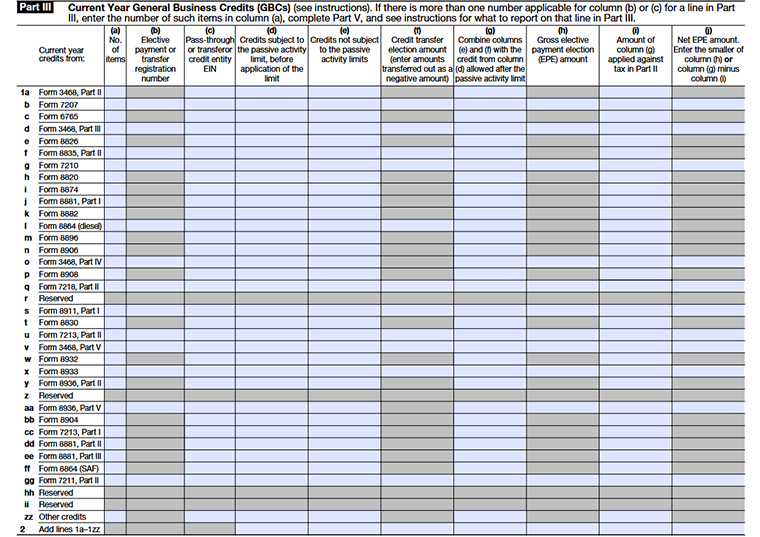
Line 1 – Current-Year General Business Credits
Lines 1a through 1zz list the current-year General Business Credits (GBCs)available for the 2025 tax year.
Each lettered line ( 1a, 1b, 1c, ... , 1zz) corresponds to a specific credit form shown in the left column of Part III (for example, Form 3468, Form 7207, Form 6765, Form 8911, Form 8936, and others).
For each applicable credit, complete columns (a) through (j)to report the credit amount, any transfer election or Elective Payment Election (EPE) information, applicable limitations, and the portion of the credit applied against your tax liability.
Line 2
Add the amounts from lines 1a through 1zz and enter the total on line 2. This represents your total current-year general business credits before any applicable limitations or adjustments.
Column (a) – Number of Items
Enter the number of facilities or pass-through entities listed for the credit in Part V. If only one applies, you can leave this column blank.
Column (b) – Registration Number
Enter the registration number if you are making an Elective Payment Election (EPE) or transfer election. If no election is being made, leave this column blank.
Column (c) – Pass-Through or Transfer Credit Entity EIN
Enter the EIN of the entity that provided the credit, such as a pass-through entity, cooperative, or transferor. If multiple entities are involved, enter the EIN of the entity associated with the largest credit amount.
Column (d) – Credits Subject to Passive Activity Limits
Enter current-year credits that are subject to passive activity limitations before applying any limitations.
Column (e) – Credits Not Subject to Passive Activity Limits
Enter credits that are not subject to passive activity limitations due to your material participation in the business activity.
Column (f) – Credit Transfer Election Amount
Enter transferred credits as follows:
- Negative amount if you transferred the credit to another taxpayer.
- Positive amount if you received the credit as a transferee.
Column (h) – Gross EPE Amount
Enter the total credit amount eligible for an Elective Payment Election before applying any limitations or reductions.
Column (i) – Credit Applied Against Tax
Enter the portion of the credit used to reduce your tax liability. Apply carryforward credits before current-year credits.
Column (j) – Net EPE Amount
Enter the smaller of:
- The amount in column (h), or
- Column (g) minus column (i).
Line 3
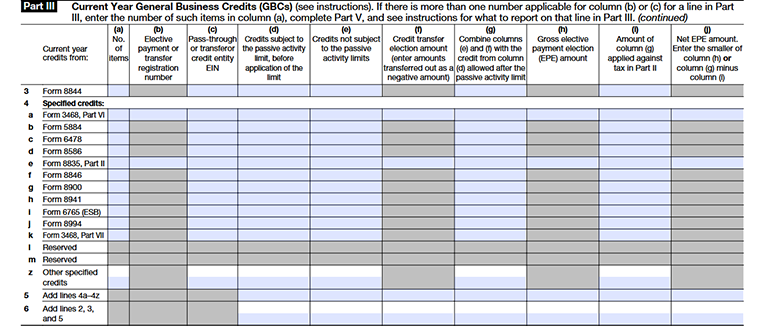
Enter the current-year credit amount from Form 8844 in the applicable columns. Complete columns (a) through (j) as required.
Line 4
Lines 4a through 4z list the current-year specified credits eligible for reporting in Part III. Enter each credit on its corresponding line and complete the applicable columns (a) through (j).
Line 5
Add the amounts from lines 4a through 4z and enter the total on line 5. This represents your total current-year specified credits.
Line 6
Add the amounts from lines 2, 3, and 5 and enter the total on line 6. This is your total current-year general business credit amount before applying any limitations or adjustments.
Columns (a)–(j)
Complete columns (a) through (j) for lines 1a–1zz to report current-year general business credits. These columns are used to provide details such as the number of items, registration numbers, entity EINs, passive and non-passive credit amounts, transferred credits, Elective Payment Election (EPE) amounts, credits applied against tax, and net EPE amounts. Complete only the columns that apply to the credit being reported.
Part IV- Carryovers of General Business Credits (GBCs)
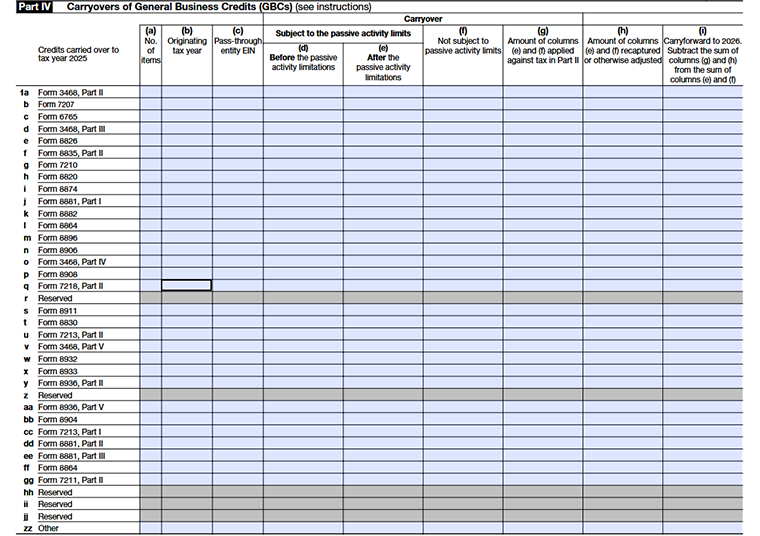
Line 1 – General rule
- Lines 1a through 1zz list the current‑year carryovers of specific general business credits into 2025.
- Each lettered line (1a, 1b, 1c, …, 1zz) corresponds to a particular credit form shown in the left column of Part IV (for example, Form 3468 , Form 8911, Form 8936, etc.).
- On each line, complete columns (a) through (i) to describe the carryover for that specific credit.
Column (a) – Number of items
- If you have more than one source credit form for the same credit (for example, multiple Forms 5884),
- Show the detailed breakdown in Part VI, and in Part IV, column (a), enter the number of source forms.
Column (b) – Originating tax year
- Enter the tax year where the carryover started (the year the unused credit was first created).
- This could be a prior year, or (for amended returns) a later year that now carries back into 2025.
- If you have carryovers from several years for the same credit, enter the most recent year in column (b).
Column (c) – Pass‑through entity EIN
- If the credit was allocated by a pass‑through entity (like a partnership or S‑corp), enter that entity’s EIN here.
- If there are multiple pass‑through entities for the same credit and they are broken down in Part VI, enter the EIN of the entity that allocated the largest amount of that credit to you.
Column (d) – Carryovers subject to passive activity limits (before limitations)
- Enter the full carryover amounts of credits that come from passive activities (as defined in section 469).
- This is the amount before applying the passive activity limitations.
- For transferred credits under section 6418, see any special rules in the “Transferee taxpayer” guidance.
Column (e) – Carryovers subject to passive activity limits (after limitations)
- This column shows the portion of the passive credit (from column (d)) that is actually allowed after applying passive activity rules.
- Use Form 8582‑CR or Form 8810 (if required) to compute this allowed amount.
- Enter the allowed passive carryover in column (e).
Column (f) – Carryovers not subject to passive activity limits
Column (f) lists non‑passive carryover credits.
Column (g) – Amount of columns (e) and (f) applied against tax in Part II
- Enter the total portion of columns (e) and (f) that you actually used to reduce tax in Part II of Form 3800.
- For 2025, line 7 of column (g) should equal the sum of Part II, lines 33, 34, and 35.
Column (h) – Amount of columns (e) and (f) recaptured or otherwise adjusted
- Enter any amount from columns (e) and (f) that is recaptured (for example, reported on Form 4255 or elsewhere).
- Also include credits reduced or adjusted because of an audit or other change.
Column (i) – Carry forward to 2026
- This is the remaining carryover after what you used and what was recaptured.
- Column (i)= (column (e)+ column (f) ˆ’ (column (g) + column (h)))
- These amounts will appear as carryovers into 2026 and will be included on your 2026 Form 3800, Part IV.
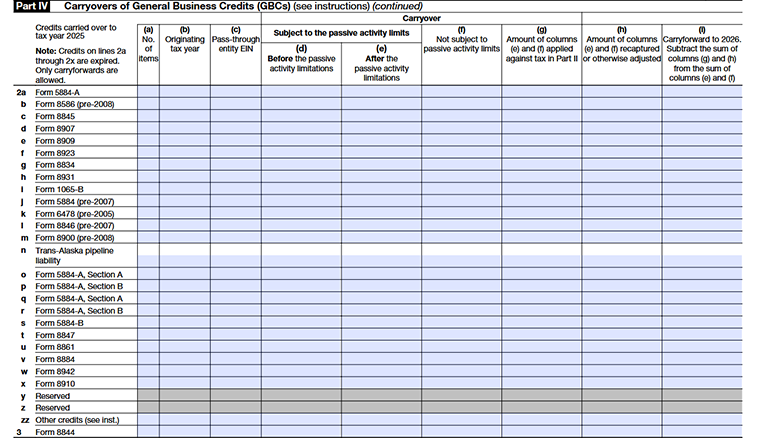
Line 2 – General rule
Lines 2a through 2zz list carry forwards of older general business credits that are being brought into 2025, where the underlying credits are no longer available as new, current‑year credits.
Each lettered line (2a, 2b, 2c, …, 2zz) corresponds to a specific “expired” credit form or provision shown in the left column of Part IV (for example, Form 5884‑A, pre‑2008 Form 8586, pre‑2005 Form 6478, Form 8910, and other listed credits).
Column (a)- Column(i)
Complete these columns for lines 2a–2zz using the same rules explained above for Part IV, lines 1a–1zz number of items, originating tax year, pass‑through EIN, passive and non‑passive carryovers, amounts used or recaptured, and carryforward to 2026.
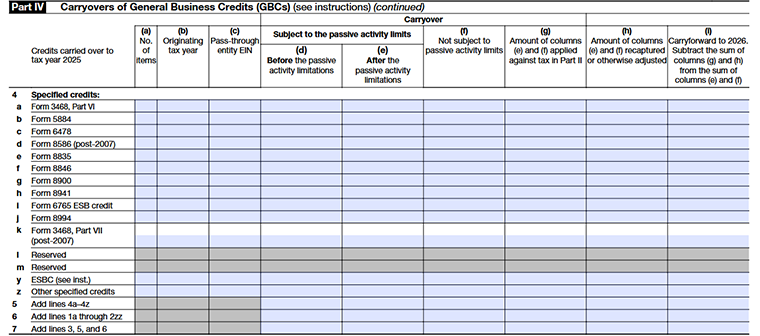
Lines(4a–4z)
Lines 4a–4z are used to report carryovers for a specific list of “specified” general business credits that are carried into tax year 2025. Each lettered line identifies one credit type.
Line 5 – Add lines 4a–4z
Line 5 provides the total carryover for all specified credits listed on lines 4a–4z.
Line 6 – Add lines 1a through 2zz
Line 6 summarizes the carryovers from all earlier sections of Part IV (lines 1 and 2).
Line 7 – Add lines 3, 5, and 6
On line 7, add the amounts from lines 3, 5, and 6 (by column as the form indicates). Line 7 represents the final total of all general business credit carryovers to tax year 2025 shown in Part IV and is used to support the carryover figures in Part II.
Column (a)- Column(i)
Complete these columns for lines 2a–2zz using the same rules explained above for Part IV, lines 1a–1zz number of items, originating tax year, pass‑through EIN, passive and non‑passive carryovers, amounts used or recaptured, and carry forward to 2026.
Part V- Breakdown of Aggregate Amounts on Part III for Facility-by-Facility, Multiple Pass-Through Entities, etc.
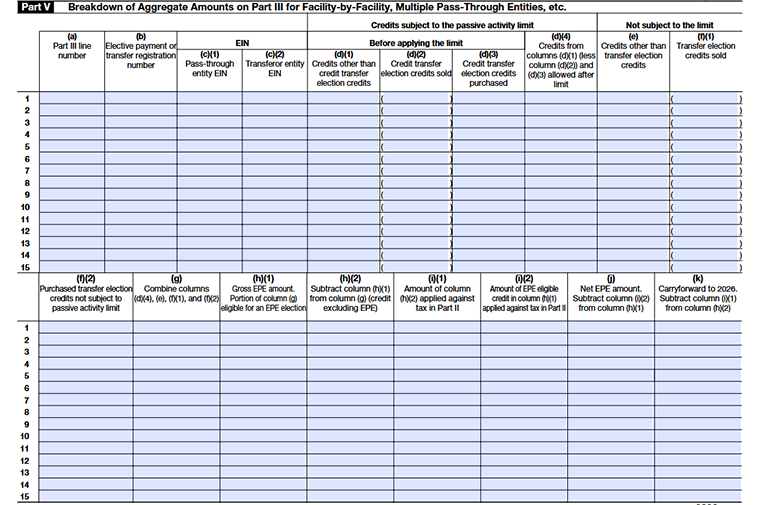
If every Part III amount comes from only one facility and one entity, you can usually leave Part V blank. If any Part III amount combines more than one facility, entity, or registration number, you must use Part V to show the breakdown.
Column (a)- Column(i)
- Enter the exact line number from Part III you are breaking down.
- Include both the number and the letter (for example, 1b, 2a, 3c).
- This connects each Part V row to the correct line in Part III.
Column (b) – Elective payment or transfer registration number
For each facility or credit that has its own elective payment or transfer registration number, enter that number in column (b) so the IRS can match this row back to your registration.
Column (c)(1) – Pass‑through entity EIN
If the credit was allocated to you from a pass‑through entity (partnership, S corporation, or other pass‑through), enter that entity’s EIN here.
Column (c)(2) – Transferor entity EIN
If you are involved in a transferable credit under section 6418(either as transferor or transferee), Enter the transferor’s EIN here (the entity that originally earned the credit)
Column (d)(1) – Credits other than credit transfer election credits
- Put credits here that are not involved in a transfer under section 6418.
- These are your “normal” passive activity credits (self‑earned or from pass‑throughs) that you did not sell or buy as transfer credits.
Column (d)(2) – Credit transfer election credits sold
- Put in the amount of credits you sold under section 6418.
- These are credits you transferred to someone else (you no longer keep them).
Column (d)(3) – Credit transfer election credits purchased
- Put in the amount of credits you purchased under section 6418.
- These are credits someone else earned but transferred to you.
Column (d)(4) – Credits allowed after passive activity limit
This column shows the allowed credit amount after passive activity limits. To get this amount:
- Start with column (d)(1).
- Subtract column (d)(2) (credits you sold).
- Add column (d)(3) (credits you purchased).
- Then apply the passive activity rules (using Form 8582‑CR or Form 8810, if required).
- The final allowed amount after those limits goes in column (d)(4).
Column (e) – Credits other than transfer election credits
- Put non‑transfer credits here that are not passive.
- This includes credits you earned yourself or credits allocated to you by a pass‑through entity.
Column (f)(1) – Transfer election credits sold
- Put here the amount of credits you sold under section 6418 that are not subject to passive limits.
- These are non‑passive credits that you transferred away.
Column (f)(2) – Purchased transfer election credits not subject to passive activity limit
- Put here the amount of non‑passive credits you purchased under section 6418.
- These are credits you acquired from someone else that are not passive for you.
Column (g) – Combine columns (d)(4), (e), (f)(1), and (f)(2)
- This column shows your total credit for that line.
- To compute it:
- Add columns (d)(4), (e), and (f)(2).
- Then subtract column (f)(1).
- Think of column (g) as all credits for this facility/registration after transfers and limits.
Column (h)(1) – Gross EPE amount
- This is the part of column (g) that is eligible for an elective payment election (EPE) under section 6417 or section 48D.
- Only put in credits that qualify for EPE.
CColumn (h)(2) – Credit excluding EPE
- Here you enter column (g) minus column (h)(1).
- This is the portion of your total credit that is not part of the gross EPE amount.
- This remaining amount can include credits that are still subject to the passive activity rules and may only offset tax on your passive activities.
Column (i)(1) – Amount of column (h)(2) applied against tax in Part II
- Put here how much of the non‑EPE credit (from column (h)(2)) you actually used to reduce tax in Part II.
- Remember: carryforward credits (from Part II, line 34) are used first, before current‑year credits from Part III or Part V.
- So column (i)(1) represents the portion of column (h)(2) that was applied after that ordering rule.
Column (i)(2) – Amount of EPE applicable credit in column (h)(1) applied against tax in Part II
- Put here the amount of the EPE‑eligible credit (column (h)(1)) that first gets applied to tax in Part II.
- By rule, credits in column (h)(1) must be used to offset any tax before the remaining amount can be treated as a payment (elective payment/direct pay).
Column (j) – Net EPE amount
- This is your remaining elective payment amount after applying some or all of it to tax.
- Column (j)=column (h)(1) ˆ’column (i)(2)
- The result is the net EPE amount that can be treated as a payment of tax (subject to the rules). Some or all of this can effectively become a refund.
Column (k) – Carryforward to 2026
- This is the credit you still carry forward to 2026.
- Column (k): column (h)(2) - column (i)(1).
- These carryforwards will appear in your 2026 Form 3800, Part IV, as part of your future‑year credit computations.
Part VI - Breakdown of Aggregate Amounts in Part IV :
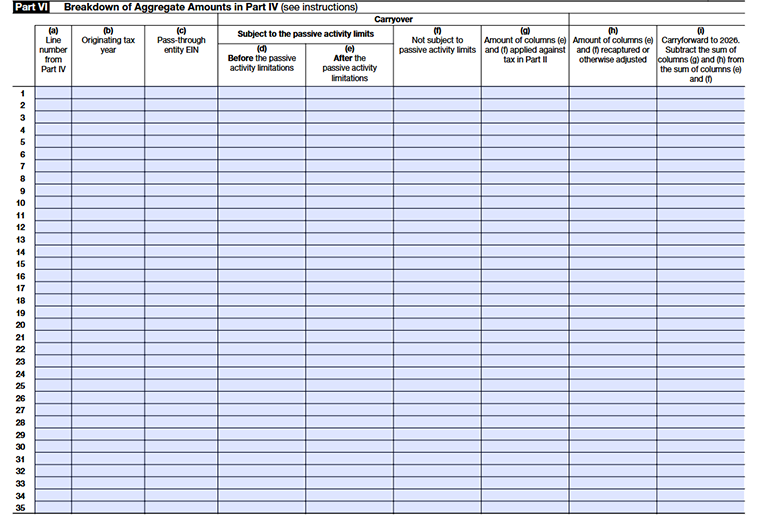
Use Part VI only if a number you entered in Part IV is an aggregate amount, meaning it combines credits from more than one tax year or more than one pass‑through entity. If your Part IV amounts come from just a single year and a single entity, you generally do not need to complete Part VI.
Column (a) – Line number from Part IV
- Enter the Part IV line number that this breakdown relates to.
- This tells which Part IV total you are “unpacking” here.
Column (b) – Originating tax year
- Enter the tax year when the credit was originally generated (for example, 2023, 2024, etc.).
- Each year gets its own line, even if it relates to the same Part IV line.
Column (c) – Pass-through entity EIN
- If the credit comes from a partnership, Corporation, estate, or trust, enter that entity’s EIN here.
- If the credit is not from a pass-through entity, you can leave this column blank.
Columns (d) and (e) – Subject to the passive activity limits
Column (d) – Before the passive activity limitations
- Enter the amount of credit before applying passive activity limitations.
- Think of this as the “raw credit” for that year/entity.
Column (e) – After the passive activity limitations
- Enter the allowed credit amount after passive activity limits are applied.
- This is usually the credit that can move forward to be used on IRS Form 3800.
If the credit is not subject to passive activity limits, users typically leave columns (d) and (e) blank and use column (f) instead.
Column (f) – Not subject to passive activity limits
- Use this column if the credit is not subject to passive activity limitations.
- Enter the carryover credit amount for that year/entity that is fully available (before applying current‑year tax limits in Form 3800).
Column (g) – Amount applied against tax in Part II
- Enter the portion of columns (e) and/or (f) that is actually used (applied) against current‑year tax in Part II of Form 3800.
- This tells how much of that specific year’s credit has been consumed.
Column (h) – Amount recaptured or otherwise adjusted
- Enter any part of the credit that is recaptured or adjusted (for example, due to a recapture event or other required adjustment).
- This column explains why some of the original carryover disappears without being used as a credit.
Column (i) – Carry-forward to 2026
- This is the remaining credit that still carries forward to the next year.
- To figure the amount in column (i), add the amounts in columns (e) and (f), then subtract the amounts in columns (g) and (h). The result is your carry forward to 2026.
Commonly Asked Questions
1. What types of credits are included on Form 3800?
Form 3800 includes various business credits such as the Research and Development Credit, Work Opportunity Credit, Energy-related credits, and much more.
These credits are offered to incentivize beneficial economic activities and help reduce the total tax owed.
2. Do I need to file separate forms for each credit?
No, Form 3800 consolidates multiple business credits, allowing you to file them all together without needing separate forms. However, for some credits, you may need to complete additional documentation before filing Form 3800.
3. How does Credit ordering work in Form 3800?
- Carryforwards to that year, the earliest ones first;
- The general business credit earned in that year; and
- The carryback to that year.