
Form W-2c Instructions
Last updated:
-by Alexia Zepeda | TaxZerone
Form W-2c at a Glance
- Form W-2c, Corrected Wage and Tax Statement is used to correct errors reported on a previously filed Form W-2.
- Employers use this form to amend incorrect wage, tax withholding, employee information, and state or local tax information that was originally reported to employees, the Social Security Administration (SSA), and tax agencies.
- This article covers line-by-line instructions including employer information, employee information, Tax Year (Box c), Correct SSN (Box d), Employee Name/SSN Corrections (Boxes e-h), Employee Address (Box i), Boxes 1-14 (Federal Wage, Tax, and Compensation Corrections), and Boxes 15-20 (State and Local Information Corrections).
What is IRS Form W-2c?
Form W-2c, the "Corrected Wage and Tax Statement," is used to fix errors on previously submitted Form W-2. Employers can use Form W-2c to correct inaccuracies in the wage and tax information they reported to employees and the IRS.
When is the due date for filing Form W-2c?
There is no specific deadline for filing Form W-2c. However, it is important to correct any errors in your returns as soon as they are identified. Additionally, promptly send corrected copies to your recipients.
What information can be corrected on Form W-2c?
You can correct the following information reported on Form W-2:
- Tax year
- Employer Identification Number (EIN)
- Employee name and SSN
- Employee earnings and tax withholdings:
- Wages, tips, and other compensation
- Federal income tax withheld
- Social security wages
- Medicare tax withheld and Medicare wages and tips
- Allocated tips
- State and local information
Reported any of the information mentioned above incorrectly on Form W-2? E-file Form W-2c with TaxZerone now.
Instructions to file Form W-2c
Let's see line-by-line instructions on how to fill out Form W-2c.
Employer details
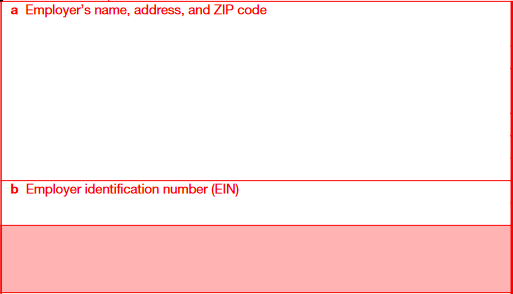
Enter the employer's name, complete address, and EIN.
Employee details
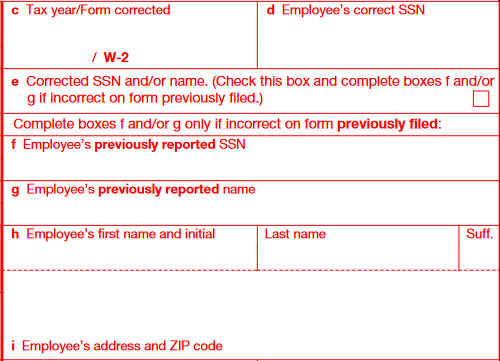
- Box c: Enter the tax year for which the form is corrected
- Box d: Enter the employee’s correct SSN
- Box e: Check this box only if you are correcting the employee’s name or SSN
- Box f: Enter the SSN that you have reported in the previously filed return
- Box g: Enter the employee name that you have reported in the previously filed return
- Box h: Enter the employee’s correct name
- Box i: Enter the employee’s address and ZIP code
Boxes 1 to 14
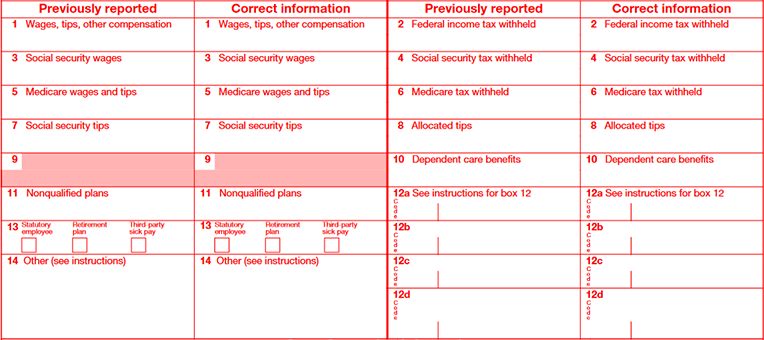
Enter the previously reported amount and the correct amount in the respective boxes.
If you are not sure how to fill out previously reported amount boxes, refer to our Form W-2 instructions.
Boxes 15 to 20
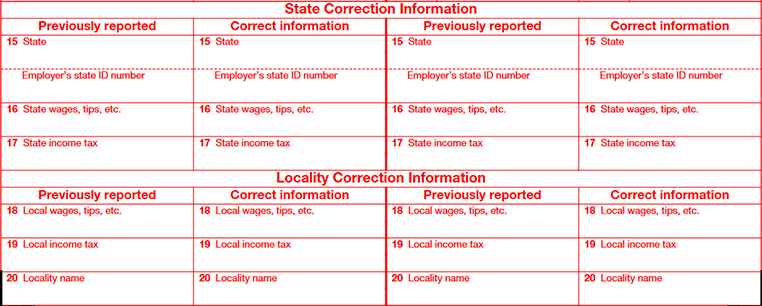
If you want to correct any details related to state and locality, report those in the respective boxes.
How to file Form W-2c?
You can file W-2c Form through online e-filing and traditional paper filing.
Form W-2c E-filing (recommended)
The IRS recommends e-filing your W-2c for faster processing. Plus, you'll get instant notifications when they're processed. With TaxZerone, you can fill out your W-2c in just a few clicks, review and submit it, and share recipient copies easily.
Benefits of e-filing:
- Faster processing and reduced errors
- Simpler, more streamlined experience
- Instant notifications upon form processing
- Secure transmission of sensitive data
Choose e-filing for a smooth and efficient W-2c filing experience.
Paper filing
If you choose to paper-file Form W-2c, here are the steps you need to follow:
- Download and print Form W-2c from the IRS website.
- Fill out:
- Recipient details (name, address, SSN, compensation)
- Your business information
- Mail the completed form to SSA
- Send a copy to each recipient
Important notes:
- Mail early to ensure timely arrival
- Always provide copies to recipients for their tax reporting
Form W-2c mailing address
If you have chosen to file Form W-2c by paper, send the completed form to the mailing address below:
Social Security Administration,
Direct Operations Center,
P.O. Box 3333,
Wilkes-Barre, PA 18767-3333
How to e-file Form W-2c with TaxZerone?
Follow the steps below to e-file Form W-2c using TaxZerone.
Step 1: Fill out Form W-2c with previously reported and correct information.
Step 2: Review & transmit the return
Step 3: Send the recipient copy
Why choose TaxZerone to e-file Form W-2c?
When you choose to e-file Form W-2c with TaxZerone, you can:
- Catch any errors before you submit.
- Upload multiple forms and finish in a flash.
- Share recipient copies by email instantly
- Share recipient copies in a secure portal—ZeroneVault—where employees can download them anytime, anywhere.
- Enjoy the industry's best price, starting at just $0.59 per form.