
Schedule A (Form 3800) - Transfer Election Statement
Accurately report transferred credits and stay IRS-compliant
Last updated:
-by Peter Samuel | TaxZerone
Form 3800 Schedule A at a Glance
- What Is Schedule A (Form 3800)? Schedule A (Form 3800) is used as a transfer election statement to report the required information when eligible general business credits are transferred under Section 6418.
- Who Uses It? Credit transferors and transferees may use Schedule A to document a transferred eligible credit and attach the statement to their respective tax returns.
- What Is Reported? Schedule A reports the credit being transferred, transfer registration number, payment amount and date, and other required information about the credit transfer.
- Form 3800 Connection: Schedule A works with Form 3800 , General Business Credit, and is attached to the applicable annual tax return when a Section 6418 transfer election is made.
- Multiple Transfers: A separate Schedule A or equivalent transfer election statement may be required for each transferred credit transaction or applicable transfer.
Table of Contents
What is Schedule A (Form 3800)?
Schedule A (Form 3800), also called the Transfer Election Statement, is the IRS form used to formally report that an eligible tax credit was transferred from one taxpayer to another. It serves as the official confirmation that both parties agreed to the transfer. Without this statement attached to the return, the IRS will not recognize the transferred credit.
Taxzerone provides end-to-end guidance on the Transfer Election Statement. Refer to the instructions for a clear explanation of credit transfers and filing requirements.
Who must file Schedule A (Form 3800)?
Schedule A must be completed and attached by both partiesinvolved in the credit transfer:
- Transferor – the exempt organization or taxpayer that earned the credit and transferred it
- Transferee - the taxpayer that received the credit and will claim it
Each party attaches Schedule A to their own tax return for the year of transfer.
What credits can be Transferred?
Only eligible credits may be transferred. These commonly include certain clean energy, investment, and other legislatively approved credits. The specific credit must be calculated on its original IRS credit form before it can be transferred.
Schedule A does not make a credit transferable; it only reports a transfer that is already allowed by law. To learn more about eligible credits and the related transfer guidelines, refer to our TE Statement Credits resource page.
How to file Schedule A (Form 3800) with Taxzerone
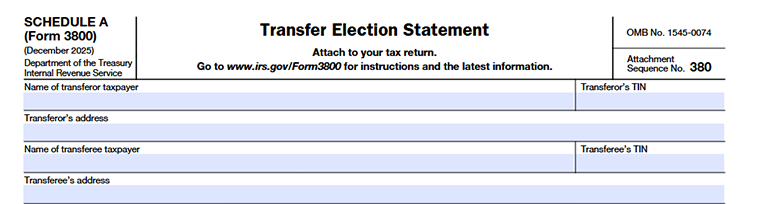
Give the full legal name, TIN, and mailing address of both the transferor (the person giving the credit) and the transferee (the person receiving the credit). This makes sure that the IRS can keep track of the transfer correctly.
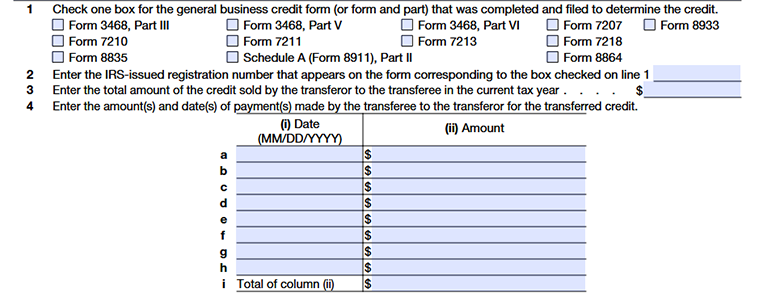
Line 1
To find out how much credit is being transferred, check the box that matches the tax form you sent in.
Line 2
Enter the IRS transfer registration number for this credit transaction.
Line 3
Enter the IRS transfer registration number for this credit transaction.
- The amount that was reported as negative in Part III, column (f) of the transferor's Form 3800, and
- The amount that is positive in Part III, column (f) of the transferee's Form 3800.
Both sides must report the same amounts.
Line 4
Enter the payment amount and the date of payment on Line 4a. If more than one payment was made for this credit transfer, report each additional payment on Lines 4b through 4h.
Line 5
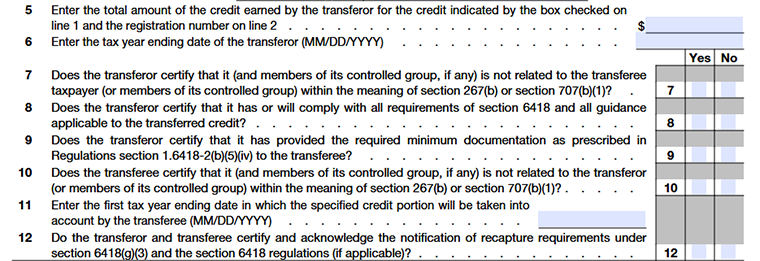
Enter the full amount of the credit earned by the transferor for the credit type you selected on Line 1. Be sure this amount matches the IRS transfer registration number entered on Line 2 to ensure accurate reporting and avoid delays.
Line 6
Enter the transferor’s tax year ending date in MM/DD/YYYY format. Make sure the date matches the tax year for which the credit was earned.
Line 7
Confirm whether the transferor (and any related controlled group members) is not related to the transferee under IRS rules (Sections 267(b) or 707(b)(1)). Select “Yes” only if they are completely unrelated.
Line 8
Confirm that the transferor has complied - or will comply - with all requirements under Section 6418 and any IRS guidance related to the transferred credit.
Line 9
Confirm that the transferor has provided the transferee with all required documentation as outlined in IRS Regulations Section 1.6418-2(b)(5)(iv).
Line 10
Confirm that the transferee (and any members of its controlled group) is not related to the transferor under IRS related-party rules (Sections 267(b) or 707(b)(1)).
Line 11
Enter the first tax year ending date (MM/DD/YYYY) in which the transferee will claim or apply the transferred credit.
Line 12
Confirm that both the transferor and transferee understand and acknowledge the IRS recapture rules under Section 6418(g)(3), if applicable.
Line 13
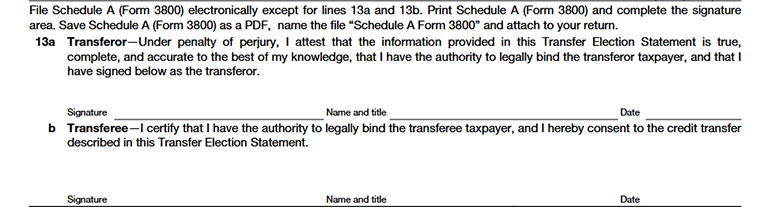
File Schedule A (Form 3800) electronically, except for Lines 13a and 13b.Print the form, complete the signature section, save it as a PDF named “Schedule A Form 3800”, and attach it to your return.
Line 13a (Transferor)
Sign, date, and confirm that the information is correct and that you have the power to approve the credit transfer.
Line 13b (Transferee)
Sign, date, and confirm that you have the right to do this and agree to accept the credit.
Ready to File Schedule A (Form 3800)?
EEnsure your transferred business tax credits are properly documented and attached in compliance with IRS requirements. TaxZerone is a safe and dependable way to fill out and send in Schedule A (Form 3800) – Transfer Election Statement, as well as Form 3800 and Form 990-T for organizations that don't have to pay taxes.