








Form 990 Schedule G
Introduction
Schedule G is generally filed by non-profits and exempt organizations to report professional fundraising services, fundraising events, and gaming activities conducted for the tax year.
In this resource guide, we aim to brief on Schedule G, providing valuable insights into its purpose, the entities obligated to file, the filing requirements, and addressing common queries.
Table of Contents
What is Schedule G?
Schedule G, Information Regarding Fundraising or Gaming Activities is a supplementary schedule filed annually by tax-exempt organizations to provide detailed information about fundraising events and gaming activities they organized for the tax year
This schedule seeks details on the revenue, expenses, and net income associated with these events, providing a comprehensive overview of the organization's financial landscape.
Who must file Schedule G?
Tax-exempt organizations engaging in fundraising events or gaming activities must file Schedule G as part of their annual reporting. This requirement extends to entities falling under section 501(c) of the Internal Revenue Code.
If your organization conducts activities such as auctions, charity events, bingo nights, or any other fundraising endeavor, Schedule G becomes a vital component of your annual reporting requirements.
Effortlessly complete your Schedule G filing requirements and e-file your exempt organization return with ease through TaxZerone!
Start E-filing NowSchedule G Filing Requirements

All tax-exempt organizations that file Form 990 or 990-EZ returns must complete and attach Schedule G along with their annual information return.
Below, we have provided Schedule G filing requirements for each part.
Part I - Fundraising Activities
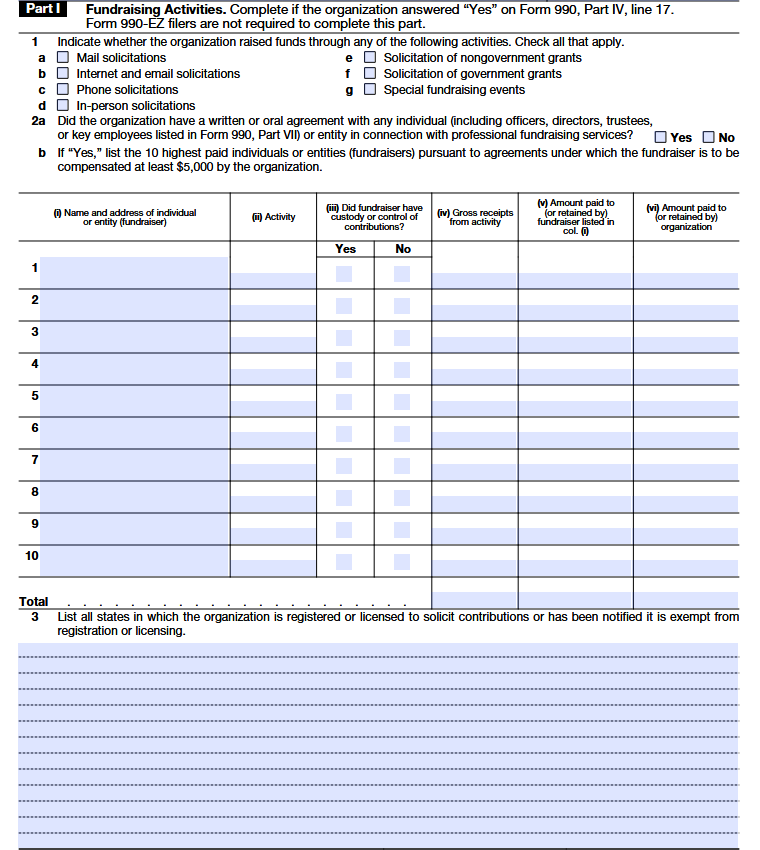
Line 1
This question asks how your organization asked for or received donations or funding during the year. Simply check all the ways you used to raise funds.
- Mail solicitations: Requesting donations through letters or other mailed materials.
- Internet and email solicitations: Asking for support through emails, websites, or online campaigns.
- Phone solicitations: Calling donors or supporters to request contributions.
- In-person solicitations: Asking for donations face-to-face, such as during meetings or visits.
- Nongovernment grants: Applying for funding from private foundations, companies, or other non-government sources.
- Government grants: Applying for funding from federal, state, or local government agencies.
- Special fundraising events: Raising money through events like dinners, auctions, or charity programs.
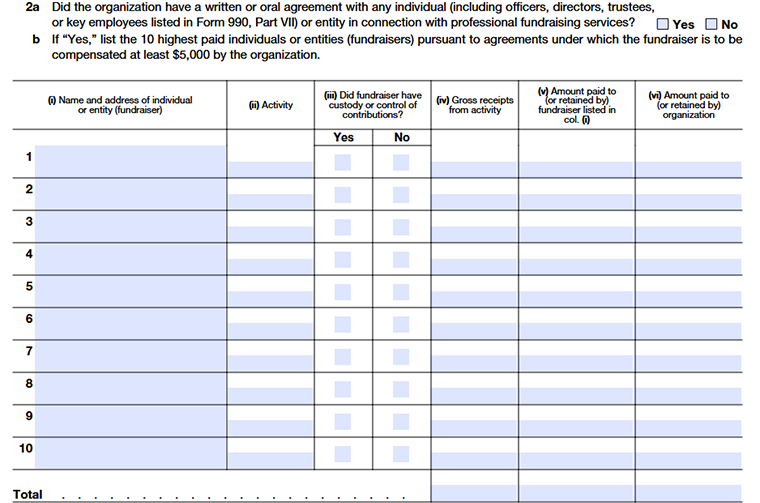
Line 2a
This question asks whether your organization had any agreement (written or verbal) with a professional fundraiser during the year. This includes outside fundraising companies or even individuals connected to the organization who were hired to help raise funds.
- Check “Yes” if you hired someone to provide fundraising services.
- Check “No” if you didn’t use any professional fundraiser.
Line 2b
If your organization hired professional fundraisers and paid any of them $5,000 or more during the year, list up to the 10 highest-paid fundraisers here.
Column (i)
Write the name of the person or fundraising company and their business address.
Column (ii)
Briefly explains what they helped with, such as mail campaigns, online fundraising, phone outreach, or donor data support.
Column (iii)
Check whether the fundraiser handled donation money or had permission to deposit or use it. If they did, explain the details later in Part IV.
Column (iv)
Enter the total amount of donations raised through that fundraiser during the year. If the work hasn’t brought in money yet, you can enter 0.
Column (v)
Report how much you paid the fundraiser, or how much they kept as their fee.
Column (vi)
Subtract what the fundraiser was paid (Column v) from the total raised (Column iv). This shows what your organization has kept.
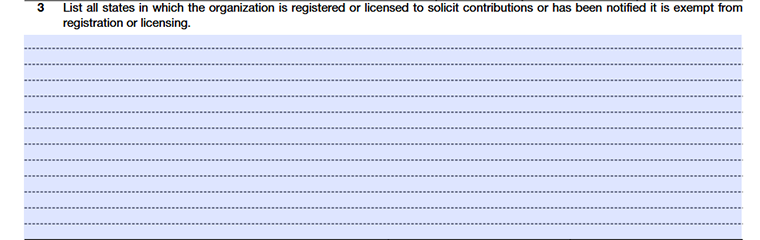
Line 3
This line asks you to list the states where your organization is allowed to ask for donations. Include any state where you are registered to fundraise, licensed to solicit contributions, or officially exempt from registering.
Part II - Fundraising Events
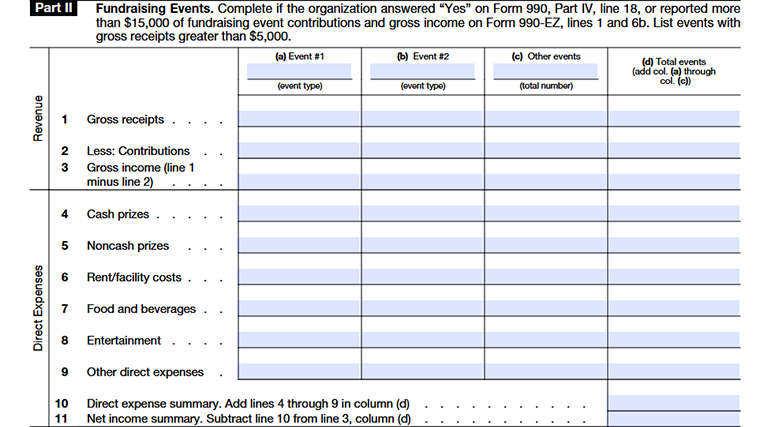
Complete this part if your organization earned more than $15,000 from fundraising events during the year (based on Form 990 or Form 990-EZ). Only include fundraising events that brought in more than $5,000 in gross receipts. Gaming activities should not be reported here; they belong to Part III.
Line 1
Enter the total money received from each fundraising event before subtracting any expenses or costs. Include ticket sales, sponsorships, or other amounts collected. Add all columns to get the total in column (d).
Column (a), (b)
Report on the second-largest fundraising event that also exceeded $5,000 in gross receipts.
Column (c)
Count all other fundraising events that each brought in more than $5,000 and report them together as one total. If there were no additional events, write none.
Column (d)
Add together the amounts from columns (a), (b), and (c). This shows the overall totals for all qualifying fundraising events.
Line 2
Enter the portion of payments that are considered donations or gifts, including the value of any noncash contributions received during the events. Total the amounts across all columns.
Line 3
Subtract Line 2 from Line 1. This shows the income from the events that are not treated as a contribution before deducting expenses like catering, entertainment, or other event costs.
Line 4
Enter the total amount of cold hard cash handed out as prizes or winnings.
Line 5
Enter what the physical prizes (like gift baskets or electronics) would actually cost if you bought them at a store.
Line 6
Enter what you spent to rent the space or any equipment needed to host the event.
Line 7
Every dollar spent on catering, snacks, and beverages for the event.
Line 8
Fees for the DJ, band, or performers, plus any wages paid to event workers.
Line 9
Anything else you spent on, like decorations or printing that wasn't listed above; just make sure to keep your own list of these.
Line 10
The sum of Lines 4 through 9; this is the total "bill" for running the event.
Line 11
Your event income minus your total costs (Line 10). If you lose money, put the number in parentheses.
Part III - Gaming
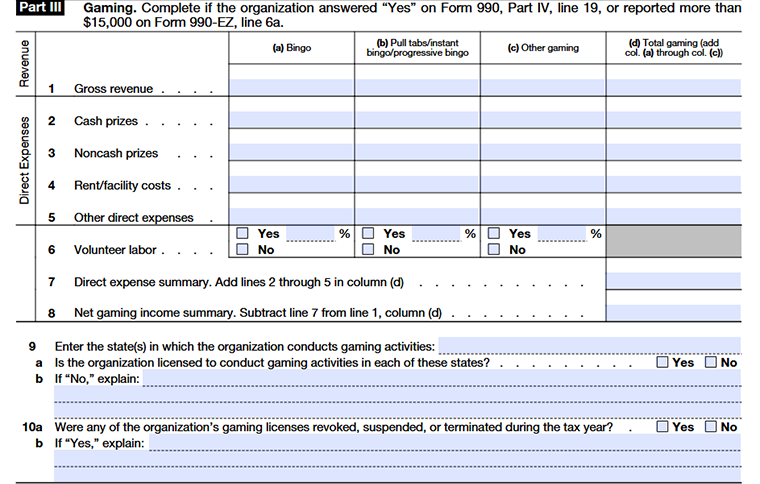
Column (a)
Enter the amount related to the first category of gaming activity listed, such as bingo.
Column (b)
Enter the amount related to the second category of gaming activity, such as raffles.
Column (c)
Enter the amount related to any other type of gaming activity conducted by the organization.
Column (d)
Add the amounts from columns (a), (b), and (c) to show the total for all gaming activities.
Line 1
- Enter the total income earned from each type of gaming activity during the year. This should be the amount collected after removing contributions or donations, but before taking out any expenses.
- Do not subtract prizes, supplies, staff payments, fees, or any other costs at this stage. Simply report the full gross revenue for each activity in columns (a), (b), and (c), and then add them together to show the total in column (d).
Line 2
Enter the total amount of cash prizes your organization gave to winners from gaming activities during the year.
Line 3
Enter the value of prizes given in items rather than cash, such as gift cards, merchandise, or donated products that were awarded to participants.
Line 4
Include any payments made for using a location, hall, or equipment needed to conduct the gaming activity.
Line 5
Include any additional costs directly related to running the gaming activities that are not already listed above. This may cover payments to gaming staff or contractors, payroll-related taxes, wagering taxes, supplies, or similar operating expenses. Keep a detailed breakdown in your records for support.
Line 6
If any gaming activities are run by volunteers, check “Yes” and enter the percentage of workers who were volunteers. This is calculated by dividing the number of volunteers by the total number of workers (paid and unpaid) for that activity. If no volunteers were involved, check “No.”
Line 7
Add up all direct expenses from lines 2 through 5 and enter the total in column (d).
Line 8
Subtract the total expenses (Line 7) from the gross revenue (Line 1). If expenses are higher than revenue, show the result as a negative number in parentheses.
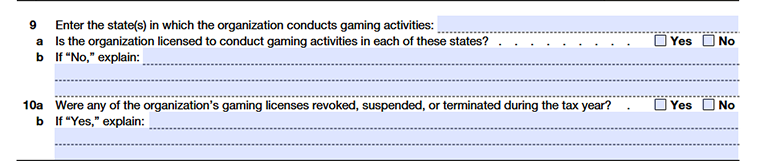
Line 9
List all states where your organization ran gaming activities or asked residents to participate. If you need more room, use Part IV.
Line 9a
Check “Yes” only if your organization is officially licensed or registered to run gaming in every state you listed.
Line 9b
If your organization isn’t licensed in any of the states listed, explain why in the space provided. Use Part IV if you need more room.
Line 10a
Check “Yes” if any gaming licenses were revoked, suspended, or terminated during the tax year.
Line 10b
For each state where a license was affected, provide details. Use Part IV if you need extra space.
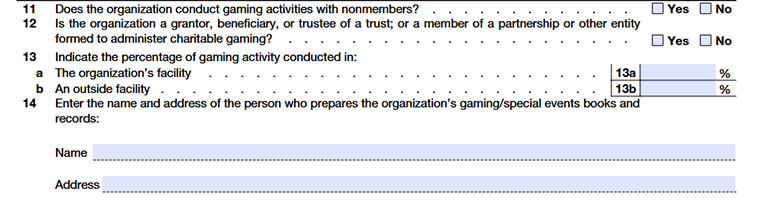
Line 11
Check “Yes” if any nonmembers took part in your gaming activities. Members invited guests who are covered by the member are considered members, but anyone paying their own way is treated as a nonmember.
Line 12
Check “Yes” if your organization is part of a trust, partnership, or similar group that manages charitable gaming together with other organizations.
Line 13a
Enter the percentage of gaming done in your organization’s own facilities.
Line 13b
Enter the percentage done in locations you don’t own.
Line 14
Provide the name and business address of the person who keeps your organization’s gaming or special events books. If the books are kept at the person’s home, you can just use the organization’s business address.
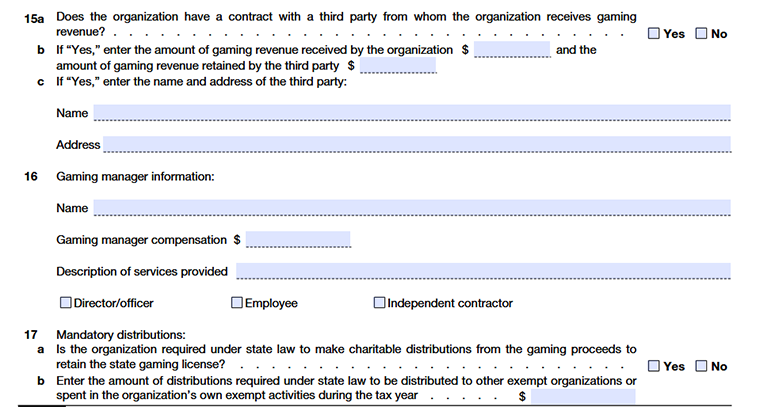
Line 15a
Check “Yes” if your organization has a contract with an outside company or person who runs gaming on your behalf and you receive revenue from them. Check “No” if you run gaming entirely with your own staff.
Line 15b
If “Yes” to 15a, enter how much money your organization received from the gaming and how much the third party kept. If there’s more than one operator, list the rest in Part IV.
Line 15c
If Yes , write down the name and address of any outside company or person that helps run your gaming activities. If you have more than one third-party operator, you can list the others in Part IV.
Line 16
Enter the name of the person who oversees the gaming activities and the portion of their pay related to that work. This is the person who takes care of day-to-day operations, like keeping track of money, managing staff, and making deposits. If more than one person shares these duties, include the others in Part IV.
Line 17a
Check “Yes” if state law requires your organization to distribute a portion of gaming proceeds to other charities or use it in your own exempt activities in order to maintain a valid gaming license.
Line 17b
Enter the total amount required by state law to be distributed during the tax year. Break it down by state in Part IV if needed.
Part IV - Supplemental Information
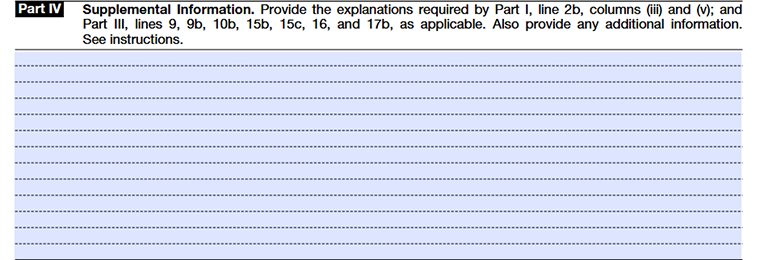
Use Part IV to provide the narrative explanations required, if applicable, to supplement responses to
- Part I, line 2b, columns (iii) and (v); and
- Part III, lines 9, 9b, 10b, 15b, 15c, 16, and 17b.
Part IV may also be used to supplement other responses to questions on Schedule G (Form 990). In Part IV, identify the specific part and line number that each response supports, in the order in which those parts and lines appear on Schedule G (Form 990).
Choose TaxZerone to complete your Schedule G filing
TaxZeroneis your trusted IRS-authorized e-file service provider. With us, experience the magic of seamless filing experience and get instant updates on your filing status. At TaxZerone, we're not just about e-filing; we're about making the entire process effortlessly smooth!
Our expert assistance is not just a promise; it's a guarantee. From start to finish, we ensure to guide your e-filing experience with ease, armed with the support you need.
Here's how your Form 990/990-EZ return with Schedule G attachment is transmitted to the IRS in 3 simple steps!
- Provide Organization Details -Choose the tax year for which you want to file a return, and provide your organization's details.
- Preview the Return - Complete Schedule G and preview the information provided in the return for accuracy before transmitting.
- Transmit to the IRS - Transmit Schedule G along with your 990/990-EZ return to the IRS and get the acceptance in just a few hours.
And here's another WOW thing about us – should the IRS happen to reject your information return, fear not! TaxZerone makes sure you can rectify the errors and retransmit your form back to the IRS, all free of cost!
Choose TaxZerone for a seamless e-filing experience and stay compliant with the IRS.
Your journey to stress-free tax filing starts here!
Commonly Asked Questions
1. What is the purpose of Schedule G?
2. Is Schedule G mandatory for all tax-exempt organizations?
No, Schedule G must be filed only by organizations that actively participated in fundraising and gaming activities. If your exempt organization does not engage in such events, the filing of Schedule G may not be applicable.
3. What specific information is required on Schedule G?
Schedule G mandates a detailed breakdown of financial information related to fundraising events, activities, and gaming activities. This includes reporting on revenues generated, associated expenses, and the resulting net income.