







Form 990 Schedule A
Report your organization’s public charity status with Schedule A using TaxZerone!
Introduction
For many non-profits and exempt organizations, filing Schedule A is the most significant part of completing your 990/990-EZ. Organizations that are described in Internal Revenue Code Section 501(c)(3) and are public charities must complete and attach IRS Schedule A along with their Form 990 / 990-EZ return.
If you're a tax-exempt or non-profit organization looking for comprehensive information on Schedule A, you've come to the right place. Let's learn more about filing requirements, and key Schedule A instructions.
Table of Contents
What is Schedule A?
Schedule A, Public Charity Status and Public Support is a supplementary schedule that accompanies the standard Form 990/990-EZ and is filed annually by tax-exempt organizations.
If you're wondering about Schedule A on a tax return, it is the attachment used by 501(c)(3) organizations to report their public charity status and public support details to the IRS.
Filing schedule A along with your information return allows you to report critical data on your public charity status, support, and revenue, helping to ensure transparency and compliance with IRS regulations.
Who must file Schedule A?
Not all tax-exempt organizations are required to file Schedule A. To determine if your organization must file this schedule, consider the following:
- Section 501(c)(3) and Public Charities: Organizations that are described in section 501(c)(3) and qualify as public charities, as opposed to private foundations, are generally required to file Schedule A.
- Gross Receipts:If your organization's gross receipts exceed $50,000, you will likely need to file Form 990 Schedule A. However, smaller organizations with gross receipts below this threshold may be exempt.
- Nonexempt Charitable Trusts:Nonexempt charitable trusts described in section 4947(a)(1) that aren't treated as private foundations.
- Public Support Test: Organizations relying on public support rather than endowments must file Schedule A. The support test evaluates the percentage of public support received in comparison to other forms of support.
Complete your Schedule A filing requirements and e-file your Form 990-EZ with TaxZerone. It’s as simple as that!
E-File Your Form 990/990-EZSchedule A filing Requirement
All Section 501(c)(3) organizations that file Form 990/990-EZ must complete and attach Schedule A along with their information return.
Below, we have provided Schedule A filing requirements for each part.
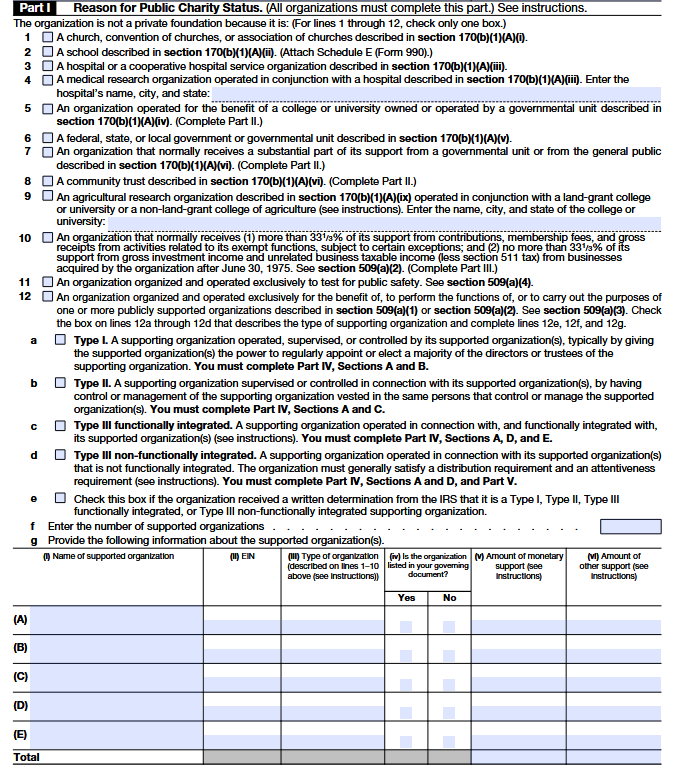
Part I - Reason for Public Charity Status
Line 1
Check this box if your organization functions as a church or a group of churches. The IRS looks at things like regular worship services, religious teachings, and an organized leadership setup to decide if an organization qualifies as a church for tax purposes.
Line 2
Check this box if your organization is a school that provides formal education, with
teachers, students, a curriculum, and regular classes at a physical location. For details, see
Schedule E (Form 990).
Line 3
Check this box if your organization operates a hospital or provides medical care (including rehab centers or outpatient clinics that function like hospitals). This does not include medical schools, research-only groups, or nursing/children’s homes.
Line 4
Check this box if your organization actively conducts medical research together with a qualifying hospital. Simply funding others to do research doesn’t count your team must be directly involved.
Line 5
Check this box if your organization raises and manages funds to support a state-owned public college or university (like managing donations, building campus facilities, or giving student scholarships). This is for “friends of” or foundation-type organizations that support public universities, and you must complete Part II.
Line 6
Only check this if your organization is federal, state, or local unit and has an IRS letter saying it’s tax-exempt under 501(c)(3). Most nonprofits should not check this out.
Line 7
Check this box if your organization gets broad support from the public (many donors, not just a few big ones) and meets the IRS for public support tests. You’ll prove this by completing Part II with your income numbers.
Line 8
Check this box if your organization is a community trust that raises money for a specific city, region, or community and meets the public support test. Even if you’re legally set up as a trust (not a corporation), you still check Line 8 and complete Part II.
Line 9
Check this box if your organization does agricultural research together with a college of agriculture (land-grant or similar). Just list the college’s name and location -Part II is not required.
Line 10
Check this box if your organization is publicly supported through program fees, services, and small donors (not a few big donors). You’ll need to complete Part III to prove this.
Line 11
Check this box only if the IRS has specifically approved your organization as one that tests products or methods for public safety.
Line 12
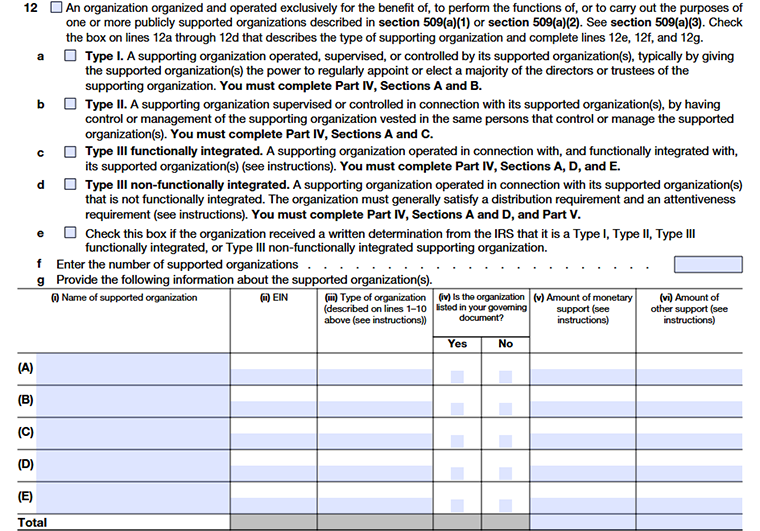
Line 12a – 12d First, Pick Your Supporting Organization Type
These lines apply only if your nonprofit mainly exists to support other charities
Line 12a
Choose this if the supported charity has real control over your organization, like appointing most of your board.
Line 12b
Choose this if the same people manage both organizations (shared directors or officers).
Line 12c
Choose this if you work closely in daily operations with the supported charity and meet the IRS tests in Part IV.
Line 12d
Choose this if you mainly provide money or resources and must also complete Part V.
Line 12e
Check this box if your IRS exemption letter already states your supporting organization type (Type I, II, or III).If your letter doesn’t mention a type, or it’s unclear, leave this blank and choose the type that best fits how you actually operate.
Line 12f
- Enter the number of organizations you support during the year.
- Include all the charities you are set up to support even if you didn’t give them money this year
Line 12g
Use one row (A–E) for each supported organization. This table shows who you support and how.
Column i
Write the full legal name of each charity you support.
Column ii
Enter the EIN of that charity.
Column iii
Enter the line number from Lines 1-10 that best fits the supported charity.
Column iv
Choose Yes if this charity is written in your official paperwork.If no, just explain briefly in Part VI why it isn’t listed
Column v
Enter how much cash you gave them this year.If none, enter 0.
Column vi
Estimate the value of goods, services, space, or other help you provide.
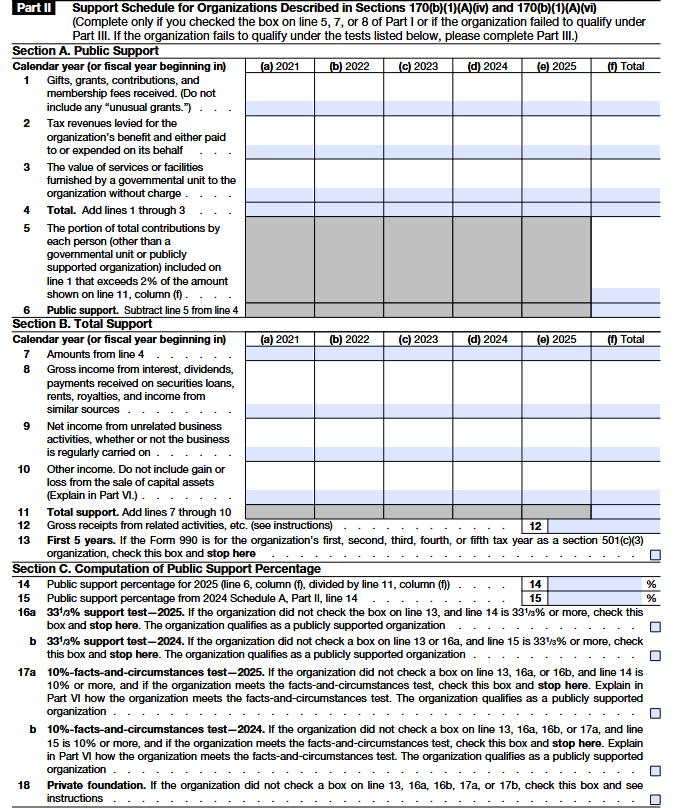
Part II - Support Schedule for Organizations Described in Sections 170(b)(1)(A)(iv) and 170(b)(1)(A)(vi)
Section A. Public support
Line 1
Report normal donations and grants here (including forgiven PPP loans when applicable). Don’t include payments for tickets, services, or merchandise; those go on other lines. Don't count donated services or free use of space/equipment. Leave out “unusual grants” (large, rare gifts) and list them separately in Part VI.
Line 2
Enter tax money a government collected for your benefit and give to you (or spent on you). Report this even if you didn’t treat it as revenue in your books.
Line 3
Enter the value of free office space or services provided by a government unit just for you. Don’t include services that the government provides to everyone for free.
Line 4
This line shows your total support from all sources for the year, based on the amounts you entered above. Make sure this total is correct, because it’s used to calculate your public support percentage. A small mistake here can change whether you qualify as a public charity.
Line 5
List the portion of any donor’s total gifts that exceeds 2% of your total support. Combine gifts from related people (like spouses) as one donor. This limit doesn’t apply to gifts from government or publicly supported charities.
Line 6
This line shows your public support percentage based on the IRS formula. You generally need 33⅓% or more to qualify as publicly supported. If it’s lower, you may still qualify under special rules shown later.
Section B. Total Support
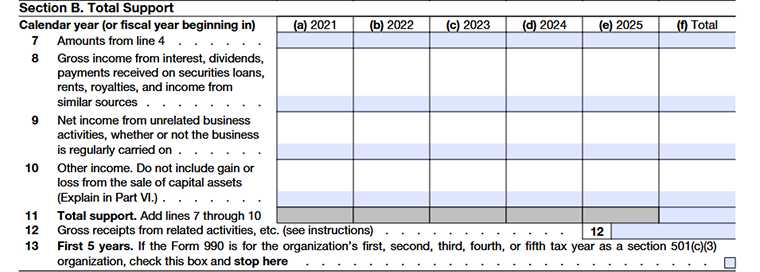
Line 7
Include all donations, grants, and contributions that help your organization qualify as a public charity. This shows that your nonprofit is supported by a broad group of people, not just a few large donors.
Line 8
Report on income from interest, dividends, rents, or royalties. Only include earnings from investments, not from activities directly related to your mission. Do not report income from program activities here only passive investment income counts.
Line 9
Enter net income from activities that are not related to your mission. If the result is a loss, enter zero. This separates business income from charitable support.
Line 10
Include any remaining support not reported on Lines 7-9. Explain the source and nature of these amounts in Part VI for clarity.
Line 11
Add Lines 7 through 10 to get your total support. This number is used to calculate your public support percentage, so accuracy is essential.
Line 12
Report total income from activities that directly further your mission, such as program fees or mission-related sales. Do not include unrelated business income.
Line 13
Check this box only if your organization is in its first five years as a 501(c)(3). New organizations are not required to complete the full public support test until the sixth year.
Section C. Computation of public support percentage
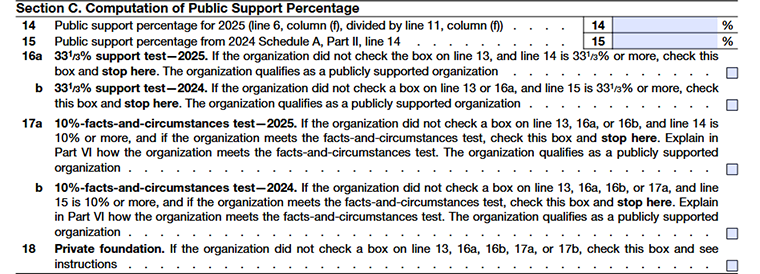
Line 14
Check this box only if your organization is in its first five years as a 501(c)(3). New organizations are not required to complete the full public support test until the sixth year.
Line 15
Enter last year’s public support percentage from Schedule A. This is used to check if you continue to qualify based on prior-year results.
Line 16a
Select this if your current-year public support is 33⅓% or more. Your organization qualifies as publicly supported for this year and the next.
Line 16b
Select this if last year’s public support was 33⅓% or more. Your organization qualifies as publicly supported for this year.
Line 17a
Select this if your current-year public support is at least 10% and you meet the IRS “facts and circumstances” test. Explain in Part VI how you met this test.
Line 17b
Select this if last year’s public support was at least 10%, and you meet the IRS requirements. Provide your explanation in Part VI.
Line 18
Select this if none of the above applies. Your organization is treated as a private foundation for filing purposes and must file Form 990-PF instead.
Part III - Support Schedule for Organizations Described in Section 509(a)(2)
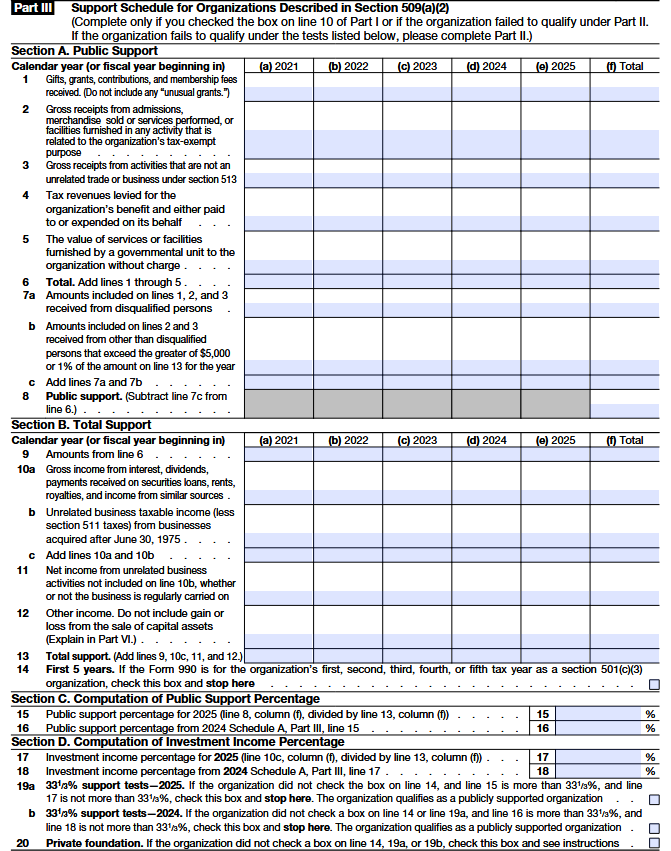
Column (a)
Enter the amounts received during 2021 for each line (gifts, tax revenues, services, etc.). This reflects only that year’s activity.
Column (b)
Report the same categories of support, but only for 2022.
Column (c)
Include the organization’s public support amounts received in 2023.
Column (d)
Enter the amounts related to public support for 2024.
Column (e)
Report the public support figures for 2025 (the most recent year in the five-year period).
Column (f)
Add together columns (a) through (e).This column shows the five-year total for each line and is used to calculate the organization’s overall public support and public support percentage.
Line 1
Report true donations that support your mission. Do not include unusual grants or donated services or facilities. Count membership fees here only when they are supported, not payments for goods or services.
Line 2
Report income from activities that directly carry out your exempt purpose, such as program fees, admissions, or service charges. Include membership fees paid to access your programs or services.
Line 3
Report income from activities that are not treated as unrelated business income, such as volunteer-run sales or convenience services. These receipts belong here, not as donations.
Line 4
Report taxes collected by a government and provided for your organization’s benefit, whether paid to you directly or spent on your behalf.
Line 5
Report the fair value of services or space provided to you by a government at no charge, if these are not generally available to the public.
Line 6
Add the total through Line1 to Line5.
Line 7a
Identify how much Lines 1-3 came from disqualified persons and total these amounts by year. Keep donor details in your records, but do not attach them to your return.
Line 7b
Report the portion of related-activity receipts from any single donor or government agency that exceeds the allowed threshold. Maintain internal records showing the payer and the excess amount.
Line 8
Share the Line 8 instruction text, and I’ll convert it into the same clear, humanized format instantly.
Section B. Total support
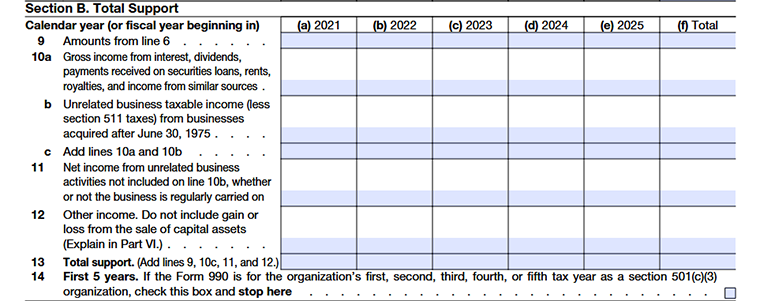
Column (a)
Report the amounts for each listed line (public support, investment income, other income, etc.) for the year 2021 only.
Column (b)
Enter the same categories of total support amounts, but only for 2022.
Column (c)
Include all applicable total support figures received or earned in 2023.
Column (d)
Report the organization’s total support amounts for 2024.
Column (e)
Enter the total support figures for 2025, the most recent year in the five-year period.
Column (f)
- Add together columns (a) through (e).
- This column shows the combined five-year total for each line and is used to determine overall total support and calculate the public support percentage.
Line 9
Report income your organization earned from passive sources such as interest, dividends, rent, royalties, or similar earnings. Do not include income from activities that directly support your mission. If the income comes from your regular programs or services, report it under program revenue instead.
Line 10a
Enter the total gross income your organization received from interest, dividends, rents, royalties, securities lending, and similar sources. This line is only for passive income. If the money was earned through activities that support your exempt purpose, it should be reported as program revenue, not here.
Line 10b
Report the net taxable income your organization earned from unrelated business activities that started or were acquired after June 30, 1975, after subtracting the related tax. Include membership fees only when they are payments for goods, services, admissions, or facility use connected to these unrelated business activities.
Line 10c
Add Line 10a and 10b together.
Line 11
Report the net earnings from any unrelated business activities that are not already reported under Line 10b. Do not include income from unrelated businesses that began before July 1, 1975. If these activities result in a loss, enter zero. Membership fees paid for goods or services in these unrelated activities belong here.
Line 12
Report any remaining support your organization received that was not reported in the earlier lines of this section. Briefly describe the source and nature of this support in the explanation section. Do not include gains or losses from selling assets.
Line 13
Calculate this by adding together the amounts reported on Lines 9, 10c, 11, and 12.
Line 14
If your organization is within its first five years of qualifying as a public charity, check this box and stop here. You do not need to complete the public support or investment income calculations yet. From the sixth year onward, you must complete the remaining lines and apply for the public support tests.
Section C. Computation of Public Support Percentage

Line 15
Enter your public support percentage for this year. Round it into two decimal positions. (for example, 58.3456 rounded to 58.35%).
Line 16
Enter last year’s public support percentage from Schedule A (Form 990), Part III, Line 15. Round it into two decimal places.
Section D. Computation of Investment Income percentage

Line 17
Show the investment income percentage, rounded to a whole number.
Line 18
For 2025, carry forward the 2024 investment income percentage (Schedule A, Part III, Line 17) and round to a whole number.
Line 19a
If Line 14 isn’t checked, Line 15 is above 33⅓%, and Line 17 is 33⅓% or less, check this box and stop. The organization qualifies as publicly supported for 2025 and 2026.
Line 19b
If Line 14 or 19a isn’t checked, Line 16 is above 33⅓%, and Line 18 is 33⅓% or less, check this box and stop. The organization qualifies as publicly supported for 2025.
Line 20
If none of the above boxes apply, check this box. The organization doesn’t meet the public support test for 2025 and must file Form 990-PF as a private foundation.
Part IV-Supporting Organizations
Section A. All Supporting organizations

Line 1
Confirm that your governing document clearly names (or defines) the organizations you support.
- Check Yes if you support only those listed.
- If you support any organizations beyond those listed, select No and briefly explain in Part VI how your organization decides which groups to support
Line 2
If you supported any organization that doesn’t yet have an IRS public-charity determination, check Yes and explain in Part VI how you verified it qualifies as a public charity.
Line 3a
If you support a 501(c)(4), (5), or (6) organization that meets public-support rules, check Yes.
Line 3b
- Make sure each year that the 501(c)(4), (5), or (6) organization you support still meets the public-support rules.
- Check Yes and briefly explain in Part VI how you confirmed this (for example, by checking their records or filings).
Line 3c
Make sure any support given to a 501(c)(4), (5), or (6) groupis used only for charitable purposes. Check Yes if you have controls in place and explain them in Part VI.
Line 4a
An organization cannot qualify as a Type III supporting organization for the tax year if it supports any organization that is not organized in the United States. All supported organizations must be U.S.-based to meet Type III eligibility requirements.
Line 4b
If you provide funds to any organization that is not recognized as a 501(c)(3), you must show that you retained control over how the funds were used. This means setting conditions, monitoring use of funds, and ensuring the money was used only for charitable purposes. Briefly describe your controls in Part VI.
Line 4c
If you supported a foreign organization, you must confirm that you maintained oversight of the funds and ensured they were used solely for charitable purposes. If the foreign organization does not have an IRS determination, explain in Part VI the safeguards you used to protect your charitable use of funds.
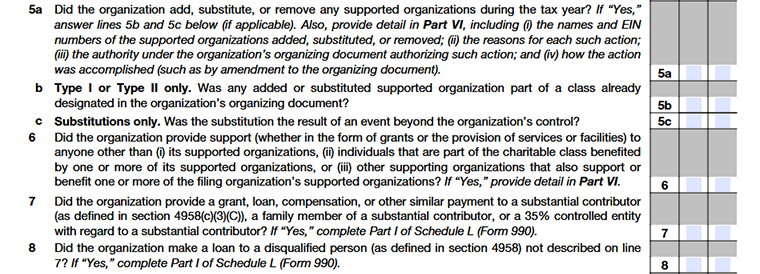
Line 5a
Say whether you added, removed, or replaced any supported organizations during the year. If yes, explain the change in Part VI (who changed, why, and how it was approved).
Line 5b
Confirm whether any new or replaced organization was already included in the class listed in your governing document.
Line 5c
Confirm whether a replacement happened because of a situation you couldn’t control, such as a supported organization losing its public charity status.
Line 6
Confirm whether all your activities were carried out only to support your supported organization(s). If you provide grants, services, or benefits to anyone else, explain the details in Part VI.
Lines 7 & 8
State whether you made any payments or loans to substantial contributors, their family members, or entities they control. These transactions are treated as improper benefits under Internal Revenue Service rules and must be disclosed on Schedule L if they occur.
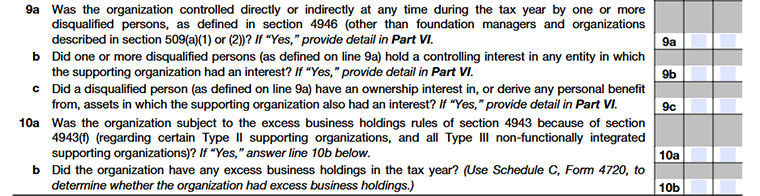
Line 9a
Say whether anyone who isn’t allowed to control the organization actually has a say in how it runs.
Line 9b
Say whether any such person has money invested in, or ownership ties to, your organization or its assets.
Line 9c
Indicate whether any disqualified person personally benefits from your organization’s property or resources. If yes, explain briefly in Part VI as required by the Internal Revenue Service.
Line 10
State whether your organization is subject to excess business holding rules. Certain Type II and Type III supporting organizations can trigger excise taxes under Internal Revenue Service rules when accepting contributions from controlling persons or related parties.

Line 11a
Answer “Yes” if the organization receives any gifts from someone who controls a supported organization.
Line 11b
Answer “Yes” if any contributions came from close family members of a person who controls a supported organization.
Line 11c
Answer “Yes” if any donations were received from a business or entity that is owned or controlled by a person who controls a supported organization.
Section B. Type I Supporting organizations
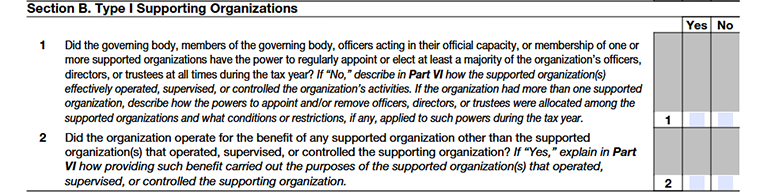
Line 1
Confirm that one or more supported organizations actively control your organization. This means they have real authority over your leadership and key decisions (for example, they can appoint or remove most of your board). If control is shown in another way, select “No” and explain how this control works in Part VI.
Line 2
You may support organizations that do not control you, but only when doing so clearly advances the mission and goals of the organizations that do control you.
Section C. Type II Supporting Organizations

Line 1
Confirm that your organization and its supported organization(s) are overseen by the same people. This shared leadership helps ensure your organization follows the needs and direction of those it supports. If this connection is maintained in another way (not mainly through shared board members), select “No” and briefly explain the arrangement in Part VI.
Section D. All Type III Supporting Organizations
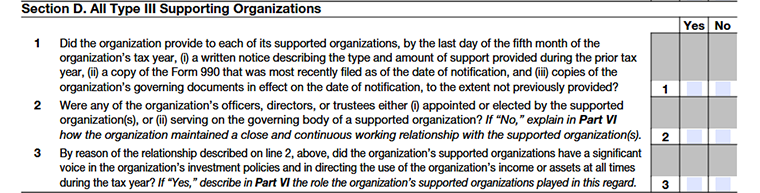
Line 1
If you’re a Type III supporting organization, you must send a yearly update to each supported organization. Tell them what support you provided last year, share your latest Form 990 (you can hide donor names/addresses), and include any updated governing documents. Make sure this is sent on time.
Line 2
Confirm that your supported organization has a real connection with you, such as shared board members, appointment power, or a close working relationship. If it’s based mainly on a long-standing relationship, explain it in Part V.
Line 3
Confirm that your supported organization has a genuine role in key decisions, such as how funds are invested or grants are made. If so, briefly describe their involvement in Part VI.
Section E. Type III Functionally Integrated Supporting Organizations
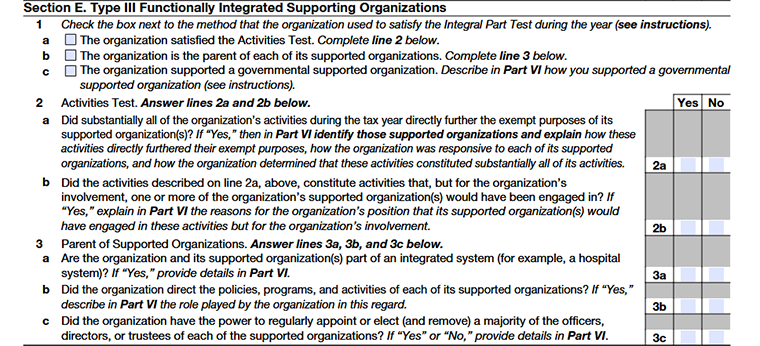
Line 1
- If your organization is classified as a Type III supporting organization, it can’t just exist to send funds once in a while. There needs to be a real connection between you and the organization you support. In simple terms, your involvement should actually matter to their work.
- The IRS looks at this requirement in three possible ways.
Line 1a
This applies if your organization actively runs programs or services that directly help the supported organization achieve its mission. In other words, you’re not just giving financial help; you’re doing work that supports their purpose in a hands-on way.
For example, if the supported organization focuses on education, and your organization runs tutoring programs that further that same mission, that would generally meet this test.
Line 1b
You function as the parent organization, meaning you have real oversight or governing authority over the supported organization.
Line 1c
You support only government-based organizations, and a large part of your work directly advances their public mission. If you support more than one, they must either operate in the same area or work closely together on shared efforts.
Line 2
- To meet this test, most of what your organization does must directly carry out the mission of the organization you support.
- You must be doing the actual charitable work yourself, not just fundraising, investing money, or giving grants. The work should also be something the supported organization would normally do on its own if you weren’t doing it for them.
Line 3a
Your organization and the supported organizations must operate together as one unified system (not separately).
Line 3b
Your organization should guide the big decisions like planning, policies, and budgets.
Line 3c
Your organization must have the power to appoint and remove most of the board members or leaders of each supported organization.
Part V Type III Non-Functionally integrated 509(a)(3) Supporting Organizations
Section A. Adjusted net income
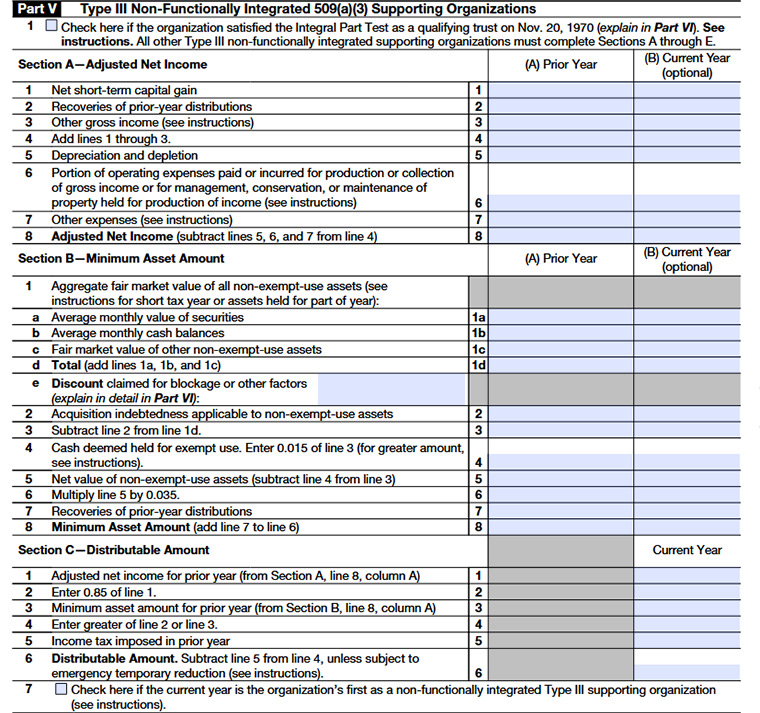
Column (A)
Shows last year’s income and expenses. These numbers are used to calculate how much must be distributed this year.
Column (B)
Shows this year’s figures. It is mainly for comparisons and tracking.
Line 1
- Enter your net short-term capital gain, if any.
- Do not include long-term capital gains or losses.
- Short-term capital losses cannot be carried out in other years.
Line 2
Report any amounts you previously treated as distributions but later received back. This includes repayments, proceeds from sale of previously distributed property, or unused set-aside amounts.
Line 3
Enter all other income earned during the year (including business income and tax-exempt bond income).Do not include gifts, grants, contributions, long-term capital gains/losses, certain trust or estate distributions.
Line 4
Add Lines 1 through 3.
Line 5
You may deduct depreciation (straight-line method only) and allowable depletion expenses.
Line 6
- Enter the regular and necessary expenses directly connected to earning income. This can include salaries, rent, interest, and taxes related to income-generating activities.
- If a property is used partly to earn income and partly for charitable work, only report the portion of expenses related to the income-earning use.
Line 7
- Enter any other permitted income-related expenses.
- Do not include capital losses, charitable contributions, net operating losses, or dividend deductions.
Line 8
Subtract Lines 5–7 from Line 4. This final amount is your Adjusted Net Income.
Section B. Minimum Asset Amount
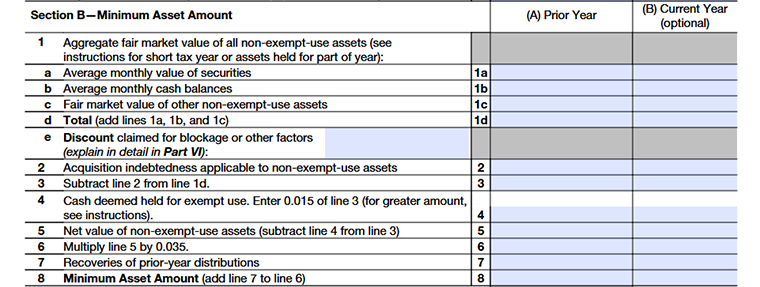
Column (A)
Lists last year’s asset values. These amounts help determine the minimum distribution requirement.
Column (B)
Shows current year asset values. This is optional and used for internal reference.
Line 1
This is the Total Value of Your Investment Assets. List the combined market value of any property or funds not used for your daily mission. If an item was only owned for part of 2026, follow the guide to calculate its average value.
Line 1a
Securities: Use the average monthly value of stocks, bonds, or mutual funds. Pick a consistent method (first/last day of month, or average).
Line 1b
Cash: Average your cash on hand for each month. Include all cash, even if reserved for distributions.
Line 1c
Other Assets: Value property or other assets once a year. New valuation is needed each year, unless using a certified 5-year real estate appraisal.
Line 1d
Total: Add above lines 1a, 1b, 1c and mark the total.
Line 1e
Discounts: If assets lose value due to size, marketability, or other reasons, report the discount and explain in Part VI. Max discount for securities: 10%.
Line 2
Report loans or mortgages on these assets. If you held an asset part of the year, adjust the debt for that period.
Line 3
Take the total value of your assets from line 1d and subtract any debts reported on line 2. The result is the net asset value you’ll use for your calculations.
Line 4
You can set aside some cash from your minimum assets to cover everyday costs, like office expenses or normal spending for your charitable work. Normally, this is about 1.5% of your total assets (after any debts). If you need more to cover your actual expenses, that’s fine just explain the reason in Part VI.
Line 5
Take the total value of your non-exempt-use assets by subtracting the cash set aside for expenses (line 4) from your total assets (line 3).
Line 6
Multiply the result from line 5 by 3.5% (0.035) to calculate the required minimum amount.
Line 7
If you have any recoveries from prior-year distributions (from Section A, line 2), enter that amount here.
Line 8
Add the recoveries (line 7) to your calculated 3.5% of non-exempt assets (line 6) to get your Minimum Asset Amount.
Section C. Distributable Amount
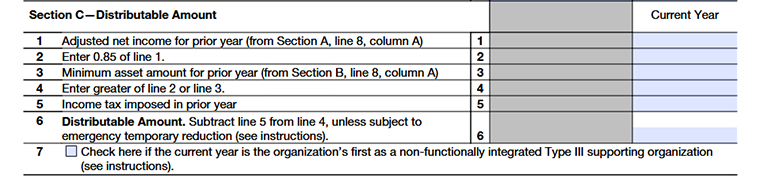
Line 1
Enter your adjusted net income from last year (from Section A, line 8, column A). This is the starting point to figure out how much your organization should distribute.
Line 2
Calculate 85% of the amount from line 1. This gives an estimate of the portion of last year’s income that you generally need to set aside for charitable distributions
Line 3
Enter your minimum required assets from last year (from Section B, line 8, column A). This makes sure you keep enough assets to support your charitable work.
Line 4
Look at the numbers from line 2 and line 3. Enter the bigger number here. This makes sure you meet the higher of the two rules either based on income or assets, so your distributable amount is enough.
Line 5
Enter any income tax your organization paid in the prior year. This reduces the amount you must distribute.
Line 6
Calculate your Distributable Amount by subtracting line 5 from line 4.
Line 7
Select this box if this is the first year your organization is being treated as a non-functionally integrated Type III supporting organization. If you’re not sure whether this applies to you, take a moment to review the detailed instructions before making your selection.
Section D. Distributions
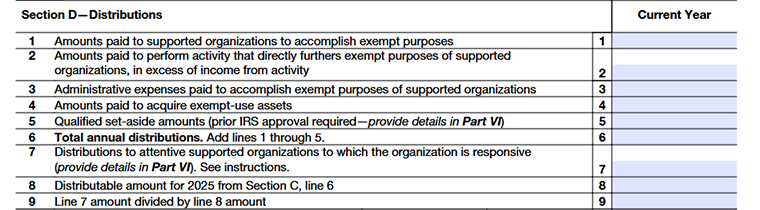
Line 1
Enter the amounts you paid directly to supported organizations to help them carry out their charitable (501(c)(3)) purposes.
Line 2
Report amounts you spent on activities that directly support the charitable work of your supported organizations, but only the portion where expenses were more than any income earned from that activity.
Line 3
Include reasonable and necessary administrative expenses that help accomplish the supported organizations’ charitable purposes. Do not include investment-related costs or general fundraising expenses (with limited exceptions for certain contributions received directly by a supported organization).
Line 4
Report amounts used to purchase assets that will be used for charitable purposes (called exempt-use assets). These assets must be used by your organization or made available to supported organizations at no cost or for a very small fee.
Line 5
Enter any money you set aside this year for a specific charitable project for a supported organization. It counts for this year once approved -not again when it’s later paid out. You must get written approval from both the supported organization and the IRS by filing Form 8940 before year-end. Mention in Part VI if you receive approval.
Line 6
Add lines 1 through 5. This is the total amount distributed for the year.
Line 7
Enter the portion of distributions from line 1 that were given to supported organizations that were actively involved with (attentive to) and engaged with (responsive to) your organization during the year. Provide details in Part VI.
Line 8
Use this line to calculate what percentage of your total distributable amount (from Section C) was given to supported organizations that met both the attentiveness and responsiveness requirements.
Line 9
- For a Type III non-functionally integrated supporting organization, at least one-third (33⅓%) of your distributable amount must go to supported organizations that meet both tests.
- If this percentage is less than one-third, you may not qualify for this status and could be treated as a private foundation instead.
Section E. Distribution Allocations
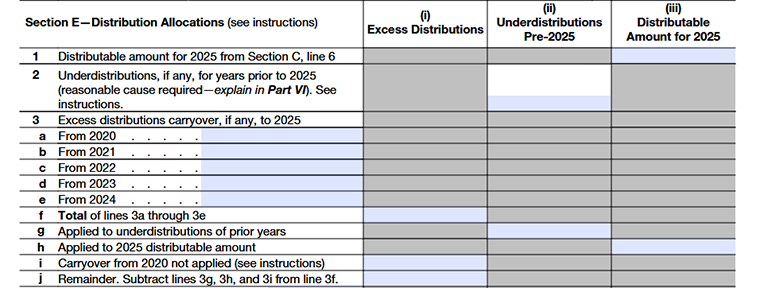
Column (i)
Excess Distributions: Shows any amount the organization gave more than required in previous years.
Column (ii)
Under distributions Pre-2025: Shows any amount the organization did not distribute enough in prior years (before 2025).
Column (iii)
Distributable Amount for 2025: Shows the amount the organization must distribute in 2025 based on current calculations, taking prior over- or under-distributions into account.
Line 1
Enter your 2025 distributable amount from Section C, line 6. This is the amount your organization is required to distribute for the year.
Line 2
If 2024 was your first year as a Type III non-functionally integrated supporting organization, your required distribution for that year was zero. If you didn’t distribute enough in 2023 or 2024, you may lose this status and be treated as a private foundation unless you qualified for a special exception. If so, explain it in Part VI.
Line 3
This part is just about checking whether you still have any extra distribution amounts left from previous years and how they’re being used now.
Line 3a
Write down any extra amounts from 2020 that you haven’t used yet. These are the amounts you gave above the required minimum this year.
Line 3b
Write down any extra amounts from 2020 that you haven’t used yet. These are the amounts you gave above the required minimum this year.
Line 3c
Write down any extra amounts from 2020 that you haven’t used yet. These are the amounts you gave above the required minimum this year.
Line 3d
Write down any extra amounts from 2020 that you haven’t used yet. These are the amounts you gave above the required minimum this year.
Line 3e
Write down any extra amounts from 2020 that you haven’t used yet. These are the amounts you gave above the required minimum this year.
Line 3f
Add those amounts together. This shows how much extra you currently have available. Now you apply that extra amount step by step.
Line 3g
First, use it to cover anything you may have fallen short on in earlier years.
Line 3h
If there’s still some left, apply it toward your 2025 required amount.
Line 3i
If any leftover from 2020 is too old to use anymore (because it passed the 5-year limit), show it here.
Line 3j
After subtracting what you used (and what expired) from your total, the remaining balance is what you can still carry forward.
Line 4
Use your current-year distributions (from Section D, line 7). First apply them to any unpaid required amounts from prior years. If any amount remains, apply it to this year’s required distribution. If there is still an excess after covering both, you can carry that remaining amount forward to future years.
Line 5
Now check whether you met this year’s required distribution. Add together your prior-year carryovers and current-year distributions and compare that total to your required distributable amount. If the required amount is more than what you distributed, the requirement has not been met.
Line 6
If the full required amount was not distributed, the organization generally does not qualify as a Type III non-functionally integrated supporting organization for that year and may be treated as a private foundation, requiring the filing of Form 990-PF. However, if the shortfall was due to reasonable cause or a legal restriction, an exception may apply. If so, explain the details clearly in Part VI.
Line 7
Enter any excess distributions from the past five years that you haven't used yet. These leftovers can be applied toward your current requirements to save you money.
Line 8
Show how the total carryover on line 7 is made from each previous year. List the amounts left over from 2021, 2022, 2023, 2024, and 2025 separately. This helps keep track of which year each carryover came from.
Part VI - Supplemental Information
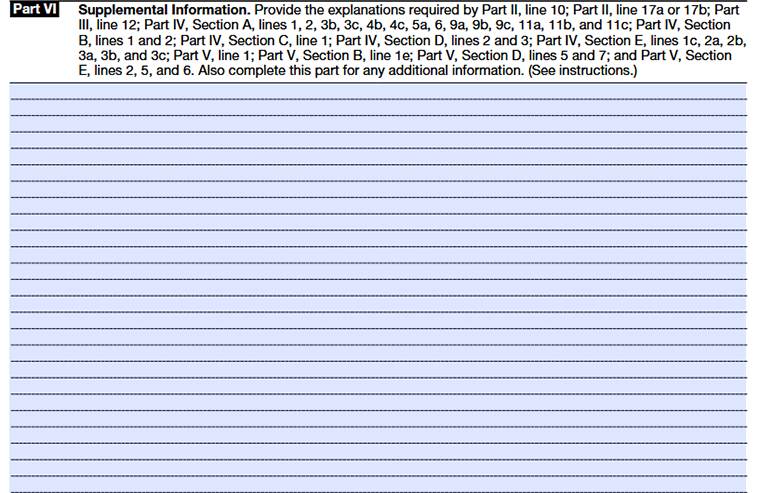
Use this section to explain or give more details for any answers on Schedule A (Form 990). Be sure to mention the part and line number your information relates to.
If you need more space, you can add extra pages.
Choose TaxZerone to complete your Schedule A filing
TaxZerone is an IRS-authorized e-file service provider; meaning you get instant updates on your 990/990-EZ return filing status. We ensure help is available in every step to provide you with a smooth e-filing experience!
Even if the IRS rejects your exempt organization's information return due to any reason, you can correct and retransmit it to the IRS for free!
Here's how your 990/990-EZ return with Schedule A attachment is transmitted to the IRS - just 3 simple steps!
- Provide Organization Details - Choose the tax year for which you want to file a return, and provide your organization’s details.
- Preview the Return - Complete Schedule A and preview the information provided in the return for accuracy before transmitting.
- Transmit to the IRS - Transmit Schedule A along with your 990/990-EZ return to the IRS and get the acceptance in just a few hours.
Ready to attach Schedule A along with your 990/990-EZ return with TaxZerone?
Make the e-filing process simple and hassle-free by clicking the button below.
Commonly Asked Questions
1. What is the purpose of Schedule A?
2. Is there a filing deadline for Schedule A?
There's no separate filing deadline for Schedule A as it aligns with the deadline for the standard Form 990/990-EZ return.
In most cases, the due date to file a 990/990-EZ return is on the 15th day of the 5th monthafter the end of your organization's fiscal year. For organizations that follow the calendar year (ending on December 31), the due date is May 15th.