
Form 1120-POL Political Organizations
E-file your political organization’s Form 1120-POL with TaxZerone and stay IRS compliant.
Last updated:
-by Peter Samuel | TaxZerone
Form 1120-POL at a Glance
- What Is Form 1120-POL? IRS Form 1120-POL U.S. Income Tax Return for Certain Political Organizations, is used to report political organization taxable income and related federal income tax under Section 527.
- Who Must File? A political organization must generally file Form 1120-POL when it has political organization taxable income exceeding the $100 specific deduction. Certain Section 501(c) organizations may also have to file when they are treated as having political organization taxable income under Section 527(f)(1).
- What Is Reported? Form 1120-POL generally reports taxable investment and other non-exempt-function income, allowable deductions directly connected with earning that income, and the resulting political organization taxable income and tax liability.
- What Other Forms May Be Required? Depending on the organization's filing obligations, Form 8871, Form 8872, 990/ 990-EZ, Form 8997 or other applicable forms may also be required.
Table of Contents
What’s New for Form 1120-POL?
The IRS encourages political organizations to use electronic payment and direct deposit options for faster, safer, and more convenient processing of Form 1120-POL.
- Electronic Payments
Organizations with access to U.S. banking services can make IRS tax payments electronically whenever possible. - Making a Payment
If there is a tax balance due on Part III, line 24, payments can be made through the IRS electronic payment system. - Direct Deposit for Refunds
If there is an overpayment reported on Part III, line 25, organizations can receive refunds through direct deposit by filing Form 8050 with their banking information. Direct deposits are generally the fastest way to receive an IRS refund.
What is Form 1120-POL?
Form 1120-POL, “U.S. Income Tax Return for Certain Political Organizations," is an IRS tax form used by political organizations to report their taxable income and to figure out their federal income tax, if any, for the tax year. Generally, this form should be filed by political parties, campaign committees, political action committees (PACs), and similar political organizations.
Despite the fact that most political organizations receive contributions that are not taxable, there is a possibility that some types of incomes might be taxed according to IRS requirements. Thus, filling Form 1120-POL will help you in reporting your taxable income and claiming deductions.
File your Form 1120-POL quickly and securely with TaxZerone and enjoy 10% off — use code TZOTE10 at checkout!
Who Must File Form 1120-POL?
Political organizations that have any taxable income during the tax year must fill out
Form 1120-POL, including:
- Political parties
- Political committees
- Campaign committees
- PACs
- Associations and other similar organizations primarily influence elections and appointments.
Nonpolitical organizations classified as tax-exempt but not as political organizations must also fill out this form, as they are subject to income tax under Section 527(f)(1). Some income is considered taxable if it doesn't qualify as exempt function
- Investment income
- Advertising revenue, or
- Other revenue received by the organization
Political organizations filing Form 1120-POL may also be required to file Form 990 or Form 990-EZ to report annual information to the IRS.
Filing Deadline for Form 1120-POL
Political organizations must generally file Form 1120-POL by the 15th day of the 4th month following the end of their tax year. For calendar-year organizations, the usual filing deadline is April 15. If the due date falls on a Saturday, Sunday, or legal holiday, the return may be filed on the next business day.
If there are organizations that need more time to file, they can apply for an automatic extension with the help of Form 7004. It is necessary to note that the extension does not mean extending the payment deadline. The tax due should be paid regardless of the filing period.
Need more time to file your political organization form?
E-file Form 7004 with the IRS through TaxZerone and request an automatic extension in just a few simple steps- fast, secure, and completed online within minutes.
Penalties for Late Filing or Late Payment
Late filing or late payment of the tax due may lead to penalties and interest charges from the IRS. Generally, the late filing penalty is 5% of the tax for each month of delay and the maximum 25% of the tax due.
If the 1120-POL form is filed more than 60 days after the due date, the IRS may charge a minimum late filing penalty equal to the smaller of the unpaid tax or $525.
However, when the organization fails to pay the tax on the deadline, the IRS can impose a late payment penalty of 0.5% of the amount per month or part until the balance is paid, which cannot exceed 25% of the unpaid tax. Penalties may also be imposed if there is negligence, substantial underpayment of tax, or fraud.
Avoid IRS Penalties for Late Filing
Avoid late filing and payment penalties by submitting Form 1120-POL on time. TaxZerone makes e-filing simple, secure, and IRS-compliant for political organizations.
Form 1120-POL Instructions
Use the instructions below to learn how to complete the form below and e-file Form 1120-POL online for a secure and IRS-compliant filing experience.
Organization Information
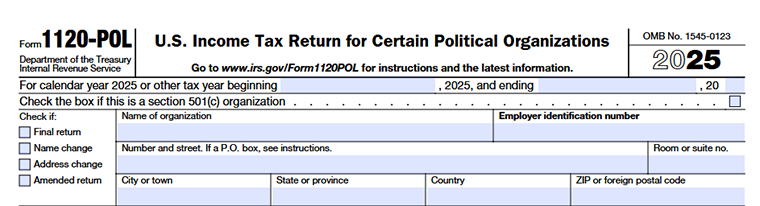
First, you need to fill in information about the organization such as political organization name, address, employer identification number (EIN), and tax year. You must also provide details related to the type of political organization and filing status before completing the income and tax sections of the form.
Tax Year
Enter the organization’s tax year in this section. For those organizations that operate on a calendar year basis, the tax year shall start on January 1, 2025, and end on December 31, 2025.
In the case of fiscal-year organizations, one needs to enter the starting and ending date of the tax year. Ensure the dates entered match the organization’s accounting records and IRS filing period.
Check if this is a section 501(c) organization
Mark this checkbox if the political organization is associated with a tax-exempt organization under Section 501(c). This helps the IRS identify organizations that may have political organization taxable income under Section 527(f)(1). Additional details about Section 527(f)(1) are available on our 1120-POL form Instructions page.
Check if
Select the appropriate box that applies to the return being filed:
- Final return - Check this box if the organization is closing or no longer required to file Form 1120-POL.
- Name change - Select this if the organization’s legal name has changed since the last filing.
- Address change - Check this box if the organization’s mailing address has changed.
- Amended return - Check this box if you are amending an existing Form 1120-POL.
Name of organization
Enter the legal name of the political organization registered with the IRS.
Employer Identification Number (EIN)
Provide the organization’s valid EIN. This number is used to identify the organization for federal tax purposes.
Number and street / P.O. box
Enter the organization’s mailing address, including the street address or P.O. box number.
Room or suite number
Enter the room, suite, or office number if applicable to the mailing address.
City, State or Province, Country, and ZIP or Foreign Postal Code
Enter the complete information about city, state/province, country, and ZIP code/foreign postal code of the organization.
Part I - Income

In this section, the political organizations must disclose their taxable income according to IRS reporting rules. Most of the campaign contributions and exempt function income are not taxable income. Income from sources that are not associated with exempt political activities may be disclosed in Form 1120-POL.
Line 1 - Dividends
Include any income received in dividends by the political organization in that tax year. Provide a statement indicating sources of dividend income.
Line 2 - Interest
Indicate all taxable interest income received from banks, investments, or other sources generating interest income.
Line 3 - Gross Rents
State the total rental income received from rental properties in that tax year.
Line 4 - Gross Royalties
Report royalty income received from copyrights, trademarks, licensing agreements, or similar sources.
Line 5 - Capital Gain Net Income
Enter the organization’s net capital gains. Attach Schedule D (Form 1120) if required.
Line 6 - Net Gain or (Loss) from Form 4797
Gains or losses realized from the disposition of business property must be reported and, where appropriate, Form 4797 must be attached.
Line 7 - Other income and nonexempt function expenditures
- Other income taxable from other sources, including income from trade or business, advertising income, exempt function income not properly segregated, or income subject to tax because of late filing of Form 8871.
- Also include expenditures made from exempt function income that were not used for exempt political activities, including certain nonexempt or illegal expenditures. Attach a detailed statement listing all amounts included on this line.
Line 8 - Total Income
Add lines 1 through 7 and enter the total taxable income for the organization.
Part II – Deductions
Line 9 - Salaries and Wages
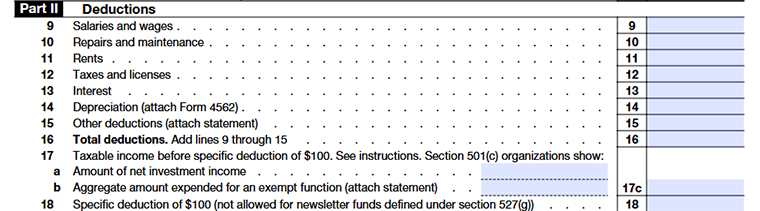
Salaries, wages, and other employee payments made in connection with taxable income generating activities.
Line 10 - Repairs and Maintenance
Expenses incurred for repairs and maintenance of taxable income producing property or activities.
Line 11 - Rents
Rental expenses incurred for the use of offices, machinery, or other property used in the generation of taxable income.
Line 12 - Taxes and licenses
Tax-deductible taxes, licenses, and fees incurred during the taxable year.
Line 13 - Interest
Interest expenses that were incurred due to activities connected with the generation of taxable income.
Line 14 - Depreciation
Deductions for depreciation of expense on property that is used in business.
Line 15 - Other Deductions
Enter other allowable deductions directly connected with earning taxable income. Attach a supporting statement with details.
Line 16 - Total Deductions
Add lines 9 through 15 and enter the total deductions.
Line 17 - Taxable Income Before Specific Deduction of $100
Subtract total deductions (line 16) from total income (line 8) to calculate taxable income before the specific deduction.
For Section 501(c) organizations that are not political organizations:
Line 17a
Enter net investment income.
Line 17b
Enter the total amount spent for exempt political activities.
Line 17c
Enter the smaller of line 17a or line 17b.
Line 18 - Specific Deduction of $100
Political organizations may claim a specific deduction of $100. However, this deduction is not allowed for newsletter funds described under Section 527(g).
Part III - Tax and Payments
Line 19 - Taxable Income
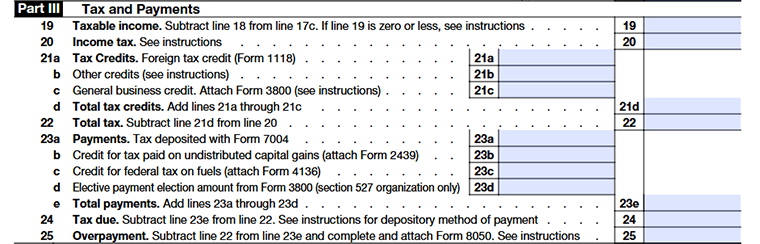
Enter the organization’s taxable income after subtracting the $100 specific deduction from line 18. If the taxable income in line 19 is zero or less, Form 1120-POL is generally not required to be filed. However, organizations may still choose to file the return to begin the IRS statute of limitations period.
Line 20 - Income Tax
- Form 1120-POL income is taxed at a flat rate of 21%. Multiply the taxable income on line 19 by 21% (0.21) and enter the result on this line.
- If Form 8978 was filed, attach it to the return, but do not include amounts from Form 8978, line 14, on this line.
Line 21 - Tax Credits
Political organizations may claim certain eligible tax credits in this section.
Line 21a
Enter any allowable foreign tax credits and attach Form 1118 if applicable.
Line 21b
Report other eligible credits, such as the employer credit for paid family and medical leave or qualified electric vehicle credit carryforwards.
Line 21c
Enter general business credits from Form 3800, excluding credits that are not allowed for Form 1120-POL filers.
Line 21d
Add all applicable credits and enter the total amount. Attach all supporting credit forms.
Line 22 - Total Tax
Subtract total credits on line 21 from the income tax amount reported on line 20 to determine the organization’s total tax liability. Include any qualified electric vehicle credit recapture amount on this line, if applicable.
Line 23 - Payments
Enter all payments and credits already made toward the organization’s tax liability.
Line 23a
Tax paid with Form 7004 extension request
Line 23b
Credit for tax paid on undistributed capital gains (attach Form 2439)
Line 23c
Credit for federal tax on fuels (attach Form 4136)
Line 23d
Elective payment election amount from Form 3800 for Section 527 organizations
Line 23e
Total payments and credits
Attach all applicable forms supporting the payments and credits claimed.
Line 24 - Tax Due
If the total tax on line 22 is more than the payments reported on line 23e, enter the remaining balance due on this line.
The IRS requires federal tax payments to be made electronically. Organizations unable to pay the full amount immediately may apply for an IRS online payment agreement to pay in installments.
Line 25 - Overpayment
If your organization has access to U.S. banking services, direct deposit is the fastest way to receive IRS refunds. If there is an overpayment when filing Form 1120-POL, complete and attach Form 8050 to provide the organization’s banking information for direct deposit.
Signature Section

This part of the tax form is to ensure that the information entered on Form 1120-POL is correct and complete. A signature is required from an authorized officer of the political organization and a paid tax preparer if one is hired.
Signature of Officer
The signature of an authorized officer of the political organization (president, vice-president, treasurer, assistant treasurer, or tax officer) is required. By signing, the authorized officer confirms that the information provided on the return is true, accurate, and complete to the best of their knowledge.
Date and Title
Enter the date the return is signed along with the official title or designation of the authorized signer within the organization.
May the IRS discuss this return with the Preparer?
Check “Yes” if the organization authorizes the IRS to discuss the filed return with the paid preparer listed in this section. Otherwise, check “No.”
Paid Preparer Use Only
If the return is prepared by a paid tax professional, the preparer must complete this section by providing:
- Preparer’s name
- Signature
- Date
- PTIN (Preparer Tax Identification Number)
- Firm’s name
- Firm’s EIN
- Firm’s address
- Phone number
If the return is prepared by an employee of the organization and no payment was made for preparation services, this section should generally be left blank.
Part IV - Additional Information
Line 26 - Foreign Financial Accounts
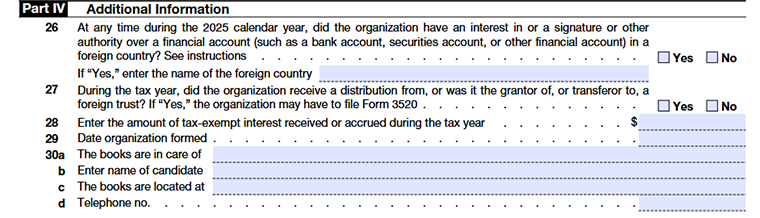
- Check “Yes” if the organization had a financial interest in, signature authority over, or other authority over foreign financial accounts during the calendar year and the combined value of those accounts exceeded $10,000 at any time during the year.
- Organizations must also check “Yes” if they own more than 50% of a corporation that holds such foreign financial accounts.
- If “Yes” is selected, the organization may be required to electronically file FinCEN Form 114 (FBAR) with the U.S. Department of the Treasury. This form is filed separately and should not be attached to the 1120-POL Form. The organization must also enter the name of the foreign country or countries associated with the accounts.
Line 27 - Foreign Trusts and Foreign Gifts
- If the organization answers “Yes” to line 27, it may be required to file Form 3520, Annual Return to Report Transactions with Foreign Trusts and Receipt of Certain Foreign Gifts.
- Organizations that own a foreign trust may also need to ensure that Form 3520-A is filed annually for the trust.
Line 28 - Tax-Exempt Interest Income
Enter any tax-exempt interest income received or accrued during the tax year. This includes exempt-interest dividends received from mutual funds or other regulated investment companies.
Line 29 - Date Organization Formed
Enter the date the political organization was officially formed or established.
Line 30a - The Books Are in Care Of
Enter the name of the individual responsible for maintaining the organization’s financial books and records.
Line 30b - Enter Name of Candidate
Enter the name of the political candidate associated with the organization.
Line 30c - The Books Are Located At
Provide the address where the organization’s books and financial records are maintained.
Line 30d - Telephone Number
Enter the contact number for the individual or office responsible for maintaining the organization’s records.
Where to mail Form 1120-POL?
Political organizations filing Form 1120-POL by paper mail should send the return to the following address:
Department of the Treasury
Internal Revenue Service Center
Ogden, UT 84201
If the organization’s principal office or agency is located in a foreign country or a U.S. territory, mail the return to:
Internal Revenue Service Center
P.O. Box 409101
Ogden, UT 84409
Organizations may also use IRS-designated private delivery services (PDSs) to meet the timely filing requirement for paper returns. Since private delivery services cannot deliver to P.O. boxes, the IRS provides separate street addresses for Private Delivery Services (PDS) filings. Always verify the latest mailing and delivery instructions on the official IRS website before filing.
Ready to E-file your Form 1120-POL?
Stay compliant with IRS requirements for political organizations. TaxZerone makes it simple, accurate, and secure to e-file your Form 1120-POL online.