







Form 8936, Clean Vehicle Credit
Introduction
Form 8936, Clean Vehicle Credit form, is designed to support individuals and businesses looking to claim tax credits for purchasing qualified plug-in electric drive motor vehicles. These credits are part of a broader initiative to promote eco-friendly transportation, rewarding those who choose vehicles that reduce environmental impact.
For tax-exempt organizations filing Form 990-T, this form provides an opportunity to offset unrelated business income tax (UBIT) through credits for purchasing qualified plug-in electric drive motor vehicles.
In this resource guide, we’ll cover everything you need to know about Form 8936, along with Schedule A (8936), including filing requirements, who must file, purposes, and answers to commonly asked questions.
Table of Contents
What's New for Form 8936?
Clean Vehicle Credits for Vehicles Acquired after September 30, 2025.
Taxpayers generally cannot claim clean vehicle credits for vehicles acquired after September 30, 2025, including:
- New clean vehicle credit.
- Previously owned clean vehicle credit.
- Qualified commercial clean vehicle credit.
For purposes of Sections 25E, 30D, and 45W, a vehicle is considered acquired when:
- A written binding purchase contract has been signed, and
- A payment has been made toward the vehicle.
A qualifying payment may include:
- A cash down payment,
- A nominal deposit, or
- The value of a trade-in vehicle.
To qualify for a clean vehicle credit, taxpayers generally must have entered into a binding purchase agreement and made a qualifying payment on or before September 30, 2025, while also meeting all other IRS eligibility requirements.
For additional guidance regarding these changes, is available under Public Law 119-21, which amended the rules for Sections 25E, 30D, and 45W.
What is Form 8936?
Form 8936, Clean Vehicle Credit, allows taxpayers to claim credits for purchasing eligible plug-in electric vehicles. Tax-exempt organizations use this form to figure out the following credits for clean vehicles you placed in service during your tax year.
- New Clean Vehicle Credit - For eligible new clean vehicles that meet IRS requirements.
- Previously Owned Clean Vehicle Credit - For qualifying used clean vehicles purchased from a registered dealer.
- Qualified Commercial Clean Vehicle Credit - For eligible clean vehicles used for business purposes.
In addition to Form 8936, taxpayers must generally complete Schedule A (Form 8936) to determine the credit amount for each qualifying vehicle before transferring the calculated credit to Form 8936.
Who must file Form 8936?
Taxpayers, both individuals and businesses, who purchase or lease a qualifying plug-in electric drive motor vehicle during the tax year must file Form 8936 to claim the Clean Vehicle Credit. This includes individuals, partnerships, S corporations, and estates and trusts.
However, not every electric vehicle qualifies, so it’s essential to confirm that the vehicle is eligible under the current IRS guidelines before filing.
Choose TaxZerone for a filing experience that goes beyond expectations.
Empower your tax compliance journey with us today!
How Can Tax-Exempt Entities Claim Clean Vehicle Credits?
Certain tax-exempt organizations and governmental entities that do not typically benefit from federal income tax credits may be eligible to receive the Qualified Commercial Clean Vehicle Credit through an elective payment process. This allows eligible entities to treat the credit as a payment of income tax, which may result in a refund if the credit exceeds any tax liability.
Eligible entities generally include:
- Tax-exempt organizations
- State, local, and territorial governments
- Indian tribal governments
- Alaska Native Corporations
- Rural electric cooperatives
- The Tennessee Valley Authority (TVA)
To claim the credit, eligible entities must generally file:
- Schedule A (Form 8936)
- Form 8936
- Form 3800
- Form 990-T or another applicable tax return
Before claiming the credit, entities must complete the IRS pre-filing registration process and obtain a registration number. before electing payment of the Qualified Commercial Clean Vehicle Credit. For additional details, see IRC Section 6417 and related IRS guidance.
Form 8936 Line-by-Line Filing Guide

Before starting the line-by-line explanation on Form 8936, it's important to understand the information displayed at the top of the form.
Name(s) Shown on Return
Enter the name(s) exactly as shown on the federal tax return to which Form 8936 is attached.
Identifying Number
- Enter the identifying number shown on the federal tax return, such as a Social Security Number (SSN) or
- Employer Identification Number (EIN), as applicable.
Part I - Modified Adjusted Gross Income (MAGI) Amount
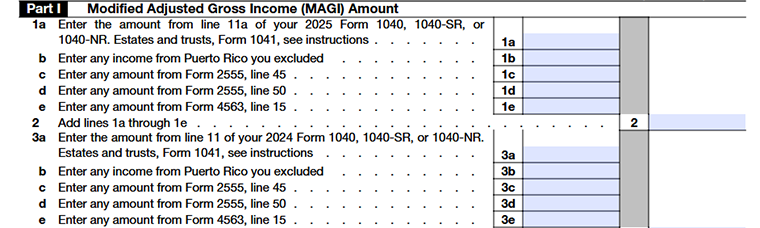
The IRS uses your Modified Adjusted Gross Income (MAGI) to determine whether you meet the income requirements for claiming certain clean vehicle credits. In this section, you will calculate your MAGI for both the current tax year and the prior tax year.
Line 1a - Current Year Adjusted Gross Income
- Enter the amount from Line 11 of your 2025 Form 1040, Form 1040-SR, or Form 1040-NR.
- If you are filing as an estate or trust, enter the applicable amount from Form 1041 as instructed by the IRS.
Line 1b - Puerto Rico Income Exclusion
- Enter any income from Puerto Rico that was excluded from your gross income.
- If you do not have excluded Puerto Rico income, enter 0.
Line 1c - Form 2555 Foreign Earned Income
- Enter the amount reported on Form 2555, Line 45.
- This amount generally represents foreign-earned income and certain housing exclusions or deductions claimed while living and working abroad.
Line 1d - Form 2555 Foreign Housing Deduction
- Enter the amount from Form 2555, Line 50.
- This amount relates to the foreign housing deduction claimed on Form 2555.
Line 1e - Form 4563 Exclusion Amount
- Enter the amount from Form 4563, Line 15.
- This figure applies to taxpayers who exclude income earned in American Samoa.
Line 2 - Current Year Modified AGI
- Add the amounts entered on Lines 1a through 1e and enter the total on Line 2.
- This total represents your 2025 Modified Adjusted Gross Income (MAGI), which the IRS uses to determine your eligibility for clean vehicle credits.
Line 3a - Prior Year Adjusted Gross Income
- Enter the amount from Line 11 of your 2024 Form 1040, Form 1040-SR, or Form 1040-NR.
- If you are filing as an estate or trust, enter the applicable amount from Form 1041 as instructed by the IRS.
Line 3b - Prior Year Puerto Rico Income Exclusion
Enter any income from Puerto Rico that was excluded from your gross income during the prior tax year.
Line 3c - Prior Year Form 2555 Amount
- Enter the amount from Form 2555, Line 45, for the prior tax year.
- This includes foreign-earned income and certain housing-related exclusions claimed for that year.
Line 3d - Prior Year Foreign Housing Deduction
- Enter the amount from Form 2555, Line 50, for the prior tax year.
- This amount reflects any foreign housing deduction claimed during the prior year.
Line 3e - Prior Year Form 4563 Exclusion Amount
- Enter the amount from Form 4563, Line 15, for the prior tax year.
- This figure applies only if you excluded income earned in American Samoa.
Line 4 - Prior Year Modified AGI (MAGI)
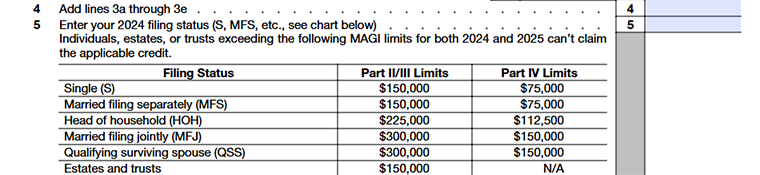
Add the amounts entered on Lines 3a through 3e and enter the total on Line 4. This total represents your prior-year Modified Adjusted Gross Income (MAGI).
Line 5 - 2024 Filing Status
Enter the abbreviation that corresponds to your filing status for the 2024 tax year.
- S - Single
- MFS - Married Filing Separately
- HOH - Head of Household
- MFJ - Married Filing Jointly
- QSS - Qualifying Surviving Spouse
The filing status entered on this line determines the MAGI limit that applies to your clean vehicle credit claim. To qualify, your MAGI must not exceed the applicable income threshold for either the current tax year or the prior tax year.
| Filing Status | MAGI Limit |
|---|---|
| Single (S) | $150,000 |
| Married Filing Separately (MFS) | $150,000 |
| Head of Household (HOH) | $225,000 |
| Married Filing Jointly (MFJ) | $300,000 |
| Qualifying Surviving Spouse (QSS) | $300,000 |
| Estates and Trusts | $150,000 |
Part II - Credit for Business/Investment Use Part of New Clean Vehicles

Line 6 - Credit From Schedule A (Form 8936)
Enter the total credit amount from Part II of all applicable Schedule A (Form 8936) forms. If you are claiming a credit for more than one qualifying vehicle used for business or investment purposes, combine the amounts from each Schedule A and enter the total on this line.
Line 7 - Credit From Partnerships and S Corporations
Enter any new clean vehicle credits passed through to you from a partnership or S corporation.
You can find these amounts on:
- Schedule K-1 (Form 1065),
- Schedule K-1 (Form 1120-S)
Partnerships and S corporations should report this amount on Schedule K. All other taxpayers should report this amount on IRS Form 3800, Part III, Line 1y.
Line 8 - Business or Investment Use Credit
- Add Lines 6 and 7 and enter the total on Line 8.
- This amount represents your total business or investment use portion of the New Clean Vehicle Credit.
Part III - Credit for Personal Use Part of New Clean Vehicles

Line 9 - Personal Use Credit Amount
Enter the total credit amount from Part III of all applicable Schedule A (Form 8936) forms. If you are claiming credits for more than one qualifying vehicle, combine the amounts and enter the total on this line.
Line 10 - Tax Liability
Enter the amount from Form 1040, Form 1040-SR, or Form 1040-NR, Line 18. This represents your total tax liability before applying the clean vehicle credit.
Line 11 - Personal Credits
Enter the total of the applicable personal credits reported on Schedule 3 (Form 1040), Lines 1 through 4, 5b, 6d, 6I, and 6m.
Line 12 - Available Tax Liability
- Subtract Line 11 from Line 10 and enter the result.
- If the result is zero or less, enter 0 and stop here. You cannot claim the personal use portion of the clean vehicle credit.
Line 13 - Personal Use Part of Credit
- Enter the smaller value between Line 9 and Line 12. This is the allowable personal use portion of your new clean vehicle credit.
- Also enter this amount on Schedule 3 (Form 1040), Line 6f.
- If the amount on Line 12 is less than the amount on Line 9, you cannot claim the excess credit. Any unused portion of the personal clean vehicle credit is permanently lost and cannot be carried back or carried forward to another tax year.
Part IV - Credit for Previously Owned Clean Vehicles

Line 14 - Previously Owned Clean Vehicle Credit Amount
Enter the total credit amount from Part IV of all applicable Schedule A (Form 8936) forms. If you are claiming credits for more than one qualifying previously owned clean vehicle, combine the amounts and enter the total on this line.
Line 15 - Tax Liability
Enter the amount from Form 1040, Form 1040-SR, or Form 1040-NR, Line 18. This represents your total tax liability before applying the previously owned clean vehicle credit.
Line 16 - Personal Credits
Enter the total of the applicable personal credits reported on Schedule 3 (Form 1040), Lines 1 through 4, 5b, 6d, and 6I.
Line 17 - Available Tax Liability
- Subtract Line 16 from Line 15 and enter the result.
- If the result is zero or less, enter 0 and stop here.
Line 18 - Allowable Previously Owned Clean Vehicle Credit
- Enter the smaller value between Line 14 and Line 17. This is the amount of previously owned clean vehicle credit you can claim for the tax year.
- Also enter this amount on Schedule 3 (Form 1040), Line 6m.
- If the amount on Line 17 is less than the amount on Line 14, you cannot claim the excess credit. Any unused portion of the previously owned clean vehicle credit is permanently lost and cannot be carried back or carried forward to another tax year.
Part V - Credit for Qualified Commercial Clean Vehicles

Line 19 - Qualified Commercial Clean Vehicle Credit Amount
Enter the total credit amount from Part V of all applicable Schedule A (Form 8936) forms.
Line 20 - Credit From Partnerships and S Corporations
Enter any qualified commercial clean vehicle credits passed through to you from a partnership or S corporation.
You can find these amounts on:
- Schedule K-1 (Form 1065),
- Schedule K-1 (Form 1120-S)
Partnerships and S corporations should report these pass-through credits on Line 20. Other taxpayers who are also reporting a separate credit on Line 19 must include these amounts on Line 20 as well.
If you are not reporting a separate credit on Line 19, you may report the pass-through credit directly on Form 3800, Part III, Line 1aa.
Line 21 - Total Qualified Commercial Clean Vehicle Credit
Add Lines 19 and 20 and enter the total on Line 21.
- Partnerships and S corporations should report this amount on Schedule K.
- All other taxpayers should report this amount on Form 3800, Part III, Line 1aa.
Schedule A (Form 8936) - Clean Vehicle Credit Amount
Taxpayers must complete Schedule A (Form 8936) for each qualifying clean vehicle to calculate the allowable credit amount. The credit calculated on Schedule A is then reported on Form 8936 to determine the total clean vehicle credit that can be claimed on the tax return.
What Is Schedule A (Form 8936)?
Schedule A (Form 8936), “Clean Vehicle Credit Amount”, is used to calculate the credit amount for each qualifying clean vehicle. Taxpayers must complete a separate Schedule A for every vehicle for which they are claiming a credit.
When Is Schedule A Required?
You must complete a separate Schedule A (Form 8936) for each qualifying vehicle if you are claiming:
- The New Clean Vehicle Credit
- The Previously Owned Clean Vehicle Credit
- The Qualified Commercial Clean Vehicle Credit
If you are claiming credits for multiple vehicles, you must complete a separate Schedule A for each vehicle.
Information Needed to Complete Schedule A
Before completing Schedule A, gather the following information:
- Vehicle Identification Number (VIN)
- Vehicle make and model
- Date the vehicle was placed in service
- Date of purchase
- Credit transfer information, if applicable
- Business-use percentage (for business vehicles)
Schedule A (Form 8936) - Instructions
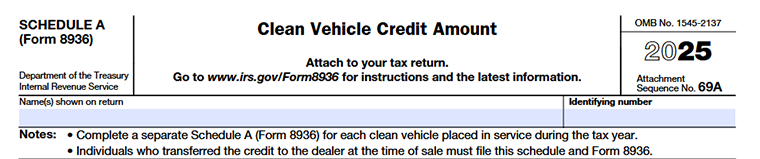
Before completing the credit calculation sections, enter the required taxpayer's information at the top of Schedule A.
Name(s) Shown on Return
Enter the name exactly as it appears on the federal tax return to which Schedule A (Form 8936) is attached.
Identifying Number
Enter the identifying number shown on your tax return, such as a Social Security Number (SSN) or Employer Identification Number (EIN), as applicable.
Part I - Vehicle Details
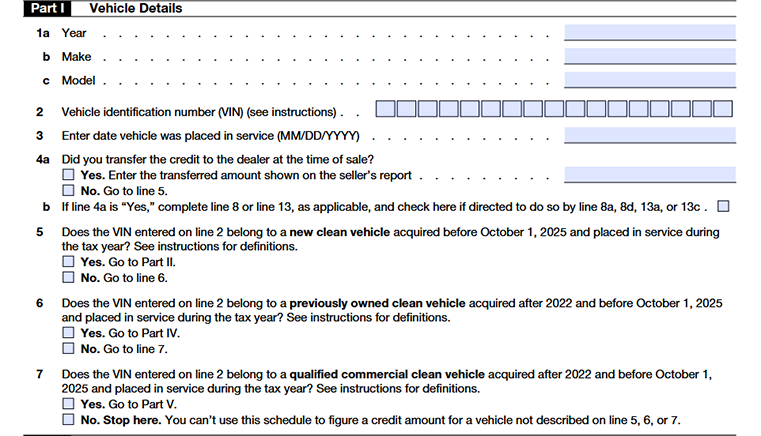
Line 1a - Vehicle Year
Enter the vehicle's model year.
Line 1b - Vehicle Make
Enter the manufacturer or brand of the vehicle
Line 1c - Vehicle Model
Enter the specific model of the vehicle for which you are claiming the credit.
Line 2 - Vehicle Identification Number (VIN)
- Enter the Vehicle Identification Number (VIN). The VIN is a unique identifier generally consisting of 17 characters made up of letters and numbers.
- You can find the VIN on the vehicle registration , title, insurance documents, or the vehicle itself.
Line 3 - Date Vehicle Was Placed in Service
- Enter the date the vehicle was placed in service using the MM/DD/YYYY format.
- Generally, a vehicle is considered placed in service on the date you take possession of it and begin using it.
Line 4a - Credit Transfer Election
Indicate whether you transferred the clean vehicle credit to the dealer at the time of sale.
- If “Yes,” enter the credit amount transferred to the dealer as shown on the seller's report.
- If “No,” proceed to Line 5
Line 4b - Credit Transfer Reporting
- If you transferred your clean vehicle credit to the dealer at the time of sale, select "Yes" and enter the credit amount shown on the seller's report.
- If required by Line 8a, 8d, 13a, or 13c, report the transferred credit amount on Schedule 2 (Form 1040), Line 1b.
Line 5 - New Clean Vehicle Eligibility
Indicate whether the VIN entered on Line 2 belongs to a new clean vehicle that was acquired before October 1, 2025, and placed in service during the tax year.
- If “Yes,” proceed to Part II.
- If “No,” continue to Line 6.
Line 6 - Previously Owned Clean Vehicle Eligibility
Indicate whether the VIN entered on Line 2 belongs to a previously owned clean vehicle acquired after 2022 and before October 1, 2025, and placed in service during the tax year.
- If “Yes,” proceed to Part IV.
- If “No,” continue to Line 7.
Line 7 - Qualified Commercial Clean Vehicle Eligibility
Indicate whether the VIN entered on Line 2 belongs to a qualified commercial clean vehicle acquired after 2022 and before October 1, 2025, and placed in service during the tax year.
- If “Yes,” proceed to Part V.
- If “No,” stop here. The vehicle does not qualify for a credit under Schedule A (Form 8936).
Part II - Credit Amount for Business/Investment Use Part of New Clean Vehicle
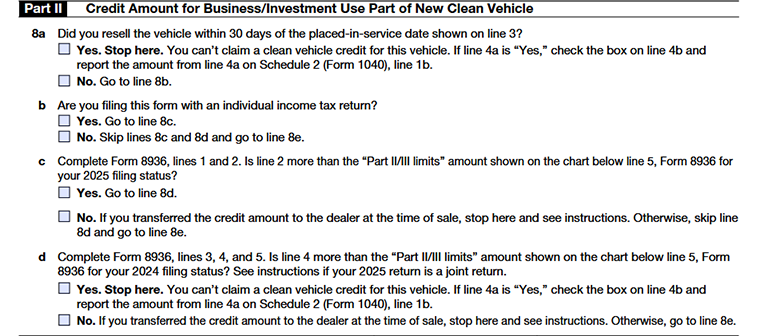
Line 8a - Vehicle Resold Within 30 Days
Indicate whether you resold the vehicle within 30 days of the placed-in-service date entered on Line 3.
- If “Yes,” you are not eligible to claim a clean vehicle credit for this vehicle. If you transferred the credit to the dealer at the time of sale, check the box on Line 4b and report the transferred credit amount from Line 4a on Schedule 2 (Form 1040), Line 1b.
- If “No,” continue to Line 8b.
Line 8b - Type of Tax Return
Indicate whether you are filing Form 8936 with an individual income tax return.
- If “Yes,” continue to Line 8c.
- If “No,” skip Lines 8c and 8d and proceed to Line 8e.
Line 8c - Current-Year MAGI Limitation
Complete Form 8936, Lines 1 and 2, and compare your current-year Modified Adjusted Gross Income (MAGI) with the applicable income limit shown in the chart below Line 5 of Form 8936.
- If your MAGI exceeds the applicable limit, continue to Line 8d.
- If your MAGI is within the applicable limit, proceed to Line 8e unless you transferred the credit to the dealer, in which case follow the instructions provided on the form.
Line 8d - Prior-Year MAGI Limitation
Complete Form 8936, Lines 3, 4, and 5, and compare your prior-year Modified Adjusted Gross Income (MAGI) with the applicable income limit for your 2024 filing status.
- If your prior-year MAGI exceeds the applicable limit, you cannot claim a clean vehicle credit for this vehicle. If you transferred the credit to the dealer at the time of sale, check the box on Line 4b and report the transferred credit amount from Line 4a on Schedule 2 (Form 1040), Line 1b.
- If your prior-year MAGI is within the applicable limit, continue to Line 8e. However, if you transferred the credit to the dealer at the time of sale, follow the instructions provided on the form before proceeding.
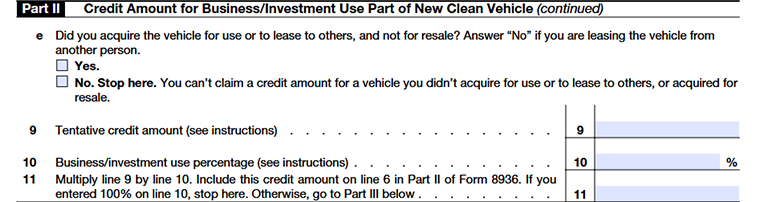
Line 8e - Vehicle Use Requirement
Indicate whether you acquired the vehicle for your own use or to lease to others.
- Select "Yes" if you purchased the vehicle for business use or for leasing purposes.
- Select "No" if you acquired the vehicle for resale or are leasing it from another person.
If you answer "No," you are not eligible to claim a clean vehicle credit for this vehicle and should stop here
Line 9 - Tentative Credit Amount
Enter the tentative credit amount provided by the seller at the time of purchase. This amount is typically listed on the seller's report and generally represents the maximum clean vehicle credit available for the vehicle.
Line 10 - Business/Investment Use Percentage
Enter the percentage of the vehicle's use that is attributable to business or investment purposes.
- Enter 100% if the vehicle is used exclusively for business purposes.
- If the vehicle is used for both business and personal purposes, calculate the business-use percentage by dividing the miles driven for business or income-producing activities (excluding commuting miles) by the total miles driven during the year.
- If employees use the vehicle and the value of any personal use is included in their taxable income or reimbursed to you, the vehicle may be treated as 100% business use.
- If the vehicle's use changed during the year from personal to business use (or vice versa), calculate the percentage based only on the period it was used for business or investment purposes.
Line 11 - Business/Investment Use Credit Amount
- Multiply Line 9 by Line 10 and enter the result on Line 11. Include this amount on Form 8936, Part II, Line 6.
- If you enter 100% on Line 10, stop here. Otherwise, continue to Part III to determine the personal use portion of the credit, if applicable.
Part III - Credit Amount for Personal Use Part of New Clean Vehicle

Line 12 - Personal Use Portion of Credit
- Subtract Line 11 from Line 9 and enter the result on Line 12.
- Enter this amount on Form 8936, Part III, Line 9. If there is no remaining personal-use portion, no further calculation is required.
Part IV - Credit Amount for Previously Owned Clean Vehicle
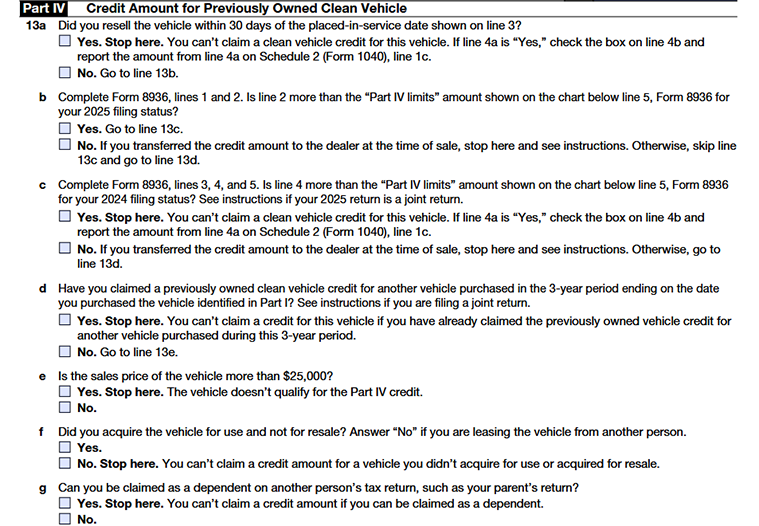
Line 13a - Vehicle Resold Within 30 Days
Indicate whether you resold the vehicle within 30 days of the placed-in-service date entered on Line 3.
- If “Yes,” you are not eligible to claim a clean vehicle credit for this vehicle. If you transferred the credit to the dealer at the time of sale, check the box on Line 4b and report the transferred credit amount from Line 4a on Schedule 2 (Form 1040), Line 1c .
- If “No,” continue to Line 13b.
Line 13b - Current-Year MAGI Limitation
Complete Form 8936, Lines 1 and 2, and compare your current-year Modified Adjusted Gross Income (MAGI) with the applicable income limit for your 2025 filing status shown in the chart below Line 5 of Form 8936.
- If your MAGI exceeds the applicable limit, continue to Line 13c.
- If your MAGI is within the applicable limit, proceed to Line 13d. However, if you transferred the credit to the dealer at the time of sale, follow the instructions provided on the form.
Line 13c - Prior-Year MAGI Limitation
Complete Form 8936, Lines 3, 4, and 5, and compare your prior-year MAGI with the applicable income limit for your 2024 filing status.
- If your prior-year MAGI exceeds the applicable limit, you cannot claim a clean vehicle credit for this vehicle. If you transferred the credit to the dealer at the time of sale, check the box on Line 4b and report the transferred credit amount from Line 4a on Schedule 2 (Form 1040), Line 1c.
- If your prior-year MAGI is within the applicable limit, continue to Line 13d. However, if you transferred the credit to the dealer at the time of sale, follow the instructions provided on the form.
Line 13d - Previously Owned Vehicle Credit Claimed Within the Last Three Years
Indicate whether you claimed a Previously Owned Clean Vehicle Credit for another vehicle purchased during the three-year period ending on the date you purchased the vehicle listed in Part I.
- If “Yes,” you cannot claim the credit for this vehicle.
- If “No,” continue to Line 13e.
Line 13e - Vehicle Sales Price Test
Determine whether the vehicle's sales price exceeds $25,000.
- If “Yes,” the vehicle does not qualify for the Previously Owned Clean Vehicle Credit.
- If “No,” continue to Line 13f.
Line 13f - Vehicle Use Requirement
Indicate whether you acquired the vehicle for your own use and not for resale.
- Select "Yes" if you purchased the vehicle for personal or business use.
- Select "No" if you acquired the vehicle for resale or if you are leasing the vehicle from another person.
If you answer "No," you are not eligible to claim the credit and should stop here.
Line 13g - Dependent Status
Indicate whether you can be claimed as a dependent on another person's tax return.
- If “Yes,” you are not eligible to claim the Previously Owned Clean Vehicle Credit.
- If “No,” continue to the next applicable line to determine your allowable credit amount.

Line 14 - Vehicle Sales Price
Enter the sales price of the previously owned clean vehicle.
Line 15 - Calculate 30% of the Sales Price
Multiply the amount on Line 14 by 30% (0.30) and enter the result.
Line 16 - Maximum Vehicle Credit Amount
- The maximum credit allowed for a previously owned clean vehicle is $4,000.
- Enter $4,000 on this line
Line 17 - Allowable Previously Owned Clean Vehicle Credit
Enter the smaller of:
- The amount on Line 15, or Line 16.
- This is your allowable Previously Owned Clean Vehicle Credit. Enter this amount on Form 8936, Part IV, Line 14.
Part V - Credit Amount for Qualified Commercial Clean Vehicle
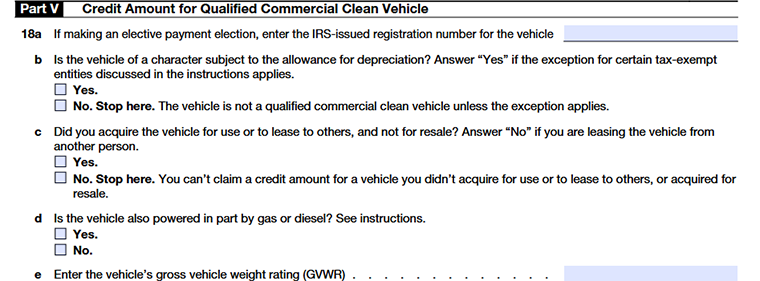
Line 18a – Elective Payment Election Number
Enter the IRS-issued registration number for the qualified commercial clean vehicle, if applicable.
Line 18b - Depreciation Requirement
Indicate whether the vehicle is subject to a depreciation allowance.
- Select "Yes" if the vehicle qualifies for depreciation.
- Select "No" if the vehicle does not qualify for depreciation.
If you answer "No," the vehicle generally does not qualify as a commercial clean vehicle unless it meets the exception available for certain tax-exempt and governmental entities.
Line 18c - Vehicle Use Requirement
Indicate whether you acquired the vehicle for use in your trade or business, or to lease to others, and not for resale.
- Select "Yes" if the vehicle was acquired for business use or leasing purposes.
- Select "No" if the vehicle was acquired for resale or if you are leasing the vehicle from another person.
If you answer "No," you are not eligible to claim the credit for this vehicle.
Line 18d - Vehicle Power Source
Indicate whether the vehicle is powered in part by a gasoline or diesel engine.
- Select "Yes" if the vehicle is powered by both an electric motor and a gasoline or diesel engine.
- Select "No" if the vehicle is not powered by a gasoline or diesel engine.
This determination affects the credit calculation. Vehicles powered in part by a gasoline or diesel engine may qualify for the credit, but the applicable credit rate is generally reduced from 30% to 15%.
Line 18e - Gross Vehicle Weight Rating (GVWR)
Enter the vehicle's Gross Vehicle Weight Rating (GVWR).
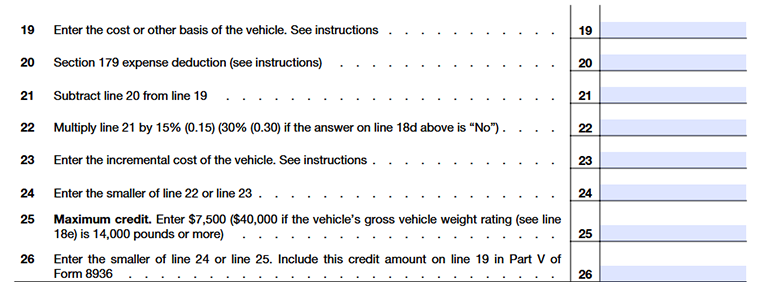
Line 19 - Cost or Other Basis of the Vehicle
Enter the vehicle's cost or other basis. This is generally the amount paid to acquire the vehicle, including certain purchase-related costs. The amount entered on this line is used to calculate the qualified commercial clean vehicle credit.
Line 20 - Section 179 Expense Deduction
Enter any Section 179 expense deduction claimed for the vehicle from Part I of Form 4562, Depreciation and Amortization.
Line 21 – Adjusted Vehicle Basis
Subtract Line 20 from Line 19 and enter the result.
Line 22 - Credit Calculation
Calculate the tentative credit amount by multiplying Line 21 by the applicable percentage:
- Multiply by 15% (0.15) if you have answered "Yes" on Line 18d.
- Multiply by 30% (0.30) if you have answered "No" on Line 18d.
Line 23 - Incremental Cost
- Enter the vehicle's incremental cost, if applicable.
- Generally, incremental cost is the excess cost of the clean vehicle compared to a similar vehicle powered solely by a gasoline or diesel internal combustion engine.
Line 24 - Smaller of Line 22 or Line 23
Enter the smaller of:
- The amount on Line 22, or
- The amount on Line 23
This amount is used to determine the allowable credit before applying the maximum credit limitation.
Line 25 - Maximum Credit Amount
Enter the applicable maximum credit amount:
- $7,500 for vehicles with a Gross Vehicle Weight Rating (GVWR) of less than 14,000 pounds, or
- $40,000 for vehicles with a GVWR of 14,000 pounds or more.
Line 26 - Allowable Qualified Commercial Clean Vehicle Credit
Enter the smaller of:
- The amount on Line 24, or
- The amount on Line 25
This is your allowable Qualified Commercial Clean Vehicle Credit. Enter this amount on Form 8936, Part V, Line 19.
Commonly Asked Questions
1. What is the IRS pre-filing registration requirement for the Qualified Commercial Clean Vehicle Credit?
2. What is a seller's report for the clean vehicle credit?
3. How much credit amount can I claim with Form 8936?
4. Can I claim the Clean Vehicle Credit for a leased vehicle?
Yes, if you lease a qualifying electric vehicle, the lessor may pass the credit on to you as part of the lease agreement. Confirm with the lessor if you qualify for the credit.