
Form 990 Schedule K
Simplify Tax-Exempt Bond Reporting with TaxZerone!
Last updated:
-by Peter Samuel | TaxZerone
Form 990 Schedule K at a Glance
- Purpose: Form 990 Schedule K is used to report supplemental information on tax-exempt bond issues, including outstanding bond liabilities and compliance with IRS tax-exempt bond requirements.
- Who Must File? Organizations that answer "Yes" to Form 990, Part IV, line 24a generally must complete and attach Schedule K. This typically applies to organizations with tax-exempt bond issues exceeding $100,000 in outstanding principal at the end of the tax year that were issued after December 31, 2002.
- What Is Reported? Schedule K reports bond issue details, use of bond proceeds, private business use, arbitrage compliance, and ongoing tax-exempt bond compliance information.
- Multiple Bond Issues: A single Schedule K can report up to four tax-exempt bond issues. Organizations with additional bond issues must attach separate Schedule K forms.
Table of Contents
What is Schedule K?
Schedule K, is a supplemental schedule attached to Form 990 to provide certain information on its outstanding liabilities associated with tax-exempt bond issues. Municipalities typically issue these bonds to raise funds for qualified organizations, allowing the organization to access capital for projects at a lower interest rate.
Who must file Schedule K?
An organization that answered “Yes” on IRS Form 990, Part IV, Checklist of Required Schedules, question 24a, must complete and attach Schedule K to Form 990. This applies to most types of tax-exempt bonds used by qualified organizations, not just the common 501(c)(3) bonds.
It also indicates the organization reported an outstanding tax-exempt bond issue that:
- Had an outstanding principal amount of over $100,000 as of the last day of the tax year, and
- Was issued after December 31, 2002.
Embrace the Future of Tax Filing – Choose TaxZerone Today!
Make your e-filing process simple by clicking the button below.
Schedule K Filing Requirements

Below, we have provided Schedule K filing requirements for each part.
Part I - Bond Issues

To complete Part I, provide the requested information for each outstanding tax-exempt bond issue (including a refunding issue) that:
- Had an outstanding principal amount of over $100,000 as of the last day of the tax year (or other selected 12-month period), and
- Was issued after December 31, 2002
- Columns (a) and (b) - Enter the name and employer identification number (EIN) of the issuer of the bond issue.
- Column (c) - Enter the Committee on Uniform Securities Identification Procedures (CUSIP) number on the bond with the latest maturity.
The CUSIP number should be identical to the CUSIP number listed on Form 8038, Part I, line 9, filed for the bond issue. If the bond issue wasn't publicly offered and there is no assigned CUSIP number, enter zeros in place of the CUSIP number. - Column (d) - Enter the issue date of the obligation. The issue date should be identical to the issue date listed on Form 8038, Part I, line 7, filed for the bond issue.
- Column (e) - Enter the issue price of the obligation. The issue price should generally be identical to the issue price listed on Form 8038, Part III, line 21(b), filed for the bond issue.
- Column (f) - Describe the purpose of the bond issue.
- Column (g) - Check “Yes” or “No” to indicate whether a defeasance escrow or refunding escrow has been established to irrevocably defease any bonds of the bond issue
- Column (h). Check “Yes” if the organization acted as an “on behalf of issuer” in issuing the bond issue. Check “No” if the organization only acted as the borrower of the bond proceeds under the terms of a conduit loan with the governmental issuer of the bond issue.
- Column (i) - Check “Yes” or “No” to indicate if the bond issue was a pooled financing issue.
Part II - Proceeds
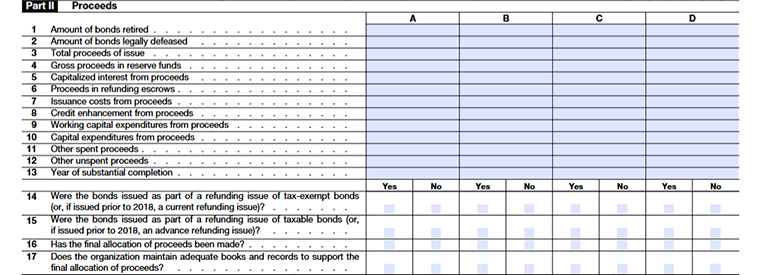
Line 1
Enter the total principal amount of bonds that have been fully paid off or retired by the end of the 12-month reporting period.
Line 2
Enter the total principal amount of bonds that are not yet paid off but have been legally set aside for repayment through a defeasance or refunding escrow.
Line 3
Report the total bond proceeds received as of the end of the 12-month period. If this amount differs from the issue price shown earlier, explain the reason in Part VI (for example, investment earnings).
Line 4
Enter the amount of bond proceeds held in required reserve, sinking, pledged, or replacement funds at the end of the 12-month period.
Line 5
Enter the total bond proceeds used to pay interest costsduring construction of the financed capital project.
Line 6
Enter the amount of bond proceeds held in a refunding escrow account at the end of the 12-month period, including related investment earnings.
Line 7
Enter the total proceeds used to pay bond issuance costs, such as underwriting fees, trustee fees, or bond counsel fees.
Line 8
Enter the proceeds used to pay credit enhancement fees, such as bond insurance premiums or letter-of-credit fees.
Line 9
Enter the proceeds used for working capital expenses (regular operating costs), excluding amounts already reported on lines 4, 6, 7, or 8.
Line 10
Enter the proceeds used for capital expenditures, such as buying, building, or improving land, buildings, or equipment. Don’t include capitalized interest already reported on line 5.
Line 11
Enter proceeds used for any other purpose not reported on lines 4–10, including amounts used to redeem or legally defense bonds.
Line 12
Enter the amount of unspent bond proceeds remaining at the end of the 12-month period, excluding amounts already reported on lines 4, 6, and 11.
Line 13
Enter the year the financed project was substantially completed, meaning it was ready and operating close to its intended design level. If multiple projects were financed, enter the latest completion year.
Line 14
Check “Yes” if the bonds were issued after 2017 to refund tax-exempt bonds, or before 2018 to current refund tax-exempt bonds. Otherwise, check “No.”
Line 15
Check “Yes” if the bonds were issued after 2017 to refund taxable bonds, or before 2018 to advance refund tax-exempt bonds. Otherwise, check “No.”
Line 16
Check “Yes” or “No” to show whether the final allocation of bond proceeds has been completed using a consistent accounting method.
Line 17
Check “Yes” or “No” to confirm whether the organization keeps proper books and records supporting the final allocation of bond proceeds.
Part III - Private Business Use
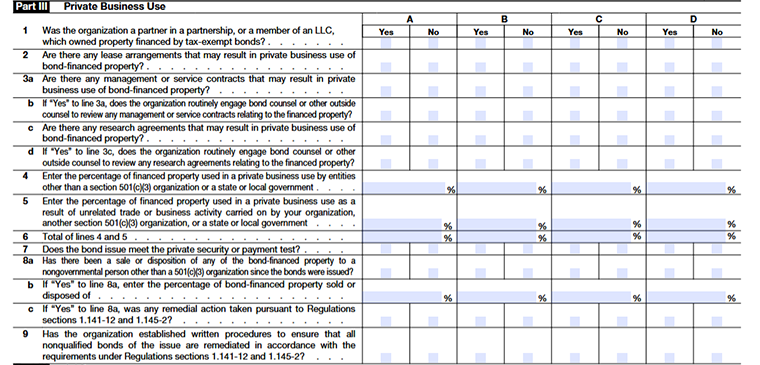
Complete this part for each applicable tax-exempt bond issue listed in Part I (rows A–D), except certain older refunding bond issues. Use additional schedules if needed to report all bond issues.
Some qualified private activity bonds (other than qualified 501(c)(3) bonds) don’t need detailed reporting here, but you must identify them in Part VI.
Line 1
Check “Yes” if, during the year, the organization was a partner in a partnership or member of an LLC that owned property financed by the bonds and included non-501(c)(3) entities as partners or members. Otherwise, check “No.”
Line 2
Check “Yes” if any lease or rental agreements existed during the year for property financed with bond proceeds that allowed private or nongovernmental use. Otherwise, check “No.”
Line 3a
Check “Yes” if there was any management or service contract during the year related to property financed by the bonds that could allow private business use.
Check “Yes” if there was any management or service contract during the year related to property financed by the bonds that could allow private business use.
Line 3b
If line 3a is “Yes,” indicates whether the organization regularly used bond counsel or outside legal advisors to review those management or service contracts.
Line 3c
Check “Yes” if there is any research agreement involving bond-financed property that could result in private business use, even if it meets safe-harbor rules.
Line 3d
If line 3c is “Yes,” indicates whether the organization regularly used bond counsel or outside legal advisors to review those research agreements.
Line 4
- Enter the average percentage of bond-financed property used by private or nongovernmental parties (other than 501(c)(3) organizations) during the year.
- Do not include uses that qualify under safe-harbor management/service contracts or research agreements.
Line 5
Enter the average percentage of the property used for unrelated trade or business activities, even if used by your organization, another 501(c)(3), or a government unit.
Line 6
Enter the total of lines 4 and 5.
Line 7
- Check “Yes” if the bond issue meets the private security or payment test under sections 141(b)(2) and 145.
- This generally means that no more than 5% of bond payments or property were used or secured for private business purposes.
Line 8a
Check “Yes” if any of the financed property was sold or transferred to someone other than a government unit or another 501(c)(3) organization.
Line 8b
If 8a is “Yes,” enter the cumulative percentage of property sold or transferred since the bonds were issued.
Line 8c
If 8a is “Yes,” indicate whether the organization took remedial actions for any nonqualified bonds resulting from the transfer.
Line 9
Check “Yes” if the organization has written procedures to ensure timely remedial actions for all nonqualified bonds, following IRS rules and regulations.
Part IV - Arbitrage

Line 1
Interest on tax-exempt bonds isn’t fully tax-exempt unless the issuer pays back any excess earnings (arbitrage profits) to the U.S. Treasury.
Check “Yes” if the issuer has filed the most recent Form 8038-T for arbitrage rebate or related payments; otherwise, check “No.”
Line 2a
Check “Yes” if the issuer did not file Form 8038-T because a filing was required but not yet completed for the most recent computation date.
Line 2b
Check “Yes” if the issuer did not file Form 8038-T because a filing was not required for some special reason (for example, a small bond exception or other IRS exemption).
Line 2c
Check “Yes” if the issuer did not file Form 8038-T because no rebate was due for that computation date. If this applies, provide the rebate computation date in Part VI.
Line 3
Check “Yes” if the bond issue is a variable rate bond, meaning the interest rate isn’t fixed or known at the time the bonds were issued. Otherwise, check “No.”
Line 4a
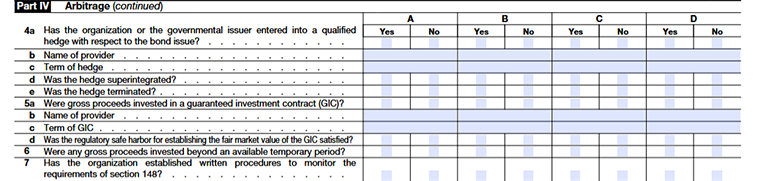
Check “Yes” if the organization (or governmental issuer) has entered a qualified hedge on the bond proceeds and recorded it in the issuer’s books. Otherwise, check “No”. A qualified hedge is a financial contract used to manage interest rate risk, which affects the bond yield.
Line 4b
If 4a is “Yes,” enter the name of the hedge provider (the company or institution that issued the hedge).
Line 4c
Enter the length of the hedge in years, rounded to the nearest tenth (e.g., 2.4 years).
Line 4d
Check “Yes” if the hedge changes the treatment of variable rate bonds to fixed yield bonds (called “super integration”). Otherwise, check “No.”
Line 4e
Check “Yes” if the hedge ended early, before its scheduled termination date. Otherwise, check “No.”
Line 5a
Check “Yes” if any bond proceeds were invested in a guaranteed investment contract (GIC) a specially negotiated investment with set terms and interest rates. Otherwise, check “No.”
Line 5b
If 5a is “Yes,” enter the name of the GIC provider.
Line 5c
Enter the term (length) of the GIC in years, rounded to the nearest tenth (e.g., 2.5 years).
Line 5d
Check “Yes” if the regulatory safe harbor for fair market value was met; otherwise, check “No.”
Line 6
Check “Yes” if any gross proceeds were invested longer than allowed temporary periods, or if any proceeds in a reserve/replacement fund exceeded limits. Otherwise, check “No.”
Line 7
Check “Yes” if the organization has written procedures to monitor compliance with arbitrage, yield restriction, and rebate rules under section 148. Otherwise, check “No.”
Part V - Procedures To Undertake Corrective Action

Check “Yes” or “No” to indicate whether the organization has established written procedures to ensure timely identification of violations of federal tax requirements and timely correction of any identified violation(s) through the use of the voluntary closing agreement program if self-remediation isn't available under applicable regulations.
Answer “Yes” only if the procedures applied during the 12 months are used to report on the bond issue.
Part VI - Supplemental Information
Use Part VI to provide the narrative explanations required, if applicable, to supplement Part I, columns (e) and (f); to provide additional information or comments relating to the reporting of liabilities by related organizations; and to describe certain assumptions that are used to complete Schedule K (Form 990) when the information provided isn't fully supported by existing records.
Also, use this part to supplement responses to questions on Schedule K (Form 990). Identify the specific part and line number that the response supports, in the order in which the responses appear on Schedule K (Form 990).
Choose TaxZerone to complete your Schedule K filing
TaxZerone is an IRS-authorized e-file service provider, that offers more than a seamless e-filing experience. By filing with us, you get instant updates on your exempt information return’s filing status, ensuring you're always in the loop.
At TaxZerone, we've designed a user-friendly platform that simplifies the e-filing process and provides comprehensive support at every step.
Here’s how your Form 990 return with Schedule K attachment is transmitted to the IRS in 3 simple steps!
- Provide Organization Details - Choose the tax year for which you want to file a return, and provide your organization’s details.
- Preview the Return - Complete Schedule K and preview the information provided in the return for accuracy before transmitting.
- Transmit to the IRS - Transmit Schedule K and your 990 return to the IRS and get the acceptance in just a few hours.
In case of IRS rejection for your 990 information return, worry not! We offer a hassle-free correction and retransmission process, absolutely free of charge!
Choose TaxZerone - Your Gateway to Seamless Tax Filing
Complete your Form 990 return and Schedule K filing requirements with ease!