
Form 940 Schedule R
Simplify aggregate FUTA tax reporting by e-filing Form 940 Schedule R for multiple clients.
Last updated:
-by Nikhil Chowdary | TaxZerone
Form 940 Schedule R at a Glance
- Purpose: Allocates FUTA wages, tax adjustments, credit reductions, and payments among multiple clients included in an aggregate Form 940 filing.
- Who Must File Form 940 Schedule R: Eligible aggregate filers (Section 3504 agents and Certified Professional Employer Organizations (CPEOs)).
- Deadlines: File Schedule R annually with the aggregate Form 940 by February 1, 2027.
- Key Requirement: Reconcile Schedule R totals should match the amounts on Form 940.
- Filing Methods: CPEOs must generally file Schedule R electronically while 3504 agents can file either electronically or by paper.
- Schedule R is used to allocate the aggregate information reported on Form 940, Employer’s Annual Federal Unemployment (FUTA) Tax Return, among multiple clients.
- These clients may include home care service recipients listed on Form 2678, customers with contracts that meet the requirements of Section 7705(e)(2), and clients with service agreements with a Certified Professional Employer Organization (CPEO).
- Schedule R reports each client’s share of the FUTA tax information, helping the IRS identify the wages and tax amounts attributable to each client.
Table of Contents
Who Needs to File Form 940 Schedule R?
Schedule R is filed by:
- Section 3504 agents: Approved agents reporting FUTA tax information on behalf of home care service recipients.
- Certified Professional Employer Organizations (CPEOs): Organizations that file an aggregate Form 940 return on behalf of their client and are certified by the IRS. CPEOs must file Form 940 and attach Schedule R electronically, subject to applicable exceptions.
When is the Due Date to File Schedule R?
- You must file Schedule R along with your aggregate Form 940. For the 2026 tax year, the due date is February 1, 2027, because January 31 falls on a Sunday.
- If you deposited all your FUTA taxes on time, you may file by February 10, 2027.
Step-by-Step Instructions for Completing Form 940 Schedule R
Read the instructions before you complete Schedule R for an accurate filing.

Enter Your Business Information
- Enter your Employer Identification Number (EIN).
- Enter Business name as shown on Form 940.
Type of Filer
- Select the applicable filer type (section 3504 agent or Certified Professional Employer Organization (CPEO))
Calendar Year
Enter the calendar year for Form 940 to which Schedule R is attached.
Client's Information
Complete a separate line for the amounts allocated to each of your clients.
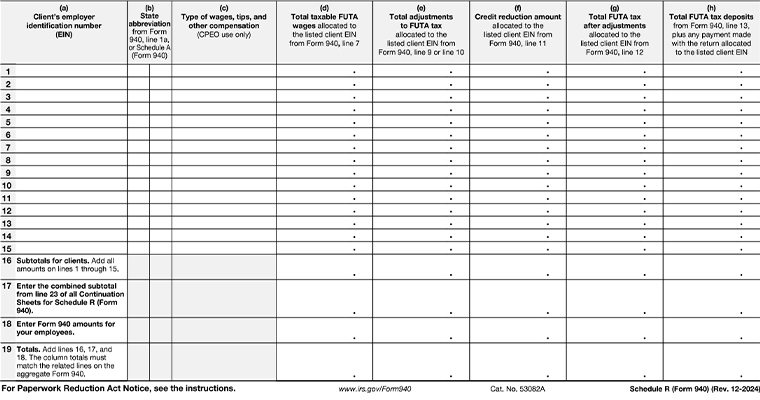
Column a:
Client’s EIN.
Column b:
The state abbreviation of the client’s location from Form 940, line 1a, or Schedule A (Form 940).
Column c: (CPEO use only)
Enter a code for the type of wages, tips, and other compensation paid to the individuals performing services for the client. (codes A, B, C, or D).
Code Summary:
- A: Wages, tips, and other compensation paid under section 3511(a).
- B: Wages, tips, and other compensation paid under section 3511(c).
- C: Wages, tips, and other compensation not reported under code A or code B paid as a payor under a service agreement described in Regulations section 31.3504-2(b)(2).
- D: Wages, tips, and other compensation paid as an agent under Regulations section 31.3504-1.
Column d:
Total taxable FUTA wages allocated to the listed client EIN from Form 940 on line 7.
Column e:
Total adjustments to FUTA tax allocated to the listed client EIN from Form 940 on line 9 or line 10.
Column f:
Credit reduction amount allocated to the listed client EIN from Form 940 on line 11.
Column g:
Total FUTA tax after adjustments allocated to the listed client EIN from Form 940 on line 12.
Column h:
Total FUTA tax deposits from Form 940 on line 13, plus any other payments made with the return allocated to the listed client EIN.
Line 16:
Add the amounts from lines 1 through 15 to calculate the total for all clients.
Line 17:
Enter the combined subtotal from line 23 of all continuation sheets for schedule R (Form 940).
Line 18:
Fill in the necessary Form 940 information for the employees.
Line 19:
Enter totals by adding lines 16, 17, and 18. Make sure that the column totals match the corresponding lines on the Form 940.
Common Mistakes to Avoid When Filing Form 940 Schedule R
- Entering an incorrect client EIN or state abbreviation.
- Allocating taxable FUTA wages to the wrong client.
- Reporting FUTA tax adjustments or credit reductions incorrectly.
- Allocation of deposits or other payments to the wrong client.
- Failing to reconcile the Schedule R totals with the corresponding amounts on Form 940.