
Form 8655 Instructions
Authorize a trusted reporting agent to file tax and information returns with TaxZerone!
Last updated:
-by Alexia Zepeda | TaxZerone
Form 8655 at a Glance
- IRS Form 8655 authorizes a trusted reporting agent to sign, file, and manage specified federal tax forms on behalf of a business.
- It is commonly used by employers working with payroll providers, accounting firms, or e-file service providers.
- The form can cover employment tax returns, deposits and payments, duplicate IRS notices, and limited disclosure access for selected information returns.
- Form 8655 does not transfer the taxpayer’s responsibility; the business remains responsible for timely and accurate filings and payments.
- A legally authorized person must sign the form, and unsigned forms are invalid.
- Completed forms can be submitted to the IRS by fax or mail, and TaxZerone helps simplify the preparation and submission process.
IRS Form 8655, Reporting Agent Authorization, allows a business to grant permission to a third-party reporting agent to prepare, sign, and file certain federal tax forms and information returns. This form is commonly used when businesses rely on payroll providers, accounting firms, or e-file services to handle IRS filings accurately and on time.
This guide explains what Form 8655 is, who needs it, which forms it covers, and how to complete it correctly.
What’s New for Form 8655?
Forms 940-PR, 941-PR, 941-SS, and 943-PR have been discontinued and removed from Line 15 of Form 8655. Filers must now use Forms 940, 941, and 943, with optional Spanish versions—940 (sp), 941 (sp), and 943 (sp)—available to all employers.
Table of Contents
What is IRS Form 8655?
IRS Form 8655 is an authorization form that allows a reporting agent to act on behalf of a business when dealing with the IRS. It does not report tax data or payments. Instead, it tells the IRS who is permitted to file specific tax, and information returns for your business.
Purpose of 8655 Form
The 8655 form IRS authorizes a reporting agent to handle IRS filings on behalf of a business. With Form 8655, a reporting agent may be authorized to sign and file returns, make federal tax deposits and payments only for the forms and periods specified on the form, and receive IRS communications related to that authority.
- Sign and file certain tax returns
- Reporting agents are generally required to file returns electronically, as outlined in Rev. Proc. 2012-32.
- For information on e-filing and obtaining a reporting agent PIN, see Publication 3112.
- Make deposits and payments
- Reporting agents must generally make deposits and payments electronically through the Electronic Federal Tax Payment System.
- Receive duplicate copies of tax information and IRS communications
- This includes notices, written documents, and electronic communications related to the authority granted.
- Provide information to aid in penalty relief determinations
- The reporting agent can assist the IRS in evaluating penalty relief for issues related to the tasks performed under irs form 8655 authorizations.
Important Note:
- Authorizing a reporting agent does not relieve the taxpayer of responsibility for timely filing returns or making federal tax deposits and payments.
- Reporting agents must notify clients of this responsibility in writing when entering into an agreement and at least quarterly while services are provided.
- Clients are encouraged to enroll in EFTPS to track deposits and payments made on their behalf.
Forms covered by Form 8655
- Forms covered For Signing and Filing:
Reporting agents can be authorized to sign and file the following federal tax returns on behalf of the taxpayer: - Form 940 – Employer’s Annual Federal Unemployment (FUTA) Tax Return
- Form 941 – Employer’s Quarterly Federal Tax Return
- Form 943 – Employer’s Annual Tax Return for Agricultural Employees
- Form 944 – Employer’s Annual Federal Tax Return
- Form 945 – Annual Return of Withheld Federal Income Tax
- Form 1042 – Annual Withholding Tax Return for U.S. Source Income of Foreign Persons
- Form CT‑1 – Employer’s Annual Railroad Tax Return
- Forms covered for Deposits and Payments:
Reporting agents can be authorized to make deposits and payments for: - Form 720 – Quarterly Federal Excise Tax Return
- Form 940, 941, 943, 944, 945 (same employment tax returns listed above)
- Form 990‑PF – Return of Private Foundation
- Form 990‑T – Exempt Organization Business Income Tax Return
- Form 1041 – U.S. Income Tax Return for Estates and Trusts
- Form 1042 – Annual Withholding Tax Return for U.S. Source Income of Foreign Persons
- Form 1120 – U.S. Corporation Income Tax Return
- Form CT‑1 – Employer’s Annual Railroad Tax Return
- Information Returns for Disclosure Only
8655 form also includes authority to receive confidential IRS information (not filing or payment authority) for: - Form W‑2 series
- Form 1099 series
- Form 3921 and Form 3922 (certain employee stock plan information returns)
Authority Granted
- Start and Duration of Authority:
- Authority begins with the period you list on 8655 form for each line (15, 16, 18a, 18b, 18c), typically shown in YYYY/MM and YYYY format for returns or deposits.
- The authorization remains in effect indefinitely until the taxpayer or reporting agent terminates or revokes it; there is no automatic expiration.
- No authority is granted for any period prior to the first period you specify on the form.
- Related Forms Are Covered:
- When you authorize a particular form, that authority usually extends to related variations and adjustments:
- Non‑English versions, such as Form 941 (sp) and Form 944 (sp)
- Amended returns, such as Form 941‑X and 941‑X (sp)
- Related payment vouchers for the same form series
- For certain corporate returns, authority for Form 1120 can also extend to closely related versions (for example, Form 1120‑C) when handled through the same line on form 8655 irs.
- Disclosure Authority:
- Authority to receive IRS information takes effect once the IRS receives a properly signed Form 8655 IRS and processes it to the Reporting Agents File (RAF).
- Form 8655 does not revoke Form 2848, Form 8821, or third‑party designee authorizations on other returns; these remain separate and in effect until independently revoked.
- Changing Authority:
- To increase authority: Submit a new signed Form 8655 and complete the lines for the additional authority.
- To decrease authority: Send a signed written request to the IRS address listed under “ Where to File Form 8655?”
- Send a copy of the previously executed Form 8655 to the IRS at the address under Where to File, above. Re-sign the copy of the Form 8655 under the original signature. Write “REVOKE” across the top of the form. If you do not have a copy of the authorization you want to revoke, send a statement to the IRS.
- The previous authorization remains in effect, except for the parts you change with the new submission.
Where to file Form 8655?
Submit your 8655 form securely by fax or mail. Filing Form 8655 IRS with TaxZerone ensures accurate processing and timely authorization of your reporting agent.
Fax filing (Recommended)
- You can fax Form 8655 to 855-214-7523.
- Send no more than 25 forms per transmission. For faster processing and better quality, the IRS recommends faxing directly from a computer rather than using a traditional fax machine.
Mailing Address:
If you choose to mail, send the completed form to:
Mailing Address:
Internal Revenue Service
Accounts Management Service Center
MS 6748 RAF Team
1973 North Rulon White Blvd.
Ogden, UT 84404
Additional information
For more information on reporting agent authorizations, see:
- Publication 1474 – Technical Specifications Guide for Reporting Agent Authorization and Federal Tax Depositors
- Revenue Procedure 2012-32
Substitute for Form 8655
If you plan to prepare and use a substitute 8655 IRS form, refer to Publication 1167, General Rules and Specifications for Substitute Forms and Schedules. Once your substitute form is approved, the IRS form approval number must be printed in the lower-left margin of each substitute Form 8655 you submit.
Terminating or Revoking an Authorization
You can revoke authorization by:
- Sending the IRS a written statement with your signature that says you want to revoke the authorization, or
- Giving the IRS a copy of Form 8655 with "REVOKE" written on it
Who must Sign?
Form 8655 must have the signature of someone with the legal power to commit the taxpayer, like:
- The person who owns the business
- Someone in charge at the company
- A Partner (for partnerships)
- An authorized member (for LLCs)
- A person who manages money or property for others (if that applies)
❌ The reporting agent can’t sign for the taxpayer.
How to fill out Form 8655 (Reporting Agent Authorization)?
IRS Form 8655 is used by a taxpayer to authorize a Reporting Agent (such as a payroll service or tax preparer) to act on their behalf with the IRS for certain tax matters.
Taxpayer
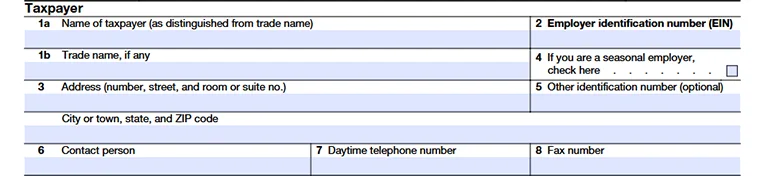
Line 1a: Legal Business Name
Enter the taxpayer’s legal business name as registered with the IRS.
Line 1b: Trade Name (Optional)
Enter the DBA or trade name, if applicable.
Line 2: Employer Identification Number (EIN)
Enter the taxpayer’s EIN.
Line 3: Business Address
Enter the taxpayer’s complete address, including street, city, state, and ZIP code.
Line 4: Seasonal Employer
Check this box only if the business operates seasonally.
Line 5: Other Identification Number (Optional)
Enter any additional IRS identification number, if applicable.
Line 6: Contact Person
Enter the name of the person the IRS may contact regarding this authorization.
Line 7: Daytime Telephone Number
Enter a phone number where the IRS can reach the taxpayer during business hours.
Line 8: Fax Number (Optional)
Enter the taxpayer’s fax number, if available.
Reporting Agent

Line 9: Reporting Agent Name
Enter the business name of the reporting agent.
Line 10: Reporting Agent EIN
Enter the EIN of the reporting agent.
Line 11: Reporting Agent Address
Enter the reporting agent’s address, including number, street, room or suite number, city, state, and ZIP code.
Line 12: Reporting Agent Contact Person
Enter the name of the reporting agent’s contact person.
Line 13: Reporting Agent Daytime Telephone Number
Enter the reporting agent’s daytime phone number.
Line 14: Reporting Agent Fax Number (Optional)
Enter the reporting agent’s fax number, if available.
Line 15: Authorization of Reporting Agent To Sign and File Returns
Select the tax forms the reporting agent is authorized to sign and file, and enter the starting tax period.
- For quarterly returns, use “YYYY/MM” format. “MM” is the last month of the quarter for which the authorization begins (for example, “2024/09” for the third quarter of 2024).
- For annual returns, use the “YYYY” format to indicate the year for which the authorization begins.

Line 16: Authorization of Reporting Agent To Make Deposits and Payments
Select the tax forms the reporting agent is authorized to make deposits and payments for, and enter the starting period.
- Use the “YYYY/MM” format to enter the month in which the authorization begins ( for example, “2024/08” for August 2024).

Line 17: Duplicate Notices to Reporting Agents
Check this box to allow the reporting agent to receive duplicate IRS notices and correspondence.

Line 18a–18c: Disclosure Authorization for Forms Series W-2, 1099, and/or 3921/3922
Select the applicable options to authorize the reporting agent to receive confidential IRS information for:
- Form W-2 series
- Form 1099 series
- Forms 3921 and 3922
Enter the calendar year the disclosure authority begins.

Line 19: State or Local Authorization
Check this box to authorize the reporting agent to sign and file state or local tax returns related to the federal authorizations granted on Line 15 and/or Line 16.

How to file Form 8655 with TaxZerone?
Step-by-step instructions to fill out Form 8655 in just a few clicks.
Step 1: Login to TaxZerone, click Essential Forms in the dashboard, and navigate to "Form 8655".
Step 2: Enter the business and reporting agent details, select the forms you are authorizing, and specify the applicable tax year(s) or period(s).
Step 3: Review all entries on Form 8655 for accuracy, make any necessary corrections, and submit the completed form to the IRS by fax or postal mailing.
Common mistakes to Avoid
Leaving the form unsigned
Authorizing incorrect tax periods
Selecting forms not applicable to your business
Using an outdated IRS Form 8655
Assuming Form 8655 grants full IRS representation (it does not)
Authorize Your Reporting Agent with Confidence!
Prepare and send Form 8655 accurately with TaxZerone. Simplify reporting agent authorization, avoid IRS errors, and manage your federal tax filings with ease.