
California Form 100S Instructions: Complete Filing Guide for S Corporations
Prepare and e-file your California Form 100S accurately with TaxZeroneand stay compliant with California FTB filing requirements.
Last updated:
-by Nikhil Chowdary | TaxZerone
California Form 100S at a Glance
Form 100S is filed by California S corporations with the Franchise Tax Board (FTB) to report income, deductions, credits, and tax information. S corporation income and other tax items generally pass through to shareholders.
- Due Date: The filing deadline depends on the corporation’s tax year and follows applicable California and federal filing requirements.
- Extension: S corporations can request an extension to file Form 100S. The extension provides additional filing time but does not extend the time to pay taxes owed.
- Late Filing Penalties: The FTB may charge penalties for late filing, late payment, or incorrect or incomplete return information.
CA Form 100S is the official California income tax return for S corporations. If your business is taxed as an S corporation in California, you must file Form 100S each year with the California Franchise Tax Board (FTB) to report income, deductions, franchise tax, shareholder distributions, and tax adjustments.
This comprehensive guide walks you through every part of California Form 100S with step-by-step instructions, filing requirements, due dates, required schedules, and practical examples. Whether you're filing for the first time or need help completing a specific section, you'll find clear explanations, common filing mistakes to avoid, and official guidance to help you prepare and file your return accurately and confidently.
Table of Contents
What's new about California Form 100S?
S Corporations Filing Form 100S for California 2025 Tax Returns: Important Updates
- Report on Form FTB 4197:
Certain taxpayers must declare tax spending items on Form FTB 4197, Information on Tax Spending Items, as required by California law. - OBBBA Nonconformity:
California generally does not conform to federal tax changes under the One Big Beautiful Bill Act (OBBBA). - Motion Picture Credit Program 4.0:
New California Motion Picture and Television Production Credit A new California Motion Picture and Television Production Credit is available for taxable years beginning on or after January 1, 2025. An S Corporation doesn’t claim the credit itself instead, the full amount of the credit passes through to the shareholders. - PTE Elective Tax Extended:
The PTE elective tax and credit program has been extended for taxable years beginning on or after January 1, 2026, and before January 1, 2031. Qualified PTEs that do not make or underpay the June 15 prepayment may still make the election; however, the related credit is reduced by 12.5% of the taxpayer’s share of the unpaid amount. But the related credit is reduced by 12.5 percent of the taxpayer's portion of the unpaid amount. taxpayer's share of the unpaid amount. - Changes in Single Sales Factor Apportionment:
Effective in 2025, banking, savings and loan, and other financial business activities will no longer be treated as qualified business activities for California's single sales factor apportionment. - Wildfire Settlement Exclusion:
California offers an exclusion from gross income for qualifying wildfire disaster settlement payments received during the period from 2021 to 2030. Eligible taxpayers can, if applicable, file amended returns for prior years. - Chiquita Canyon Exclusion:
California removes certain payments from the Chiquita Canyon dump event from total income for taxable years beginning after 2023 and before 2030. If applicable, eligible taxpayers may alter prior year returns.
What Is California Form 100S?
California Form 100S is the tax return filed by S corporations conducting business in California. The form reports:
- Business income and losses
- California franchise tax
- Dividends to shareholders
- Deductions and credits
- California adjustments
- Apportioned income for multi-state businesses
The form is filed with the California Franchise Tax Board (FTB) and is generally due on the 15th day of the third month after the close of the tax year.
Need Help Filing California Form 100S?
File your California S corporation return correctly and on schedule to avoid penalties and filing errors.
Who Must File Form 100S?
An S corporation is required to file CA Form 100S if it:
- Registered in California
- Conducts business in California
- California-source income earned
- Has elected S-corporation status for federal purposes
- Is incorporated or qualified with the California Secretary of State
Important Filing Deadlines for Form 100S
| Filing Requirement | Due Date |
|---|---|
| Original Return | 15th day of 3rd month |
| Extended Return | 15th day of 9th month |
| Estimated Tax Payments | 15th day of the 4th, 6th, 9th, and 12th month |
Corporations must pay the required percentage of their estimated tax liability during the taxable year as specified below.
- 30% for the first required installment
- 40% for the second required installment
- The third installment does not require an estimated tax payment
- 30% for the fourth required installment
California S Corporation Tax Rates
California S corporations Typically pay:
- Income / Franchise Tax at 1.5%
- Minimum franchise tax of $800
- Financial S corps pay 3.5%
This minimal franchise tax due even if the corporation has no income, unless a specified exemption applies.
Key Schedules and Attachments
| Required Schedule/Attachment | Purpose |
|---|---|
| Schedule D | Reports gains and losses from sales of capital assets |
| Schedule B | Reports depreciation and amortization |
| Schedule C | Claims California tax credits |
| Schedule H | Reports deductions for dividends |
| Schedule R | Calculates California apportionment income |
| Schedule F | Calculation of Trade or Business Income |
| Schedule L | Reports balance sheet information, if required |
| Schedule M-1 | Reconciles book income and tax income, if required |
| Schedule M-2 | Reports accumulated adjustments and retained earnings |
| Schedule V | Calculates cost of goods sold |
| Schedule K | Summarizes shareholder income, deductions, and credits |
| Schedule K-1 | Reports each shareholder’s share of income, deductions, credits, and other tax items |
| Federal Form 1120-S | Provides the federal S corporation return copy |
How These Schedules Work:
- Schedules attached to California Form 100S assist in the correct reporting of shareholder income, deductions, tax adjustments, credits, and other business activities accurately.
- Fill out each schedule carefully. Please attach them in the proper order to help avoid processing delays, notices, or filing errors.
California Adjustments and Apportionments
California does not always follow federal tax rules. For Form 100S, a business may be required to make California-specific adjustments.
Common adjustments include:
- Depreciation differences
- Franchise tax adjustments
- Passive activity limitations
- State-specific deductions
- Built-in gains adjustments
Multi-state enterprises may also required to file Schedule R to apportion income earned both inside and out of California. Many businesses in California adopt a single sales factor allocation technique.
Line-by-Line Instructions for Form 100S
Let’s now explore the line-by-line instructions for form 100S. This section provides a detailed summary of your corporation’s financial activity and tax reporting.
Basic Information Section
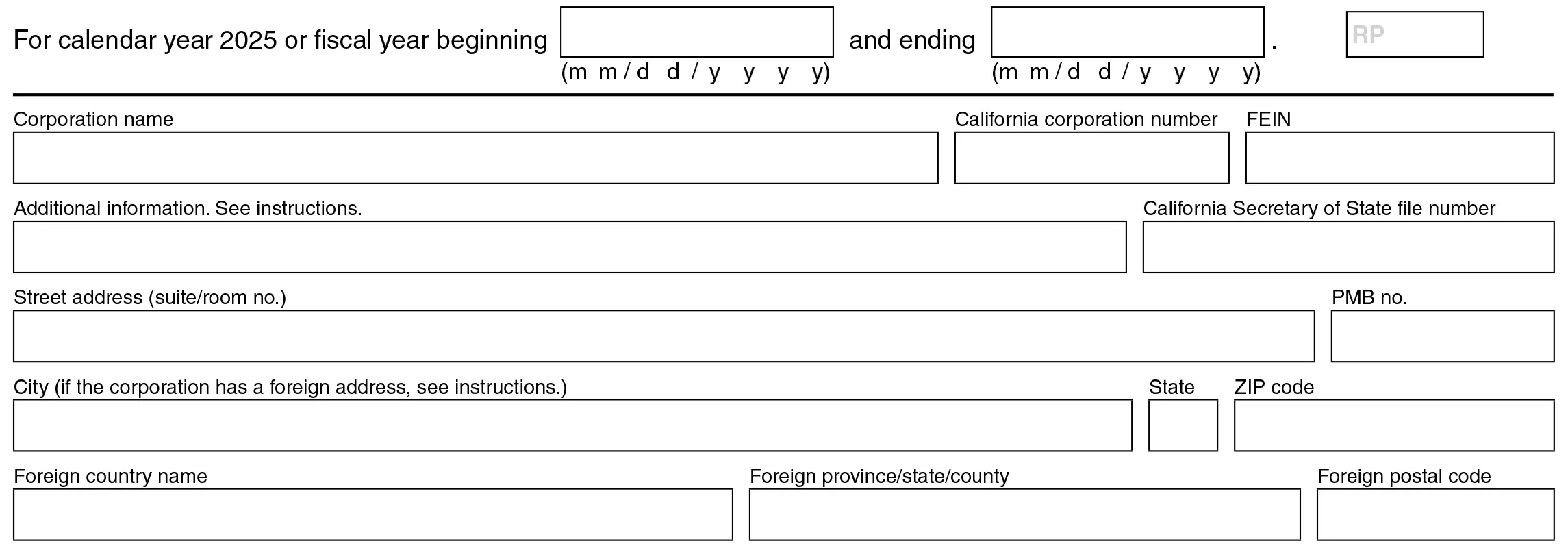
- Tax Year – Enter the beginning and ending dates of the corporation’s tax year.
- Corporation Name and Address Information – Enter the corporation’s true legal name as filed with the California SOS, including with the street address, city, state, and ZIP code.
- California Corporation Number– Enter the California corporation number. Enter your
- FEIN – Enter your Federal Employer Identification Number (FEIN).
- Additional Information – Use this field for owner, representative, or supple mental address information only.
- Secretary of State File Number – Type the file number from the California Secretary of State.
- PMB Number – Enter the private mailbox number, if applicable.
- Foreign Address – Enter foreign country, province/state/county, and postal code if the corporation is located outside the U.S.
Schedule Q Questions
Schedule Q is intended to disclose crucial informatio n regarding the corporation’s business activities, changes in ownership, deferred income and other California filing requirements. Please answer all appropriate questions in the following pages, and send any extra information or attachments as necessary.

Question A1 - Final Return Information
If this is the corporation's final return, check the box and state the reason:
- Dissolved – Corporation has been legally closed
- Surrendered (Withdrawn) – Business has officially withdrawn from California
- Merged/Reorganized – Corporation merged into another entity or reorganized
- IRC Section 338 sale – Stock purchase treated as asset sale under tax rules
- QSub election – Subsidiary treated as a disregarded entity
Enter the date of final action (mm/dd/yyyy).
Question A2 - Deferral of Income from Asset Disposition
Indicate whether the S corporation is currently deferring income from the sale or exchange of assets.
- Check Yes – If you are deferring income under the tax rules.
- Check No – If no deferred income exists.
If “Yes”, indicate the year of first disposal of the asset (yyyy).
Question A3 - Previously Deferred Income Reporting
Indicate whether the S corporation is reporting previously delayed income from any of the following:
- Installment sale
- IRC§1031 Like-kind exchange
- IRC§1033 Involuntary conversion
- Other deferred income transactions
Check all applicable boxes that apply to the income being reported.
Question B1 - Acquisition of Control (Buying Another Entity)
Answer whether the corporation (or any subsidiary) acquired more than 50% ownership/control of another entity during the year.
If yes, also check whether the acquired entity owned or leased leased rnia real property such as:
- Property or buildings
- Lease for 35+ years
- Government-Owned property
If both conditions are true → mark YES
Otherwise → mark NO
Question B2 - Change in Ownership of This Corporation (Being Acquired)
Answer whether another person or entity acquired more than 50% ownership/control of this corporation (or its subsidiaries). If YES, also check whether:
If YES, also check whether:
- The acquired entity owned California real property, or
- Held qualifying long-term or government leases
If both conditions are true → mark YES
Otherwise → mark NO
Question B3 - Real Property Transfer & Reassessment Rules
Check if California real property was transferred into the company and shielded from property tax reassessment under RTC Section 62(a)(2).
If YES, also check whether:
- More than 50% of voting stock of the corporation was transferred cumulatively in one or more transactions during the year
- And this transfer was not previously reported
If both conditions are true → mark YES
Otherwise → mark NO
State Adjustments (Line 1 - 4)

Line 1 – Ordinary Income (Loss) From Trade or Business
Enter the corporation’s ordinary business income or loss from Schedule F (Form 100S), line 22, or federal Form 1120-S, line 22. If Schedule F is not completed, attach federal Form 1120-S page 1 along with supporting schedules and statements. The CEO’s salary is $80,000.
Line 2 – Taxes Not Deductible
Report foreign or domestic income taxes, including California franchise or income taxes, that are not deductible and must be added back to income.
Line 3 – Interest on Government Obligations
Report interest from government obligations that must be added to income, even if exempt from federal or state individual income tax.
Line 4 – Net Capital Gain
Report net capital gains from the sale, exchange, or other disposition of business assets. Include gains reported on Schedule D (100S) and any IRC Section 179 recapture gains required for California tax purposes. Enter the taxable gain amount to Form 100S, Line 4.
Line 5 – Depreciation and Amortization
Apply California depreciation rules to report depreciation and amortization adjustments for qualifying business assets. Attach Schedule B (Form 100S) to support the amounts reported.
Line 6 – Portfolio Income
Report net portfolio income, such as interest, dividends, and royalties, that is not included in ordinary business income. Do not include passive activity income on this line.
Line 7 – Other Additions
- Enter income and adjustment items not reported elsewhere that must be added to California net income under R&TC Section 24425.
- Include expenses allocable to income not included in California taxable income (add-back items).
- Please also report any other adjustments necessary to accurately compute California net income.
- Attach an itemized schedule showing what the item is, how it was calculated, and why it was adjusted.
Line 8 – Total
Add Lines 1 through 7 to determine total income and adjustments.
State Adjustments (Line 9 - 14)

Line 9 – Dividends Received Deduction
Report the dividends received deduction and attach Schedule H (100S).
Line 10 – Water’s-Edge Dividend Deduction
Report the water’s-edge dividend deduction and attach Schedule H (100S).
Line 11 – Charitable Contributions
Report allowable charitable contributions subject to California limitations. Complete the required calculation and use Schedule R for apportioning corporations, if applicable.
Line 12 – Other Deductions
Report deductions not claimed elsewhere, such as pass-through losses, passive activity losses, IRC Section 179 expenses, federal ordinary gains or losses from Form 4797, exempt government interest, and eligible California exclusions. Attach supporting schedules and applicable forms, such as Schedule B (100S) and Form 8825, if necessary.
Line 13 – Total
Add Lines 9 through 12 to determine total deductions and contribution.
Line 14 – Net Income (Loss) After State Adjustments
Enter the corporation’s California net income or loss after subtracting the total deductions and adjustments on Line 13 from the total income reported on Side 1, Line 8.
Example: The corporation reported $120,000 on Line 8 and $20,000on Line 13, resulting in $100,000 of California net income.
CA Net Income (Line 15 – 20)

Line 15 – Net Income (Loss) for State Purposes
Report the corporation’s California net income or loss. Use Schedule R if income is earned both inside and outside California and attachForm FTB 3805Q if reporting a net loss. Corporations qualifying underPublic Law 86-272 may be exempt from California income tax but could still be subject to the minimum franchise tax.
Line 16 – R&TC Section 23802(e) Deduction
Enter the allowable deduction under R&TC Section 23802(e) for excess net passive investment income or built-in gains tax, if applicable. Use the Excess Net Passive Income and Income Tax Worksheet or Schedule D (100S), Section A, Part III, to calculate the deduction amount.
Line 17 – Net Operating Loss (NOL) Deduction
Claim any allowable NOL carryover from prior years. Complete and attach Form FTB 3805Q to calculate the deduction and any remaining carryover, subject to California NOL limitation rules.
Line 18 – EZ, TTA, or LAMBRA NOL Carryover Deduction
Report any eligible EZ, TTA, or LAMBRA NOL carryover from prior years. Complete and attach the applicable form(FTB 3805Z, FTB 3809, or FTB 3807) to calculate and support the deduction.
Line 19 – Disaster loss deduction
Claim any eligible disaster loss carryover using Form FTB 3805Q. The deduction cannot reduce taxable income below zero, and any unused loss must be carried forward to future years.
Line 20 – Net Income for Tax Purposes
Enter the corporation’s final net income for California tax purposes by combining the amounts on Lines 16 through 19 and subtracting the result from Line 15.
Example: The corporation reported $150,000on Line 15 and total deductions of $30,000 from Lines 16 through 19, resulting in $120,000 of net income for tax purposes.
Taxes (Line 21 - 30)

Line 21 – Tax
S corporations must compute tax at 1.5%, and financial S S orporations at 3.5% of net income. The tax on this line cannot be less than the minimum franchise tax plus any QSub annual tax, if applicable.
If the corporation is the parent of a Qualified Subchapter S Subsidiary (QSub), and has paid the $800 annual tax on its behalf, add the total QSub annual tax to either the net income tax or minimum franchise tax (whichever applies) and enter the total on this line.
Complete Schedule QS if QSub tax applies.
Example: If an S corporation reports $100,000 of taxable net income, its tax is $1,500 (1.5% × $100,000). If it has one California QSub, add the $800 QSub annual tax, resulting in a total tax of $2,300.
Lines 22 & 23 – Tax Credits
Enter the name of each tax credit, the corresponding credit code, and the amount claimed for each credit on Lines 22 and 23.
Line 24 – Additional Tax Credits
Report any remaining tax credits from Schedule C (100S). Attach all supporting credit forms, schedules, and Schedule C (100S).
Line 25 – Total Credits
Add the tax credits reported on Lines 22 through 24 to determine total credits claimed. Attach Schedule C (100S).
Line 26 – Balance
To figure out how much tax you still owe, subtract the total credits (Line 25) from the total tax (Line 21). The result must be at least the minimum franchise tax plus any applicable QSub annual taxes.
Line 27 – Tax from Schedule D (100S)
Built-in gains tax. Report any built-in gains tax calculated on Schedule D (100S) and attach Schedule D (100S). This tax generally applies to profits realized by a corporation that changed from a C corporation to a S corporation.
Line 28 – Excess Net Passive Income Tax
If the corporation has excess passive investment income and taxable income, calculate and report the excess net passive income tax. Attach a schedule showing the tax computation.
Line 29 – Pass-Through Entity Elective Tax
Report the total pass-through entity elective tax paid during the tax year. If applicable, complete and attach Form FTB 3804
Line 30 – Total Tax
Add lines 26 through 29 to determine the corporation’s total tax liability for the tax year.
Payments (line 31 – 36)

Line 31 – Overpayment Credit from Prior Year
Enter any overpayment from the previous tax year that was applied as a credit toward the current year's tax liability.
Line 32 – 2025 Estimated Tax/QSub Payments
Report all estimated tax payments made during the tax year, including any QSub annual tax payments. If applicable, attach Schedule QS for QSub payments or Schedule K-1 (568) for taxes paid on the corporation’s behalf by an LLC.
Line 33 – 2025 Withholding (Forms 592-B and/or 593)
Report California withholding credits received during the tax year. Attach Form 592-B and/or Form 593 if claiming the credit. If withholding credits are allocated to shareholders, file Form 592 with the FTB.
Line 34 – Amount Paid with Extension of Time to File Tax Return
Enter the amount paid with your tax filing extension for the current tax year.
Line 35 – Amounts Paid for Pass-Through Entity Elective Tax
Enter the total pass-through entity elective tax payments made during the tax year, including electronic payments and payments submitted with Form FTB 3893 or the tax return.
Line 36 – Total Payments
Add all payments and credits reported on Lines 31 through 35 to determine total payments for the tax year.
Refund or Amount Due (line 37 – 45)

Line 37 – Use tax
If your S corporation purchased taxable goods from an out-of-state seller (such as online, mail-order, phone, or in-person purchases) and California sales or use tax was not paid, you may owe California use tax. Calculate the tax using the Use Tax Worksheet and claim any eligible credit for tax paid to another state.
Line 38 – Payments Balance
If the total of payments and credits on Line 36 are more than the use tax reported on Line 37, subtract Line 37 from Line 36 and enter the remaining balance on this line. This amount is the balance due from the corporation after applying any use tax due.
Example: The corporation reported $5,000 in payments on Line 36 and $145 of use tax on Line 37, for a payments balance of $4,855.
Line 39 – Use Tax Balance
If the amount on Line 37, your use tax, is more than the amount on Line 36, your total payments and credits, subtract Line 36 from Line 37 and enter the amount you owe here. This amount is the corporation’s remaining California franchise or income tax liability.
Example: The corporation reported $500 of use tax on Line 37 and $300 in payments on Line 36, resulting in a use tax balance of $200.
Line 40 – Franchise/Income Tax Due
If your total tax reported on Line 30 is more than your payments balance on Line 38, subtract Line 38 from Line 30 and enter the remaining amount due on this line. This amount represents the corporation’s remaining California franchise or income tax liability.
Example: The corporation reported $2,150 on Line 30 and $1,800 on Line 38, so its tax due is $350.
Line 41 – Overpayment
If Line 38 (Payments) is more than Line 30 (Total Tax), subtract Line 30 from Line 38 and enter the overpayment on this line. The amount represents the excess payments or credits available to be refunded or carried forward as a credit.
Example: The corporation reported $5,000 on Line 38 and $4,200 on Line 30, resulting in an overpayment of $800.
Line 42 – Credit to 2026 Estimated Tax
Enter the part of the overpayment on Line 41 that the corporation wants to use to pay its estimated tax for 2026. Any excess payment remaining after that amount may be returned to the corporation.
Example: The corporation reported a $800 overpayment on Line 41 and chose to apply $500 against its estimated tax for 2026.
Line 43 – Refund
If the corporation has an overpayment, apply any amount to 2026 estimated tax and enter the balance of the refund amount on Line 43.
To receive the refund by direct deposit, complete:
Line 43a – Enter the bank routing number
Line 43b – Choose Account Type (Checking or Savings)
Line 43c – Fill in the bank account number
Line 44 – Penalties and Interest
Enter any penalties and interest due for the tax year. If you use Exception B or Exception C on Form FTB 5806 to calculate or reduce the estimated tax penalty, attach Form FTB 5806 and check the box on Line 44b.
Line 45 – Total Amount Due
Enter the corporation’s total amount due by adding the amounts reported on Lines 39, 40, 42, and 44a, then subtracting any overpayment reported on Line 41. This line represents the final balance the corporation must pay with the return.
Schedule Q (Line C – U)

Question C – Principal Business Activity (PBA) Code
Enter the six-digit California Principal Business Activity (PBA) code that best describes the corporation’s primary business activity and generates the largest share of California receipts. Also provide the corporation’s business activity and principal product or service.
Question D – Water’s-Edge Election
Select “Yes” if the S corporation is using California’s water’s-edge method to report income for the current tax year. Otherwise, select “No”.
Question E – Qualified Subchapter S Subsidiaries (QSubs)
Select “Yes” if the S corporation owns one or more Qualified Subchapter S Subsidiaries (QSubs). Complete and attach Schedule QS and report any applicable QSub annual tax with the return. Otherwise, select “No”.
Question F – Date and Place of Incorporation
Enter the corporation’s incorporation date and specify the state or country where the corporation was legally incorporated.
Question G – Maximum Number of Shareholders
Enter the highest number of shareholders the S corporation had at any time during the tax year.
Question H – Business Start Date in California
Enter the date the corporation first began doing business in California or first earned income from California sources.
Question I – Inactive Business Status
Select “Yes” if the S corporation was inactive and had no business operations or income both inside and outside California during the tax year. Otherwise, select “No”.
Question J – IRS Audit Status
Select “Yes” if the S corporation is currently under audit by the IRS or was audited by the IRS in a prior tax year. Otherwise, select “No”.
Question K – Effective Date of Federal S Election
Enter the effective date on which the corporation’s federal S corporation election became effective.
Question L – Accounting Method
Select the accounting method used to report the corporation’s income and expenses for the tax year: Cash, Accrual, or Other.
Question M – Location of Principal Accounting Records
Enter the address where the corporation’s main accounting books and financial records are maintained.
Question N – Doing Business As (DBA) Name
Enter your corporation’s DBA (Doing Business As) name if you operate under a business name different from your legal corporation's name. If you use more than one DBA, attach a list of all DBA names. Leave this field blank if you do not use a DBA.
Question O – Information Returns Filed
Select “Yes” if your corporation has filed all required federal and California information returns, such as Forms 1099, 8300, 592, and 592-B. Select “No” if any required returns have not been filed, or “N/A” if these filing requirements do not apply to your business.
Question P – Apportioning or Allocating Income
Select “Yes” if your S corporation uses Schedule R to apportion or allocate income to California. Select “No” if all income is sourced entirely to California and Schedule R is not required.
Question Q – Reportable or Listed Transactions
Select “Yes” if the S corporation participated in a reportable or listed transaction during the tax year and complete and attach federal Form 8886 for each applicable transaction. Otherwise, select “No”.
Examples of reportable transactions include
A tax strategy identified by the IRS or FTB as a potential tax avoidance arrangement.
A confidential tax transaction offered for a fee.
A transaction that provides a refund or protection if the expected tax benefits are disallowed.
A transaction that generated a large tax loss exceeding IRS reporting limits.
A transaction specifically designated by the IRS as a transaction of interest.
A transaction involving a tax credit of more than $250,000 for an asset held less than 45 days.
If your corporation claimed a deduction, loss, credit, or other tax benefit from any of these transactions, attach Form 8886 and answer “Yes”.
Question R – Federal Schedule M-3 Filing
Select “Yes” if the S corporation filed federal Schedule M-3 (Form 1120-S) with its federal tax return. Otherwise, select “No”.
Question S – Form FTB 3544 Attached
Select “Yes” if Form FTB 3544, Side 2, Part B (List of Assigned Credit Received and/or Claimed by Assignee) is attached to the return. Otherwise, select “No”.
Question T – Aggregated or Grouped Activities
Check the appropriate box if the corporation combined multiple business activities for tax reporting purposes.
At-Risk Activities (IRC Section 465): Select if activities were aggregated to calculate at-risk limitations.
Passive Activities (IRC Section 469): Select if activities were grouped to determine passive income, losses, or credits.
Leave both boxes unchecked if neither applies to the corporation.
Question U – Unclaimed Property Reporting
Answer “Yes” if the corporation has previously filed an Unclaimed Property Holder Remit Report with the California State Controller’s Office. If yes, enter the date the last report was filed and the amount remitted.
Schedule J Additional Taxes and Recapture of Tax Credits.
Use Schedule J to report additional taxes, interest, and recapture of credits that could affect the corporation’s total tax liability. Enter applicable add-on taxes, interest amounts, and credit recapture details, along with any required supporting schedules or forms, in the lines below.

Line 1 – LIFO Recapture Tax
Enter the current year installment of LIFO recapture tax due when a C corporation elected S corporation status and previously used the LIFO inventory method. This tax is a gradual repayment of the deferred LIFO benefits.
Line 2 – Long-Term Contracts (Look-Back Interest)
Report interest calculated under the look-back method for completed long-term contracts. If applicable, complete and attach Form FTB 3834. Enter the interest paid or refunded for the tax year. Use a negative amount if the result is a refund or credit.
Line 3a – Installment Sales Interest (Timeshares & Residential Lots)
Report interest on tax for installment sales of certain timeshares and residential lots under IRC Section 453(l)(3), if applicable. Use rates from FTB Pub. 1138 and attach a computation schedule. Add the interest accrued for the year.
Line 3b – Installment Sales Interest (Nondealer Installment Obligations)
Report interest on tax related to installment obligations from certain property sales under IRC Section 453A(c), if the obligation is still outstanding at the end of the tax year. Use rates from FTB Pub. 1138 and attach a computation schedule. Include the interest due for the year.
Line 4 – IRC Section 197 Election
Report tax if the corporation elects to recognize gain on the sale of an intangible asset under IRC Section 197(f)(9)(B)(ii) (related person exception to anti-churning rules). Enter the amount of tax for the tax year in the appropriate tax amount field.
Line 5 – Credit Recapture
Report any California tax credits claimed in prior years that must be repaid under the recapture rules. Includes credits such as FTB 3835, FTB 3531, FTB 3554, Environmental Tax Credit, and Farmworker Housing Credit. Enter the total recaptured amount for the year.
Line 6 – Total Adjustment from Schedule J
Combine the amounts from Lines 1 through 5 and determine the net adjustment. Enter the resulting amount on Form 100S, Side 2, Line 40 or Line 41, as applicable, and write “Schedule J” next to the adjusted line.
Signatures & Paid Preparer Use Only

The Signature Section is there to verify that the tax return is correct and that it has been officially approved to be filed.
Signature of Officer: The return must be signed by an authorized officer of the corporation who must certify under penalty of perjury that all of the information supplied is true, correct, and complete.
Title: Enter the official designation of the signing officer (e.g., President, Vice President, CFO).
Date: Enter the date on which the return is signed.
Telephone: Provide a valid contact number for the signing officer.
Officer Email (Optional): Can be provided to allow for communication.
Paid Preparer’s Use Only
This section is completed if a paid tax preparer prepares the return.
Preparer’s Name & Signature: Enter the name and signature of the tax preparer responsible for preparing the return.
Date: Enter the date the return was signed by the preparer.
Self-Employed Checkbox: Check if the preparer is self-employed.
PTIN: Furnish the Preparer Tax Identification Number (PTIN).
Firm’s Name and Address: Enter the tax preparation firm’s name and complete address.
Firm’s FEIN: Enter the firm’s Employer Identification Number.
Telephone: Provide the firm’s contact number.
FTB Discussion Authorization
Select “Yes” if you want the Franchise Tax Board (FTB) to discuss your Form 100S with the paid preparer who signed the return. This authorization allows the preparer to provide missing information, discuss the return’s processing status, refund, or payment details, and respond to certain FTB notices related to errors, offsets, or return preparation.
Select “No” if you do not want the FTB to communicate with the paid preparer regarding your return.
Schedule F - Computation of Trade or Business Income
Use Schedule F to determine the corporation’s business profit (or loss) for the tax year. Enter the corporation’s sales, income, cost of goods sold, and allowable business expenses in the next few lines to determine the corporation’s ordinary business income or loss for the year.
Income (Line 1 – 6)

Line 1a – Gross Receipts or Sales
Enter the gross income your business made from the sale of goods or the provision of services for the tax year before taking off any returns, refunds, discounts, or cost of goods sold.
Example: If your business had $100,000 in sales during the year, enter $100,000 on Line 1a even if some of the products were returned or refunded later.
Line 1b – Returns and Allowances
Enter the total amount of customer refunds, returned merchandise, rebates, or price adjustments for the year.
Example: If you had customers return products that cost $5,000, enter $5,000 on Line 1b.
Line 1c – Balance
Take Line 1a minus Line 1b to arrive at your Net Sales.
Formula: Gross Receipts or Sales (Line 1a) – Returns and Allowances (Line 1b) = Balance (Line 1c).
Example: $100,000 – $5,000 = $95,000.
Line 2 – Cost of Goods Sold (COGS)
Enter the amount from Schedule V, Line 8, which is the direct costs of producing or buying the goods sold during the tax year. These costs may include inventory, raw materials, manufacturing expenses, and direct labour.
Example: If Schedule V, Line 8 is $40,000, enter $40,000 on Line 2.
Line 3 – Gross Profit
Subtract Line 2 (Cost of Goods Sold) from Line 1c (Balance) and you will have your gross profit from business operations.
Example: $95,000 – $40,000 = $55,000.
Line 4 – Net Gain (Loss)
Enter the total net gain or loss from the sale, exchange, or disposition of business assets during the tax year. Attach a supporting schedule showing the details of each transaction and how the gain or loss was calculated.
Example: If your corporation sold business equipment and made a $5,000 gain, enter $5,000 on Line 4. If the sale resulted in a loss of $2,000, enter ($2,000).
Line 5 – Other Income (Loss)
Enter any business income or loss not shown on Lines 1 to 4. Attach a supporting schedule for each item and the amount reported.
Example: If the corporation had $3,000 of miscellaneous business income that did not belong on another line, enter $3,000 on Line 5. If it was a loss of $1,000, enter ($1,000).
Line 6 – Total Income (Loss)
Add Lines 3, 4, and 5 to calculate the corporation’s total income or loss from trade or business activities.
Example: $55,000 + $5,000 + $3,000 = $63,000. If any line is negative, subtract that amount when calculating the total.
Deductions (Line 7 – 22)

Line 7 – Compensation of Officers
Enter the total compensation paid to corporate officers during the tax year. If the corporation’s total receipts are $150,000 or more, attach a schedule listing each officer’s name, SSN, percentage of time devoted to the business, percentage of stock ownership, compensation paid, and the calculation of the deductible officer compensation reported on the return.
Example: If officers received a total of $75,000 in compensation, enter $75,000 on Line 7 and attach the required supporting schedule.
Line 8 – Salaries and Wages
Enter the total salaries and wages paid to employees during the tax year, excluding compensation reported on Line 7 (Compensation of Officers). Include amounts paid for employee services that are deductible as business expenses.
Line 9 – Repairs and Maintenance
Enter the cost of ordinary repairs and maintenance incurred during the tax year to keep business property, equipment, and facilities in efficient operating condition.
Line 10 – Bad Debts
Enter debts that became uncollectible during the tax year and were previously included in the corporation’s income. Do not include estimated bad debts or amounts not previously reported as income.
Line 11 – Rents
Enter rent paid or incurred for business property, equipment, vehicles, or other assets used in the corporation’s operations.
Example: The corporation paid $24,000 for rent of offices during the tax year.
Line 12 – Taxes
Enter taxes paid or incurred during the tax year that are directly related to the corporation’s business operations. Do not include federal income taxes.
Example: The corporation paid $3,500 in state payroll taxes and local business taxes during the tax year.
Line 13 – Interest
Enter the amount of interest you paid or incurred during the tax year on debts related to your business, such as loans, mortgages, or lines of credit used in operating your corporation.
Line 14a – Depreciation
Enter the total depreciation expense claimed for business assets during the tax year.
Example: For instance, the corporation took $12,000 depreciation on its business equipment and vehicles.
Line 14b – Less Depreciation Reported Elsewhere
Enter any depreciation already deducted elsewhere on the return, such as amounts included in the cost of goods sold or other schedules.
Example: $2,000 of depreciation included in cost of goods sold calculation.
Line 14c – Balance
Subtract Line 14b from Line 14a to calculate the depreciation deduction reported on Schedule F. The amount calculated is the net allowable depreciation deduction for this schedule.
Example: $12,000 – $2,000 = $10,000.
Line 15 – Depletion
Enter the depletion deduction for natural resources, such as oil, gas, minerals, timber, or other qualifying properties, claimed during the tax year.
Example: The corporation claimed a $3,500 depletion deduction related to mineral extraction activities.
Line 16 – Advertising
Enter advertising and promotional expenses paid or incurred during the tax year to market the corporation’s products, services, or business activities.
Line 17 – Pension, Profit-Sharing Plans, etc.
Enter contributions made during the tax year to employee pension, profit-sharing, stock bonus, or other qualified retirement plans.
Line 18 – Employee Benefit Programs
Enter the cost of employee benefit programs paid or incurred during the tax year, such as health insurance, life insurance, education assistance, and other employee welfare benefits. Do not include amounts reported elsewhere on the return.
Line 19a – Total Travel and Entertainment
Enter the total amount paid or incurred during the tax year for business-related travel, meals, and entertainment expenses.
Example: The corporation has $6,000 in business travel, meals, and entertainment costs during the tax year.
Line 19b – Deductible Amount
Enter the deductible portion of the travel and entertainment expenses allowed under applicable tax laws.
Example: If $4,500 of the $6,000 in travel and entertainment expenses is deductible, enter $4,500 on Line 19b.
Line 20 – Other Deductions
Enter deductible business expenses not reported on Lines 7 through 19. Attach a supporting schedule listing each deduction and its amount. Do not include the dividend deduction on this line; report dividend deductions on Form 100S, Side 2, Line 9 or Line 10, as applicable.
Example: The corporation incurred $2,500 in bank fees, professional dues, and other miscellaneous business expenses not reported elsewhere.
Line 21 – Total Deductions
Add Lines 7 through 20 to calculate the corporation’s total deductible business expenses for the tax year.
Line 22 – Ordinary Income (Loss) From Trade or Business
Subtract Line 21 (Total Deductions) from Line 6 (Total Income or Loss) to calculate the corporation’s ordinary income or loss from trade or business activities. Enter the result on Line 22 and on Form 100S, Page 1, Line 1.
Example: If Line 6 is $313,000 and Line 21 is $286,500, ordinary income is $26,500 ($313,000 - $286,500). If your total deductions are greater than your total income, enter the loss.
Schedule L – Balance Sheet
Schedule L shows the corporation’s financial position for the tax year. In the following lines, report the corporation’s assets, liabilities, and shareholders’ equity at the beginning and end of the year using the business records. Corporations with total receipts and total assets below $250,000 may not be required to complete this schedule.
Assets

Line 1 – Cash
Enter the total amount of cash the corporation had on hand and in bank accounts at the beginning and end of the tax year.
Line 2a – Trade Notes and Accounts Receivable
Enter the total amount owed to the corporation by customers for goods sold or services provided that remained unpaid as of the balance sheet date.
Example: The corporation had $25,000 in outstanding customer invoices at year-end.
Line 2b – Less Allowance for Bad Debts
Enter the estimated amount of accounts receivable that may not be collectible.
Example: The corporation estimated $1,000 of outstanding receivables as uncollectible.
Line 3 – Inventories
Enter the value of inventory held for sale in the ordinary course of business as of the beginning and end of the tax year.
Example: The corporation had $40,000 of inventory on hand at year-end.
Line 4 – Federal and State Government Obligations
Enter the value of federal or state government securities and obligations owned by the corporation at the beginning and end of the tax year, such as U.S. Treasury securities and municipal bonds.
Line 5 – Other Current Assets
Enter the value of current assets not reported on Lines 1 through 4 that are expected to be converted to cash, sold, or used within one year. Attach a supporting schedule listing each asset and its value.
Line 6 – Loans to Shareholders
Enter the total amount of money the corporation owes its shareholders. Please attach a loan schedule with loan information and outstanding loan balances.
Line 7 – Mortgage and Real Estate Loans
Enter the total amount owed to the corporation from mortgage loans and other loans secured by real estate.
Line 8 – Other Investments
Enter the value of investments not reported elsewhere on Schedule L. Attach a schedule listing each investment and its value.
Example: The corporation held $20,000 in corporate stock and mutual fund investments.
Line 9a – Buildings and Other Fixed Depreciable Assets
Enter the cost or basis of buildings, machinery, equipment, vehicles, and other depreciable business assets owned by the corporation.
Example: The corporation owned buildings and equipment with a total cost of $150,000.
Line 9b – Less Accumulated Depreciation
Enter the total depreciation claimed on the assets reported on Line 9a through the balance sheet date.
Example: The corporation had accumulated depreciation of $40,000 on its buildings and equipment.
Line 10a – Depletable Assets
Enter the cost or basis of natural resource properties owned by the corporation, such as oil, gas, mineral, or timber properties.
Example: The corporation owned mineral properties with a cost basis of $100,000.
Line 10b – Less Accumulated Depletion
Enter the amount of total depletion claimed on the depletable assets reported on Line 10a.
Example: The corporation experienced a $25,000 depletion of its mineral properties.
Line 11 – Land (Net of Any Amortization)
Enter the value of land owned by the corporation, less by any amortization claimed, if applicable.
Example: At the end of the year the corporation owned land with a book value of $75,000.
Line 12a – Intangible Assets (Amortizable Only)
Enter the cost or basis of amortizable intangible assets owned by the corporation, such as copyrights, trademarks, franchises, or goodwill.
Example: The corporation had amortizable intangible assets that had a book value of $30,000.
Line 12b – Less Accumulated Amortization
Enter the total amortization claimed on the intangible assets reported on Line 12a.
Example: The corporation had claimed $8,000 in accumulated amortization on its intangible assets.
Line 13 – Other Assets
Enter the amount of assets not shown on Lines 1 through 12. List all assets and their value. Include a supporting schedule.
Line 14 – Total Assets
Add Lines 1 through 13 to calculate the corporation’s total assets.
Liabilities and shareholders’ equity

Report amounts for liabilities and equity similarly at the beginning and end of the tax year:
Line 15 – Accounts Payable
Enter the total amount the corporation owes to vendors, suppliers, and other creditors for business expenses or purchases that remain unpaid.
Line 16 – Mortgages, Notes, Bonds Payable in Less Than 1 Year
Enter the amount of mortgages, notes, bonds, and other debts that are due within one year.
Line 17 – Other Current Liabilities
Enter current liabilities not reported on Lines 15 or 16 that are due within one year. Attach a schedule listing each liability and its amount.
Line 18 – Loans From Shareholders
Enter the total amount of money borrowed from the shareholders by the corporation. Please attach a schedule of loan details and balance outstanding.
Line 19 – Mortgages, Notes, Bonds Payable in 1 Year or More
Enter the amount of mortgages, notes, bonds, and other debts payable in more than one year.
Example: The corporation had $80,000 in long-term business loans payable after 1 year.
Line 20 – Other Liabilities
Enter liabilities that are not reported on Lines 15 through 19. Attach a list of each liability and the amount of each liability.
Line 21 – Capital Stock
Enter the total value of stock issued by the corporation to its shareholders.
Line 22 – Paid-In or Capital Surplus
Enter any other amounts contributed to the corporation by shareholders that are not included in capital stock.
Example: During the tax year, the corporation received an additional $20,000 from shareholders.
Line 23 – Retained Earnings
Enter the corporation’s accumulated earnings or losses retained in the business after distributions to shareholders.
Example: The corporation had $75,000 retained earnings at the end of the year.
Line 24 – Adjustments
Enter any adjustments to shareholders’ equity not reported on Lines 21 through 23. Attach a schedule listing each adjustment and its amount.
Example: The corporation reported $3,000 in prior-year accounting adjustments.
Line 25 – Less Cost of Treasury Stock
Enter the cost of the corporation’s own stock that was repurchased and held by the corporation as treasury stock.
Example: The corporation held of treasury stock at year-end.
Line 26 – Total Liabilities and Shareholders’ Equity
Add Lines 15 through 25 to calculate the corporation’s total liabilities and shareholders’ equity.
Schedule M-1 – Reconciliation of Income (Loss) per Books with Income (Loss) per Return
Schedule M-1 is used to explain the differences between the corporation’s book income and taxable income reported on the tax return. In the following lines, report adjustments for income and expenses that are treated differently for accounting and tax purposes. Corporations with total receipts and total assets below $250,000 may not be required to complete this schedule. If federal Schedule M-3 was filed, attach a copy with the return.

Line 1 – Net Income per Books
Enter the corporation’s net income or loss from its financial records before making any tax adjustments.
Example: The corporation reported $120,000 of net income in its accounting records.
Line 2 – Income Included on Schedule K, Lines 1 Through 10b, Not Recorded on Books This Year
Enter income reported on Schedule K, Lines 1 through 10b, that was not included in the corporation’s book income for the current year. Attach a schedule itemizing each amount.
Example: Tax-exempt interest income of $2,000 reported on Schedule K but not recorded in the corporation’s books.
Line 3 – Expenses Recorded on Books This Year Not Included on Schedule K
Enter expenses recorded in the corporation’s books that are not deducted on Schedule K, Lines 1 through 12f. Attach a schedule itemizing each amount.
Line 3a – Depreciation
Enter depreciation recorded on the books but not deducted on Schedule K.
Line 3b – State Taxes
Enter state taxes recorded in the books that are not deductible on Schedule K.
Line 3c – Travel and Entertainment
Enter non-deductible travel and entertainment expenses recorded in the books.
Line 3d – Other
Enter other expenses recorded on the books but not included on Schedule K. Attach details for each item.
Line 3e – Total
Add Lines 3a through 3d to calculate total book expenses not included on Schedule K.
Example: $5,000 + $2,000 + $1,500 + $500 = $9,000.
Line 4 – Total
Add Line 1 through Line 3e to calculate the total book income and adjustments.
Example: $120,000 + $2,000 + $9,000 = $131,000.
Line 5 – Income Recorded on Books This Year Not Included on Schedule K
Enter income recorded in the corporation’s books that is not included on Schedule K, Lines 1 through 10b.
Line 5a – Tax-Exempt Interest
Enter tax-exempt interest income recorded on the books.
Example: Tax-exempt municipal bond interest of $1,500.
Line 5b – Other
Enter other book income not included on Schedule K. Attach details for each item.
Example: The corporation recorded $500 of other non-taxable income.
Line 5c – Total
Add Lines 5a and 5b.
Example: $1,500 + $500 = $2,000.
Line 6 – Deductions Included on Schedule K Not Charged Against Book Income This Year
Enter deductions reported on Schedule K, Lines 1 through 12f, that were not recorded as expenses in the corporation’s books. Attach details for each item.
Line 6a – Itemized Deductions
Enter deductions included on Schedule K but not charged against book income.
Line 6b – State Tax Refunds
Enter state tax refunds included on Schedule K but not recorded in book income.
Example: The corporation reported a $1,200 state tax refund.
Line 6c – Other
Enter other deductions included on Schedule K but not recorded in the books.
Line 6d – Total
Add Lines 6a through 6c.
Example: $3,000 + $1,200 + $800 = $5,000.
Line 7 – Total
Add Line 5c and Line 6d to calculate the total income and deductions not reflected in book income.
Example: $2,000 + $5,000 = $7,000.
Line 8 – Income (Loss)
Subtract Line 7 from Line 4 to calculate the corporation’s income or loss per the California return. Enter the result on Schedule K, Line 19, Column (d).
Example: $131,000 – $7,000 = $124,000.
Schedule M-2 – CA Accumulated Adjustments Account (AAA), Other Adjustments Account (OAA), and Other Retained Earnings
Schedule M-2 is used to track changes in the corporation’s accumulated adjustments account, retained earnings, and distributions to shareholders during the tax year. Report additions, reductions and distributions relating to the Accumulated Adjustments Account (AAA), Other Adjustments Account (OAA) and retained earnings balances in the following lines. Attach any statements or schedules for distributions, elections, or other adjustments reported on this schedule.

Line 1 – Balance at Beginning of Year
Enter the beginning balances for the Accumulated Adjustments Account (AAA), Other Adjustments Account (OAA), and Other Retained Earnings at the start of the tax year.
Line 2 – Ordinary Income (Form 100S, Side 1, Line 1)
Enter the ordinary income or loss from Form 100S, Side 1, Line 1 to the Accumulated Adjustments Account (AAA).
Line 3 – Other Additions
Enter any additional increases not included on Line 2 and credit to the Accumulated Adjustments Account (AAA), Other Adjustments Account (OAA), or Other Retained Earnings.
Line 4 – Loss from Form 100S, Side 1, Line 1
Enter the loss from Form 100S, Side 1, Line 1 and subtract it from the Accumulated Adjustments Account (AAA).
Line 5 – Other Reductions
Enter any reductions that are not on Line 4 and distribute to the Accumulated Adjustments Account (AAA), Other Adjustments Account (OAA), or Other Retained Earnings.
Line 6 – Combine Line 1 Through Line 5
Enter the total combined balances of all accounts shown on Lines 1 through 5 of Schedule M-2.
Example: Following the merger of Lines 1 through 5, the company reports an ending AAA balance of $75,000.
Line 7 – Distributions Other than Dividend Distributions
Enter the total distributions to shareholders for the tax year. Do not include dividend distributions paid out of accumulated earnings and profits (E&P).
Example: The corporation paid $15,000 in non-dividend cash distributions to shareholders.
Line 8 – Balance at End of Year
Enter the ending balance of each account after the distributions reported on Line 7 are subtracted from the totals on Line 6: Accumulated Adjustments Account (AAA), Other Adjustments Account (OAA), and Other Retained Earnings.
Example: The corporation had an AAA balance of $75,000 on Line 6 and paid out $15,000 to shareholders on Line 7, ending with an AAA balance of $60,000.
Line 9 – Retained Earnings at End of Year
Add the ending balances from Line 8, columns (a) through (c) to obtain the corporation’s total ending retained earnings.
Example: The corporation reports ending balances of $60,000 in AAA, $5,000 in OAA and $10,000 in Other Retained Earnings, for a total of $75,000 of retained earnings.
Line 10 – C Corporation’s Earnings and Profits (E&P)
Enter the remaining balance of accumulated earnings and profits (E&P) from years when the corporation was taxed as a C corporation. Complete this line only if the S corporation previously operated as a C corporation and still has undistributed C corporation E&P at the end of the tax year.
Example: If the corporation has $25,000 of undistributed C corporation E&P from prior years, enter $25,000 on Line 10.
Schedule V – Cost of Goods Sold
Schedule V is used to calculate the corporation’s cost of goods sold (COGS) for the tax year. In the following lines, enter inventory costs, purchases, labour costs, and other direct production expenses related to goods sold during the year. The total cost of goods sold calculated in this schedule is carried to Schedule F, Line 2.

Line 1 – Inventory at Beginning of Year
Enter the value of inventory the corporation had on hand at the beginning of the tax year.
Line 2 – Purchases
Enter the cost of inventory, raw materials, or goods purchased during the tax year for resale or production.
Example: The corporation purchased $60,000 of inventory during the tax year.
Line 3 – Cost of Labor
Enter the corporation’s direct labour costs related to the production of goods or the provision of production services during the tax year.
Example: The corporation had direct labour costs of $25,000 in the year of account.
Line 4 – Other IRC Section 263A Costs
Enter the corporation’s additional costs required to be capitalized under IRC Section 263A. Attach a schedule listing each cost and amount.
Example: The corporation reported $8,000 in indirect production and storage costs under IRC Section 263A.
Line 5 – Other Costs
Enter the corporation’s other inventory or production costs not reported on Lines 1 through 4. Attach a schedule listing each cost and amount.
Example: The corporation reported $4,000 in packaging and freight costs.
Line 6 – Total
Add Lines 1 through 5 to calculate the corporation’s total cost of goods available during the tax year.
Line 7 – Inventory at End of Year
Enter the value of the corporation’s inventory remaining on hand at the end of the tax year.
Example: The corporation had ending inventory valued at $30,000.
Line 8 – Cost of Goods Sold
Subtract Line 7 from Line 6 to calculate the corporation’s cost of goods sold for the tax year.
Example: If Line 6 is $132,000 and Line 7 is $30,000, the cost of goods sold is $102,000.
Inventory Method Change Question
Indicate whether the corporation changed its method of determining inventory quantities, costs, or valuations between the beginning and end of the tax year.
Select “Yes” if the inventory method changed during the year.
Select “No” if the same inventory method was used throughout the year.
Additional Inventory Details
If the corporation changed its inventory method during the tax year, select “Yes” and attach an explanation of the change. Also, enter the corporation’s California seller’s permit number, if applicable.
Method of Inventory Methods
Specify the inventory valuation method used by the corporation, such as FIFO, LIFO, or Lower of Cost or Market.
LIFO Inventory Method Adoption
Check the box if the corporation adopted the LIFO (Last-In, First-Out) inventory method for any goods during the tax year. If checked, attach federal Form 970.
Closing Inventory Under LIFO
If the corporation used the LIFO inventory method during the tax year, enter the amount of closing inventory calculated under LIFO.
Schedule K – Shareholder’s Shares of Income, Deductions, Credits, and Other Tax Items
Schedule K is used to summarize the corporation’s income, deductions, credits, and other tax items that are passed through to shareholders. In the following lines, report ordinary business income, rental income, capital gains, deductions, credits, and other separately stated items allocated to shareholders for the tax year.
Income (Loss)

Line 1 – Ordinary Business Income (Loss)
Enter the corporation’s ordinary business income or loss. Include in column (c) any California adjustments to ordinary income that are not separately stated, such as the addback of the California minimum franchise tax or the1.5% tax deducted for federal purposes.
Example: The corporation had a $2,500 California adjustment for addback of franchise tax.
Line 2 – Net Rental Real Estate Income (Loss)
Report the total net income or loss from all rental real estate activities of the S corporation, including all related rental income and expenses. If there is more than one rental property, attach a separate schedule showing the income or loss for each property along with required passive activity details, and attach Form FTB 3801 to Form 100S.
Examples: Maintenance, repairs, taxes, depreciation, insurance, utilities.
Line 3a – Other Gross Rental Income (Loss)
Enter the corporation’s gross income or loss from rental activities not reported on Line 2.
Example: The corporation reported other gross rental income of $15,000.
Line 3b – Expenses From Other Rental Activities
Enter expenses for other rental activities. Attach a schedule that lists each expense.
Example: The corporation incurred $6,000 of expenses in connection with rental activity.
Line 3c – Other Net Rental Income (Loss)
Subtract Line 3b from Line 3a to determine the corporation’s net rental income or loss from other rental activities.
Example: $15,000 – $6,000 = $9,000 net rental income.
Line 4 – Interest Income
Enter the corporation’s taxable interest income that qualifies as portfolio income, such as interest earned from bank accounts, loans, or investments.
Line 5 – Dividends
Enter the corporation’s taxable dividend income that qualifies as portfolio income, including dividend distributions received from domestic or foreign corporations and other qualifying investments.
Line 6 – Royalties
Enter the corporation’s royalty income that qualifies as portfolio income, including royalties received from copyrights, patents, trademarks, franchises, mineral properties, and other intangible rights.
Line 7 – Net Short-Term Capital Gain (Loss)
Enter the corporation’s net short-term capital gain or loss from the sale, exchange, or disposition of capital assets held for one year or less. Attach Schedule D (100S).
Line 8 – Net Long-Term Capital Gain (Loss)
Enter the corporation’s net long-term capital gain or loss from the sale, exchange, or disposition of capital assets held for more than one year. Attach Schedule D (100S).
Line 9 – Net IRC Section 1231 Gain (Loss)
Enter the net IRC Section 1231 gain or loss from Schedule D-1. Do not include casualty, theft, or specially allocated gains and losses; report those on Line 10b. If the amount relates to a passive activity, attach a statement identifying the activity.
Other Income (Loss)

Line 10a – Other Portfolio Income (Loss)
Enter the corporation’s other portfolio income or loss not reported on Lines 4 through 9. Attach a schedule listing each item and amount.
Line 10b – Other Income (Loss)
Enter the corporation’s other income or loss not reported elsewhere on Schedule K. Attach a schedule listing each item and amount.
Deductions

Line 11 – IRC Section 179 Expense Deduction
Enter the corporation’s IRC Section 179 expense deduction for eligible business property, such as machinery, equipment, vehicles, furniture, computers, and qualifying business software. Attach Schedule B (100S).
Example: The corporation claimed a $10,000 IRC Section 179 expense deduction for computer equipment and business software.
Line 12a – Cash Charitable Contributions
Enter the total amount of cash charitable contributions made by the corporation in the tax year. Attach a schedule of the amount and nature of each contribution.
Example: The corporation contributed $5,000 in cash donations to qualified charities.
Line 12b – Noncash Charitable Contributions
Enter the total noncash charitable contributions of the corporation, such as donated property or goods. Attach a schedule showing the amount and type of each contribution.
Example: The corporation donated office equipment valued at $2,500.
Line 12c – Investment Interest Expense
Enter the corporation’s investment interest expense paid or accrued on money borrowed to purchase or hold investment property that produces portfolio income, such as interest, dividends, annuities, royalties, etc. For more information, see Form FTB 3526, Investment Interest Expense Deduction.
Example: The corporation reported $1,200 in investment interest expense related to investment securities.
Line 12d1 – IRC Section 59(e)(2) Expenditures
Enter total deductions allocable to portfolio income or loss (excluding interest expenses) and any qualified expenditures that the corporation elects to amortize under IRC Section 59(e)(2) rather than deduct currently.
Portfolio deductions are generally IRC Section 212 expenses subject to shareholder-level limitations, while related interest expense must be reported separately on Line 12b as investment interest expense.
Line 12d2 – Type of Expenditures
Specify the type of expenditures included in the amount reported on Line 12d1.
Example: Research and experimental expenses, intangible drilling costs, mining exploration costs, or development expenditures.
Line 12e – Deductions – Portfolio
Enter deductions not reported elsewhere. Attach a schedule showing how each deduction was computed and its basis. Include California adjustments where required, such as adding back disallowed penalties or excluding qualifying seismic incentive amounts if treated differently for federal and state purposes.
Examples: Miscellaneous business expenses, allowable deductions not listed on other lines, and non-deductible penalties for California purposes.
Line 12f – Other Deductions
Enter the corporation’s deductions not reported on any other line and attach a schedule showing how each deduction was calculated and the basis for the deduction.
Include California adjustments in column (c) for deductions not allowed under California law, such as certain professional sports league fines or penalties deducted for federal purposes.
Example: The corporation reported $2,000 in other business deductions.
Credits

Line 13a – Low-Income Housing Credit
Enter the corporation’s low-income housing credit for qualified residential rental projects providing low-income housing. Attach Form FTB 3521, Low-Income Housing Credit, if applicable.
Line 13b – Credits Related to Rental Real Estate Activities
Enter credits related to rental real estate activities, other than the low-income housing credit. Attach a schedule showing each credit amount and the related form.
Line 13c – Credits Related to Other Rental Activities
Enter credits related to rental activities other than rental real estate activities. Attach a schedule showing each credit amount and the related form.
Example: The corporation reported $900 in credits from other rental activities.
Line 13d – Other Credits
Enter each shareholder’s share of credits related to trade or business activities reported on Schedule C (100S), along with an attached schedule detailing the credit type and amount.
Examples of applicable credits include:
EZ Hiring Credit (FTB 3805Z)
LAMBRA Hiring Credit (FTB 3807)
Manufacturing Enhancement Area (MEA) Hiring Credit (FTB 3808)
Targeted Tax Area (TTA) Hiring Credit (FTB 3809)
Research Credit (FTB 3523)
The Pass-Through Entity (PTE) Elective Tax Credit must also be reported on Line 13d with an attached schedule, even though it is not a pass-through item.
Line 14 – Total Withholding Allocated to All Shareholders
Enter the total amount of withholding received by the corporation (including withholding from other entities or backup withholding) and allocate the amounts to shareholders according to their percentage of ownership.
Example: If a corporation might receive $5,000 of withholding and a shareholder might own 25 percent of the stock. In that case that shareholder’s share of the withholding would be $1,250.
Alternative Minimum Tax (AMT) Items

Line 15a through Line 15f Instructions
Use Lines 15a–15f to report AMT adjustments and preference items passed through to shareholders. Shareholders may need to file Schedule P (540, 540NR, or 541).
Line 15a – Depreciation Adjustment on Property Placed in Service After 12/31/86
Enter the difference between regular tax depreciation and AMT depreciation for tangible property placed in service after 1986.
Recompute depreciation using AMT rules and recovery periods. Property placed in service after 1998. Recompute only assets using the 200% declining balance method.
Do not include:
Section 179 deduction
Special depreciation allowance property
Unit-of-production method property
Subtract: Regular depreciation − AMT depreciation
If AMT depreciation is higher, enter the difference as a negative amount.
Include any related adjustment from depreciation capitalized to inventory.
Line 15b – Adjusted Gain or Loss
Enter the difference between regular tax gain/loss and AMT gain/loss when disposing of property placed in service after 1986. Recalculate using AMT adjusted basis.
Example: Sale of machinery or building where AMT depreciation is different than regular depreciation resulting in different gain.
Line 15c – Depletion (Other Than Oil and Gas)
Enter the adjustment for depletion deductions for mines, wells (other than oil and gas), and natural resources. Recalculate depletion under AMT rules and limits. Shareholders calculate oil and gas depletion separately under Section 613A so it should not be included.
Example: Depletion from mining operations or mineral extraction (not oil or gas wells).
Line 15d – Gross Income from Oil, Gas, and Geothermal Properties
Enter the total gross income from oil, gas, and geothermal properties (Section 613(a)) received or accrued during the tax year that is included in Form 100S, Page 1.
Example: Revenue from the sale of crude oil or from the production of geothermal energy.
Line 15e – Deductions Allocable to Oil, Gas, and Geothermal Properties
Enter deductions allowed for AMT directly allocable to oil, gas, and geothermal properties. Only expenses related to these properties, recalculated under AMT rules, and separately reported for oil/gas and geothermal.
Example: Operating costs, extraction expenses, or production-related deductions for oil or geothermal projects.
Line 15f – Other AMT Items
Enter all other AMT adjustment items not listed on Lines 15a–15e. Put a statement showing each item in parentheses.
Examples: Accelerated depreciation (pre-1987 rules), long-term contract adjustments, passive activity losses, or tax shelter farm losses.
Items Affecting Shareholder Basis

Line 16a – Tax-Exempt Interest Income
Enter the corporation’s tax-exempt interest income that affects the shareholder’s stock basis.
Example: The corporation reported $1,000 in tax-exempt municipal bond interest.
Line 16b – Other Tax-Exempt Income
Enter other tax-exempt income not reported on Line 16a that affects shareholder basis.
Example: The corporation reported $500 in other tax-exempt income.
Line 16c – Non-deductible Expenses
Enter non-deductible expenses that are not deductible for tax purposes but reduce the shareholder’s stock basis.
Line 16d – Total Property Distributions (Including Cash) Other Than Dividends
Enter total cash and property distributions made to shareholders, excluding dividends reported on Line 17c. Noncash property distributions should be reported at fair market value.
Example: The corporation distributed $8,000 in cash and equipment to shareholders.
Other Information

Line 17a – Investment Income
Enter the corporation's investment income reported on Schedule K, such as interest, dividends, royalties, and other portfolio income. Exclude income from passive activities.
Example: The corporation earned $4,000 of dividends and interest as investment income.
Line 17b – Investment Expenses
Enter investment expenses directly related to producing investment income, excluding investment interest expense reported on Line 12c.
For more information, see Form FTB 3526, Investment Interest Expense Deduction.
Example: The corporation reported $900 in investment management expenses.
Line 17c – Total Dividend Distributions Paid from Accumulated Earnings and Profits
Enter dividend distributions paid out of accumulated earnings and profits from prior C corporation years. Shareholders should also receive a federal Form 1099-DIV showing their share of distributions.
Example: The corporation paid $6,000 in taxable dividend distributions.
Line 17d – Other Items and Amounts Required to Be Reported Separately to Shareholders
Any other items or supplemental information that must be reported separately to shareholders. Attach a schedule with details and calculations, if any.
These may include:
IRC Section 179 recapture information
Installment sale information
Gross receipts information
Credit recapture amounts
Example: The corporation also included more information for an installment sale reported to shareholders.
Other State Taxes

Line 18a – Type of Income
Enter the type of income earned and taxed by another state.
Line 18b – Name of State
Enter the name of the state where the income was earned and taxes were paid.
Line 18c – Total Gross Income from Sources Outside California
Enter the corporation’s total gross income earned from sources outside California. Attach a schedule if required.
Line 18d – Total of Applicable Deductions and Losses
Enter deductions and losses relating to income earned outside of California. Attach a schedule if necessary.
Example: Deductions allocated by the corporation were $20,000.
Line 18e – Total Other State Taxes
Enter the total taxes paid to other states. Check the box to show whether the taxes were paid or accrued. Attach a copy of the return filed with the other state, if any.
Example: The corporation reported $3,500 of taxes paid to Arizona and checked the Paid box.
Reconciliation

Line 19 – Reconciliation of Income (Loss)
Enter the corporation’s final California income or loss by adding the applicable income amounts from Lines 1, 2, and 3c through 10b, then subtracting the allowable deductions from Lines 11, 12a, 12b, 12c, 12d1, 12e, and 12f. The amount should reconcile to Schedule M-1, Line 8 when Schedule M-1 is required.
Example: After combining all income items and allowable deductions, the corporation reported $45,000 of California income.
Common Form 100S Filing Mistakes
These are common mistakes businesses make:
Failure to Pay Minimum Franchise Tax of $800
Incorrect shareholder allocations
Incomplete schedules filed
Misallocations to shareholders
Using incorrect apportionment techniques
Final return submissions ignored
Penalties and Interest for Form 100S
| Type | How Much |
|---|---|
| Late Filing Penalties | 5% of the tax not paid for each month the return is late, to a maximum of 25% |
| Late Payment Penalties | 5% of unpaid tax plus 0.5% each month the tax remains unpaid, up to 25% |
| Estimated Tax Underpayment Penalties | Depending on the extent of underpayment and time of nonpayment |
| Electronic Payment (EFT) Penalties | 10% of the amount not paid electronically |
| Form 5471 / Form 8975 Penalty | $1,000 for each required form not filed |
| Record Maintenance Penalties | $10,000 for each taxable year of noncompliance |
| Accuracy-Related Penalties | 20% of the underpaid tax |
| Fraudulent Penalties | 75% of the underpaid tax |
| Interest on Unpaid Tax | Interest accrues until the entire balance is paid |
Documents Needed Before Filing
Prepare these documents before you file:
Federal Form 1120-S
Income statement
Statement of financial position (Balance sheet)
Shareholder lists of ownership
Payroll records
Prior-year California returns
Estimated tax payment records
Final Filing Tips
File before the deadline to avoid penalties
Review shareholder information carefully
Attach all required schedules and forms
Keep copies of filed returns and payment confirmations
Verify California adjustments before submission
Use e-filing for faster and secure filing
Keep your financial records accurate throughout the year
Frequently Asked Questions (FAQs)
1. What is Form 100S California?
Form 100S California Form 100S California is the official tax return filed by corporations that have elected S corporation status in California. The form reports California-source income, deductions, taxes, credits, and shareholder allocations.
2. What is the tax rate for California Form 100S?
Most California S corporations filing Form 100S pay a 1.5% franchise or income tax on their net income. Financial S corporations are taxed at a higher rate of 3.5%. California also generally requires S corporations to pay a minimum $800 franchise tax, even if the business has no income or operates at a loss.
3. What is the difference between Form 100 and Form 100S?
| Features | Form 100 | Form 100S |
|---|---|---|
| Type of Corporation | Filed by C-Corps | Filed by S-Corps |
| Taxation Method | The corporation pays taxes on its income | Income, deductions, and credits pass-through to shareholders |
| California Tax Rate | Generally taxed at 8.84% | Generally taxed at 1.5% |
| Minimum Franchise Tax | Minimum $800 franchise tax (generally applies) | Minimum $800 franchise tax (generally applies) |
| Federal Election Required | No S corporation election needed | Must elect to be treated as an S corporation with the IRS and California |
| Main Purpose | Report and pay California corporate income tax | Report California S corporation income, deductions, credits, and shareholder allocations |
| Schedules | Standard corporate schedules | Includes Schedule K and Schedule K-1 for shareholders |
4. Where can I find California Form 100S instructions?
You can find CA Form 100S instructions on the official California Franchise Tax Board (FTB) website or on tax filing platforms, such as TaxZeroone, which offers e-filing support and a collection of tax forms for California businesses, including Form 100S. Instructions include filing requirements, schedules, and California adjustments with expert support.
5. What is the California Franchise Tax Board (FTB)?
The California Franchise Tax Board (FTB) is the state agency that collects personal income and business taxes in California. It administers and enforces state tax laws, processes tax returns, issues refunds, and ensures compliance for individuals, corporations, partnerships, and S corporations.
In simple words, “What is Form 100S Franchise Tax Board” is the California FTB form that S corporations use to file their state tax return and comply with California tax laws.
File Form 100S with TaxZerone
E-file your CA S Corporation Franchise Tax Return (Form 100S) easily with TaxZerone to ensure accurate filing, timely compliance, and a smooth reporting process