
CA Form 109 Instructions (2025): Complete Filing Guide
Complete your CA Form 109 accurately with step-by-step instructions,filing requirements, due dates, and common mistakes to avoid.
Last updated:
-by Peter Samuel | TaxZerone
CA FTB Form 109 at a Glance
- Due Date: Most organizations file by the 15th day of the 5th month after the tax year ends. Employees' trusts, IRAs, and Coverdell ESAs generally file by the 15th day of the 4th month.
- Extension: An automatic 6-month extensionis available, but any tax due must be paid by the original due date.
- Late Filing Penalties: Late filing or payment may result inFTB penalties and interest.
CA FTB Form 109 is used by California tax-exempt organizations to report and pay tax on unrelated business taxable income (UBTI). Organizations with more than $1,000 in gross income from an unrelated trade or business generally must file Form 109.
File your FTB Form 109 quickly and securely with TaxZerone and enjoy 10% off — use code TZOTE10 at checkout!
What's New
The latest Form 109 instructions include these key California tax and reporting updates.
- FTB Form 4197 Reporting: You may need to file FTB Form 4197, Information on Tax Expenditure Items, with Form 109 if you have a California R&TC Section 41 reporting requirement. Check the Section 41 requirements to determine whether Form 4197 applies to your organization.
- OBBBA Federal Tax Changes: California generally does not conform to the federal tax changes under the One Big Beautiful Bill Act (OBBBA). Specific California state regulations might also be applicable.
- Program 4.0 Film Credit: ffective from the beginning of the taxable year 2025, the state of California adopted the Program 4.0 Motion Picture and Television Production Credit, which includes the refundable tax credit provision.
- Other California Tax Changes: In addition to that, there is an update for Financial Institution Apportionment, Qualified Wildfire Settlements Exclusion, and Chiquita Canyon Landfill Event Payment Exclusion.
Table of Contents
Step-by-Step Instructions to Complete CA Form 109
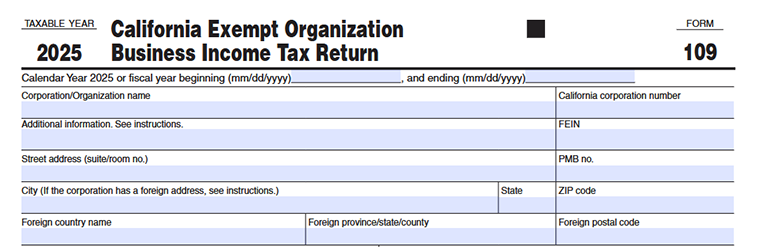
Taxable Year
Enter the tax year for which you are filing California Form 109. If your organization uses a calendar year, enter the beginning and ending dates for the calendar year. If your organization follows a fiscal year, enter the applicable beginning and ending dates in MM/DD/YYYY format.
Example
| Filing Type | Beginning Date | Ending Date |
|---|---|---|
| Calendar Year | 01/01/2025 | 12/31/2025 |
| Fiscal Year | 07/01/2025 | 06/30/2026 |
Corporation/Organization Name
Enter your organization's legal name exactly as it appears in the records of the IRS and the California Franchise Tax Board (FTB). Do not use abbreviations, nicknames, or trade names unless they are part of the registered legal name.
California Corporation Number
Enter the California entity number or identification number assigned to your organization by the California Secretary of State or the California Franchise Tax Board (FTB).
Additional Information
Complete this field only if the California Form 109 instructions specifically request additional identifying information. Otherwise, leave it blank.
Federal Employer Identification Number (FEIN)
Enter your organization's nine-digit Federal Employer Identification Number (EIN) assigned by the IRS.
Street Address
Enter your organization's complete mailing address, including the street number, street name, suite or room number (if applicable), or PO Box.
PMB Number
If your organization uses a Private Mailbox (PMB), enter the mailbox number. If not, leave this field blank.
City (If the corporation has a foreign address):
- Enter the city for your organization's mailing address.
- If your organization has a foreign mailing address, complete the foreign address fields instead.
State
Enter the two-letter abbreviation for the state where your mailing address is located.
ZIP Code
Enter the five-digit or nine-digit ZIP code for your mailing address.
Foreign Country Name:
If your organization has a mailing address outside the United States, enter the full name of the country.
Foreign Province, State, or County
Enter the province, state, territory, or county associated with your foreign mailing address.
Foreign Postal Code
Enter the postal code assigned to your foreign mailing address.
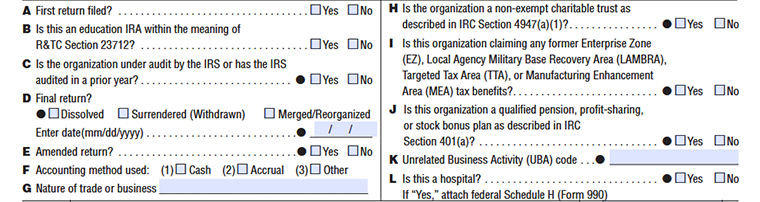
| Quick Reference | ||
|---|---|---|
| Questions | Section | What it covers |
| A, C, D, E | Return status | Is this the first return, an amendment, a final filing, or is the org under audit? |
| F, G | Accounting and business | How the org keeps its books and what unrelated business activity it conducts |
| B, H, I, J, K, L | Special classifications | Whether the org falls into a specific legal or tax category that requires additional attachments |
A: First Return Filed?
Check "Yes" only if this is the very first time your organization is filing Form 109 with California. Leave blank or check "No" for all subsequent years.
B: Education IRA
Check "Yes" if your organization qualifies as an education IRA under California Revenue & Taxation Code Section 23712. Most nonprofits will check "No."
C: IRS Audit Status
Check "Yes" if the IRS is currently auditing your organization, or audited it in any prior year. California uses this to cross-check federal audit outcomes.
D: Final Return
Check "Yes" if the organization is closing. Select the reason - Dissolved, Surrendered (Withdrawn), or Merged/Reorganized - and enter the date (mm/dd/yyyy) the closure took effect.
E: Amended Return?
Check " Yes " if you are correcting or changing a previously filed Form 109 for the same tax year; otherwise, select " No".
F: Accounting Method
Mark the method your organization uses to record income and expenses:
- (1)Cash - record when money changes hands.
- (2)Accrual - record when earned or incurred
- (3)Other - describe in an attachment.
G: Nature of Trade or Business
Write a brief, plain-English description of the unrelated business activity that generated taxable income - for example, "advertising sales" or "rental of commercial property."
H: Non-Exempt Charitable Trust
Check "Yes" if your organization is a non-exempt charitable trust described under IRC Section 4947(a)(1). These trusts are treated similarly to private foundations for tax purposes.
I: Tax Benefits Claimed
Check "Yes" if your organization is claiming tax benefits under any of California's former incentive programs:
- EZ - Enterprise Zone
- LAMBRA - Local Agency Military Base Recovery Area
- TTA - Targeted Tax Area
- MEA - Manufacturing Enhancement Area
J: Qualified Pension or Profit-Sharing Plan
Check "Yes" if the organization is a qualified pension, profit-sharing, or stock bonus plan under IRC Section 401(a). This affects how unrelated business income is taxed.
K: Unrelated Business Activity (UBA) Code
Enter the code that best describes the organization’s unrelated business activity reported on Form 109.
L: Is this Hospital?
Check "Yes" if your organization is a hospital. If so, you must attach federal Schedule H (Form 990), which reports community benefit activities and financial assistance policies.
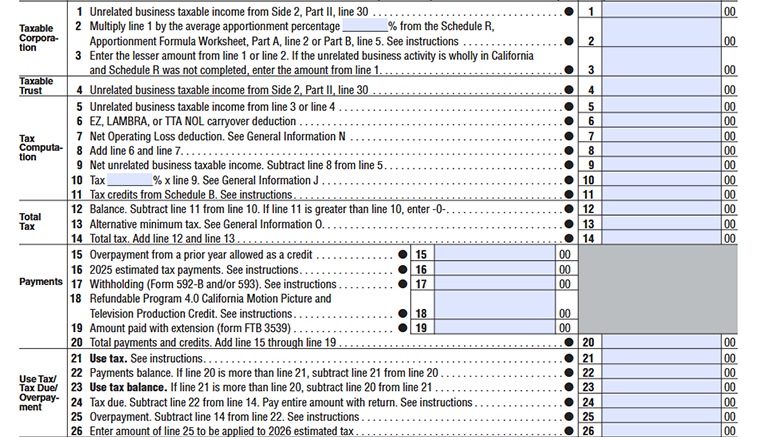
Taxable Corporation
Line 1:
Enter the unrelated business taxable income calculated on Side 2, Part II, Line 30.
Line 2:
Multiply Line 1 by the average apportionment percentage from Schedule R. This applies if your organization does business both inside and outside California.
Line 3:
Enter the lesser amount of Line 1 or Line 2. If Schedule R was not completed, enter the amount from Line 1 directly.
Taxable Trust
Line 4:
Same as Line 1 above but applies to charitable trusts. Pull the figure from Side 2, Part II, Line 30.
Tax Computation
Line 5:
Enter unrelated business taxable income from Line 3 or Line 4, depending on whether you are a corporation or a charitable trust.
Line 6:
Deduct any Net Operating Loss carryover from Enterprise Zone, LAMBRA, or Targeted Tax Area programs. See General Information N.
Line 7:
Enter the Net Operating Loss deduction. See General Information N for eligibility and limits.
Line 8:
Combine the deductions from Lines 6 and 7.
Line 9:
Subtract Line 8 from Line 5. This is your taxable income after NOL deductions.
Line 10:
Multiply Line 9 by the tax rate (shown as a percentage on the form).
Line 11:
Enter any applicable tax credits from Schedule B.
Total Tax
Line 12:
Subtract Line 11 from Line 10. If Line 11 is greater than Line 10, enter 0.
Line 13:
See General Information O for AMT calculation details.
Line 14:
Add Lines 12 and 13. This is your total tax owed.
Payments
Line 15:
Enter any overpayment from a prior year allowed as a credit toward this year's tax.
Line 16:
Enter total estimated tax payments made during 2025.
Line 17:
Enter California withholding amounts from Form 592-B and/or Form 593.
Line 18:
Enter the refundable Program 4.0 credit amount if you made the one-time irrevocable election to receive the credit as a refund because the credit exceeds your California tax liability.
Line 19:
Enter any payment made when you filed your extension using Form FTB 3539.
Line 20:
Add Lines 15 through 19. This is the total of all your payments and credits.
Use Tax / Tax Due / Overpayment
Line 21:
Enter any California use tax owed. See instructions.
Line 22:
If Line 20 is more than Line 21, subtract Line 21 from Line 20 to find your net payments available.
Line 23:
If Line 21 is more than Line 20, subtract Line 20 from Line 21. This is the additional use tax you owe.
Line 24:
Enter the amount of tax you owe after subtracting Line 22 from Line 14. If the result is more than zero, pay the full amount with your return.
Line 25:
Subtract Line 14 from Line 22. If this is positive, you have overpaid.
Line 26:
Choose how much of your overpayment (Line 25) you want carried forward and applied to next year's estimated tax.

Refund or Amount Due
Line 27:
If Line 25 is greater than Line 26, subtract Line 26, from Line 25. Enter the result as your California tax refund. If you choose direct deposit, complete Lines 27a through 27c with your bank account information.
Line 27a:
Enter your bank’s 9-digit routing number, if you want your refund deposited directly into your checking or savings account.
Line 27b:
Select the type of bank account where you want your refund deposited by checking either Checking, or Savings.
Line 27c:
Enter the account number for the checking or savings account that will receive your direct deposit refund. Make sure the account number matches the account selected on Line 27b.
Line 28:
Enter any penalties and interest you owe, if applicable. Refer to the General Information section to determine the correct amount.
Line 29:
Check the box only if your estimated tax penalty was calculated using Exception B or Exception C. Attach Form FTB 5806 when required.
Line 30:
If you owe additional tax, calculate your total amount due by adding Lines 23, 24, 26, and 28, then subtract Line 25. Enter the result on Line 30.
Unrelated Business Taxable Income
Part I Unrelated Trade or Business Income
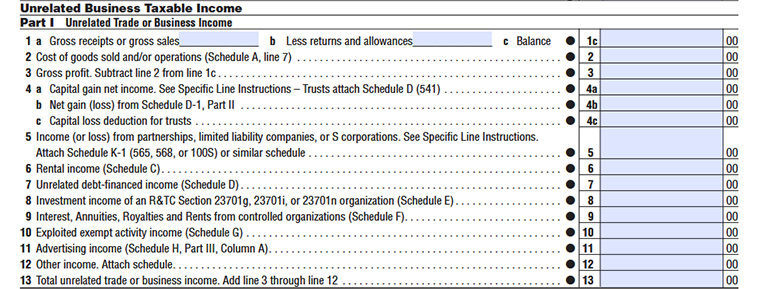
Line 1:
Enter your organization's gross receipts or gross sales from unrelated business activities. Do not subtract returns, allowances, or business expenses on this line.
Line 2:
Enter the total returns and allowances related to the gross receipts reported on Line 1. This reduces the gross receipts before calculating gross profit.
Line 3:
Subtract Line 2 from Line 1 and enter the result as your gross profit. If you report the cost of goods sold, complete the required federal schedule before calculating this line.
Line 4:
Enter any capital gain or capital loss from unrelated business activities. Include the amount reported on the applicable federal schedule, if required.
Line 5:
Enter any ordinary gains or losses from the sale, exchange, or disposition of business property. Attach the required federal schedules when applicable.
Line 6:
Enter any interest income received from unrelated business activities.
Line 7:
Enter any dividend income received from unrelated business activities.
Line 8:
Enter rental income from real property, personal property, or debt-financed property that is subject to unrelated business income tax.
Line 9:
Enter any interest, annuities, royalties, or rents received from controlled organizations.
Line 10:
Enter any exploited exempt activity income reported on the applicable schedule.
Line 11:
Enter all other business income that has not been reported on Lines 1 through 10. Include only income subject to unrelated business income tax.
Line 12:
Add Lines 3 through 11 and enter the total gross unrelated business income.
Line 13:
Enter the total deductions directly connected with the unrelated business income reported onLine 12. Do not include charitable contributions, dividends received deductions, or trust deductions claimed elsewhere on the return.
Part II Deductions Not Taken Elsewhere
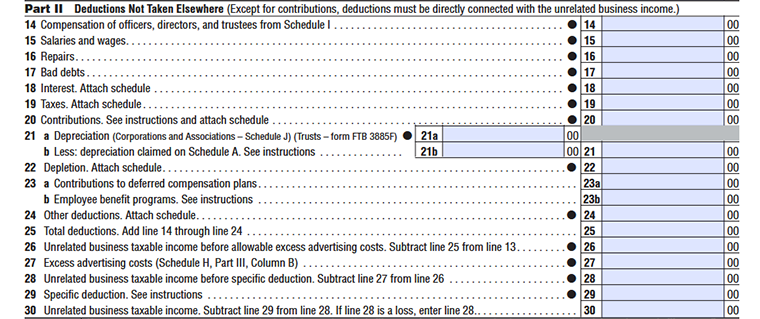
Line 14:
Subtract Line 13 from Line 12 and enter the result as your unrelated business taxable income before specific deductions.
Line 15:
Enter any allowable salaries and wages directly connected with the unrelated business activity that have not already been deducted elsewhere.
Line 16:
Enter allowable repair and maintenance expenses directly related to the unrelated business activity.
Line 17:
Enter any bad debts that are deductible for the unrelated business activity.
Line 18:
Enter allowable interest expense directly connected with the unrelated business activity.
Line 19:
Enter any taxes that are deductible for the unrelated business activity.
Line 20:
Enter allowable contributions, deductions, and adjustments reported on the applicable schedules.
Line 21a:
If your organization has a net operating loss (NOL) carryforward, enter the allowable deduction from Schedule A, Part II.
Line 21b:
If applicable, enter the charitable contributions deduction from Schedule A.
Line 22:
Enter any allowable depletion deduction related to the unrelated business activity.
Line 23:
Enter any allowable contributions reported on the applicable schedule.
Line 24:
Enter any other allowable deductions that have not been reported on previous lines.
Line 25:
Add Lines 14 through 24 and enter the total allowable deductions.
Line 26:
Subtract Line 25 from Line 12 and enter the result as your unrelated business taxable i.
Line 27:
Enter the allowable specific deduction for unrelated business taxable income. Subtract this amount from Line 26.
Line 28:
Enter any allowable business tax credits, if applicable.
Line 29:
Subtract any applicable credits from the calculated tax and enter the remaining tax due.
Line 30:
Enter the final California unrelated business income tax due after applying all deductions, credits, and adjustments.
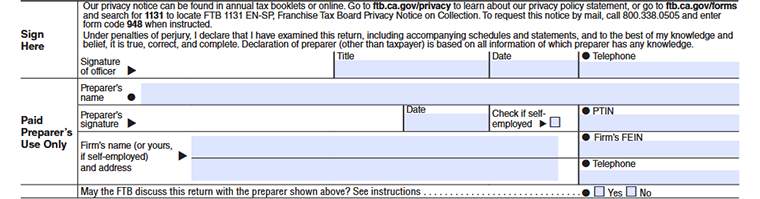
Sign Here
Enter the California entity number or identification number assigned to your organization by the California Secretary of State or the California Franchise Tax Board (FTB).
Signature of Officer:
The organization's authorized officer must sign the return. By signing, the officer declares under penalty of perjury that the return and all supporting schedules are accurate and complete.
Title:
Enter the official title of the individual signing the return, such as President, Treasurer, Chief Financial Officer, or another authorized position.
Date:
Enter the date the authorized officer signs the return using the required date format.
Telephone:
Enter the daytime telephone number of the authorized officer in case the Franchise Tax Board (FTB) needs additional information about the return.
Paid Preparer's Use Only
Complete this section only if someone other than the organization's authorized officer prepared the return for compensation.
Preparer's Name:
Enter the full name of the paid tax preparer who completed the return.
Preparer's Signature:
The paid preparer must sign the return after it has been completed.
Date:
Enter the date the paid preparer signs the return.
Check if Self-Employed:
Check this box if the paid preparer is self-employed.
PTIN:
Enter the preparer's Preparer Tax Identification Number (PTIN) issued by the Internal Revenue Service (IRS).
Firm's Name (or Yours, if Self-Employed) and Address:
Enter the name and mailing address of the preparer's firm. If the preparer is self-employed, enter the preparer's business name and address.
Firm's FEIN:
Enter the firm's Federal Employer Identification Number (FEIN), if applicable.
Telephone:
Enter the business telephone number for the preparer or preparer's firm.
May the FTB Discuss This Return with the Preparer Shown Above?
Select Yes if you authorize the California Franchise Tax Board (FTB) to discuss this return with the paid preparer listed above.
Select No if you do not want the FTB to discuss your return with the preparer.
This authorization allows the FTB to contact the preparer regarding questions about the return but does not authorize the preparer to receive refund payments or represent the organization in all tax matters.
Schedule A – Cost of Goods Sold and/or Operations
Complete this schedule only if your organization has a cost of goods sold or cost of operations related to its unrelated business activity.
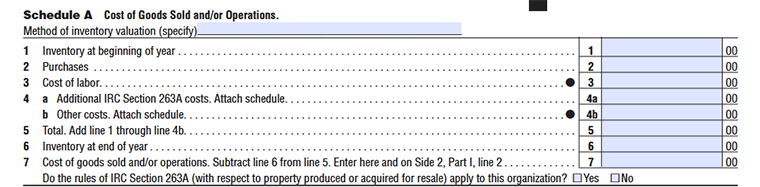
Line 1:
Enter the value of your inventory at the beginning of the tax year.
Line 2:
Enter the total cost of merchandise, materials, or supplies purchased during the tax year for resale or production.
Line 3:
- Enter the direct labor costs incurred to manufacture or produce goods sold during the year.
- Do not include salaries related to administrative or office employees.
Line 4:
Enter any additional costs that must be capitalized under IRC Section 263A. If required, attach a supporting schedule showing the calculation.
Line 5:
Add Lines 1 through 4 and enter the total.
Line 6 – Inventory at End of Year
Enter the value of inventory remaining at the end of the tax year.
Line 7:
Subtract Line 6 from Line 5 and enter the result.
IRC Section 263A:
Indicate whether the rules of IRC Section 263A require you to include additional costs in inventory.
Select Yes or No.
Schedule B – Tax Credits
Complete this schedule B only if your organization is claiming California tax credits.

Line 1:
Enter the name of the tax credit you are claiming.
Line 2:
Enter another credit, if applicable.
Line 3:
Enter a third credit, if applicable.
Line 4:
Add all allowable credits from Lines 1 through 3 and enter the total of all claimed credits, on line 4.
Schedule K – Add-On Taxes or Recapture of Tax
Complete this schedule if additional California taxes or credit recaptures apply to your organization.

Line 1:
Enter the interest amount computed under the long-term contract look-back method, if applicable.
Line 2:
Enter any interest on tax attributable to installment sales.
Line 3:
Enter any required recapture amount resulting from an IRC Section 197 election.
Line 4:
Enter any California credit recapture required for the tax year.
Line 5:
Add Lines 1 through 4 and enter the total.
Schedule R – Apportionment Formula Worksheet
Complete Schedule R only if your organization carries on unrelated trade or business activities both within and outside California. Use this schedule to calculate the percentage of income that is taxable by California.
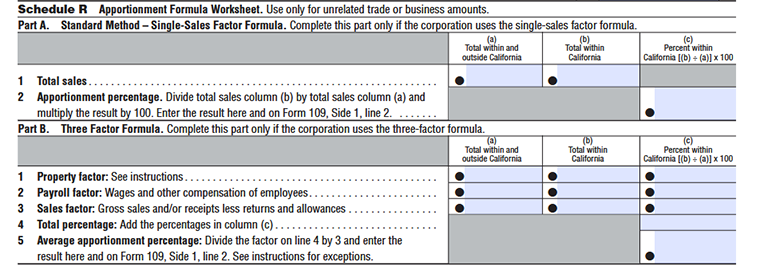
Part A: Standard Method – Single-Sales Factor Formula
Column (a) – Total Within and Outside California
Enter the total gross receipts or sales from your unrelated trade or business activities, regardless of where they were earned. Include sales from California and all other states or countries.
Column (b) – Total Within California
Enter only the gross receipts or sales generated from business activities conducted within California.
Column (c) – Percent Within California
Calculate the percentage of sales attributable to California by dividing the amount in Column (b) by the amount in Column (a). Multiply the result by 100 and enter the percentage.
Line 1:
Enter your total sales from all locations during the tax year.
Line 2:
Enter the sales attributable to California.
Line 3:
Divide California sales by total sales and enter the percentage.
Part B – Three-Factor Formula
Complete Part B only if you are required to use the three-factor apportionment method.
Line 1 – Property Factor
| Column | What to Enter | Example |
|---|---|---|
| Total within and outside California | Enter the average value of all business property used during the tax year. | $500,000 |
| Total within California | Enter the average value of property located in California. | $180,000 |
| Percent within California | Divide the California property by total property. | 36.00% |
Line 2 – Payroll Factor
| Column | What to Enter | Example |
|---|---|---|
| Total within and outside California | Enter the total compensation paid to all employees during the tax year. | $250,000 |
| Total within California | Enter compensation paid to employees working in California. | $100,000 |
| Percent within California | Divide California payroll by total payroll. | 40.00% |
Line 3 – Sales Factor
| Column | What to Enter | Example |
|---|---|---|
| Total within and outside California | Enter total gross receipts from all business locations. | $800,000 |
| Total within California | Enter only California gross receipts. | $300,000 |
| Percent within California | Divide California sales by total sales. | 37.50% |
Line 4 – Total percentage
Add the percentages in column (c)
Line 5 – Average Apportionment Percentage
Divide the amount on Line 4 by 3 and enter the result on this line and Form 109, Side 1, Line 2. If one or more apportionment factors have zero amounts in both columns, divide by the number of factors that have amounts instead.
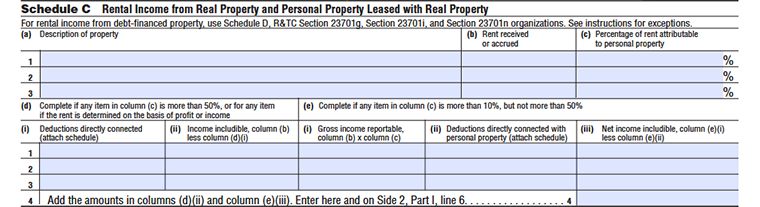
Schedule C – Rental Income from Real Property and Personal Property Leased with Real Property
Complete Schedule C if your organization received income from real property that is treated as unrelated business taxable income.
Column (a): Description of the Property
In Column (a), describe each property that generated rental income during the tax year. Enter enough information to identify the property, such as:
- Type of property
- Property description
- Location or other identifying information
Column (b): Rent Received or Accrued
Enter the rent received or accrued for the property during the tax year .Use the amount applicable to the property identified in Column (a).
Column (c): Percentage of Rent Attributable to Personal Property
- Enter the percentage of the total rent attributable to personal property leased with the real property.
- Personal property may include items such as furniture, equipment, or other movable property leased together with the real property.
This is the most important decision point in Schedule C.
Use the percentage in Column (c) to determine which section applies.
| Personal-property portion | Treatment |
|---|---|
| 10% or less | Generally, the personal-property rent is not taxable under this Schedule C rule |
| More than 10% but not more than 50% | The personal-property portion of the rent is taxable, subject to the applicable exclusions |
| More than 50% | All rents from real property and personal propertyare taxable, subject to the applicable rules |
| Rent depends on income or profits | The applicable rental income is taxable under the more-than-50% rule, subject to the exception for fixed percentage(s) of receipts or sales |
Column (d):
Complete Section (d) when:
- More than 50% of total rent is attributable to personal property; or
- The determination of rent depends in whole or in part on the income or profits derived from the leased property, subject to the fixed-percentage exception described by the FTB.
Column (d)(i) - Deductions Directly Connected
- Enter deductions that are directly connected with the rental income.
- If the form requires a supporting schedule, attach it as instructed.
Column (d)(ii) - Income Includible
- Determine the income included by reducing the applicable rental income by the directly connected deductions.
- This amount contributes to the Schedule C total.
Column (e):
- If the personal-property portion is more than 10% but not more than 50%, use Section (e).
- This section determines the taxable income attributable to the personal property.
Column (e)(i) - Gross Income Reportable
Calculate the gross income attributable to personal property.
Formula
Column (b) × Column (c)
Column (e)(ii):
Enter deductions directly connected with the personal property portion of the rental activity.
Column (e)(iii):
Subtract the deductions in Column (e)(ii) from the gross income in Column (e)(i).
Example:
| Calculation | Amount |
|---|---|
| Gross personal-property income | $20,000 |
| Less: directly connected deductions | $5,000 |
| Net income includible | $15,000 |
Enter $15,000 in Column (e)(iii).
Line 4:
After completing the applicable rows, add: Column (d)(ii) + Column (e)(iii)
- Enter the total on Schedule C, Row 4.
- The form then instructs you to enter this amount on:
- Form 109, Side 2, Part I, Line 6 - Rental Income (Schedule C).
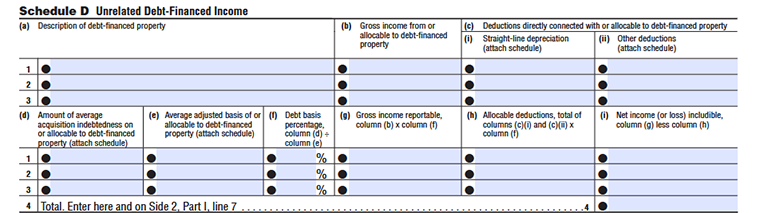
Schedule D Unrelated Debt-Financed Income
Use Schedule D to report income from debt-financed property. The FTB defines debt-financed property as property held to produce income when acquisition indebtedness existed at any time during the tax year. When completing Schedule D, use the federal Form 990-T instructions and apply California amounts where California and federal rules differ.
Column (a):
Enter a description of the debt-financed property that generates the income.
- For real property, enter the property address and a brief description. For other properties, provide enough information to identify the property.
- If you have more than one debt-financed property, enter each property on a separate row.
Column (b):
- Enter The gross income received from, or allocable to, the debt-financed property for the tax year.
- Enter the gross income attributable to the property before applying the debt-basis percentage.
Column (c)(i):
- Enter the amount of straight-line depreciation directly connected with or allocable to the debt-financed property.
- Calculate the applicable depreciation amount using the required depreciation records and attach the supporting schedule as instructed.
Column (c)(ii):
Enter other deductions that are directly connected with or allocable to the debt-financed property, excluding the straight-line depreciation already entered in Column (c)(i).
Examples may include applicable:
- Repairs
- Maintenance
- Insurance
- Property-related expenses
Column (d):
- Enter the average amount of acquisition indebtedness on, or allocable to, the debt-financed property for the tax year.
- Use the required federal Form 990-T calculation method to determine the average acquisition indebtedness.
Column (e):
- Enter the average adjusted basis of the debt-financed property, or the portion of the basis allocable to that property.
- Calculate the amount according to the federal Form 990-T instructions and attach the supporting schedule when required.
Column (f):
Enter the percentage calculated by dividing Column (d) by Column (e).
Calculation:
Column (d) ÷ Column (e) = Column (f)
Column (g):
- Enter the portion of gross income attributable to the debt-financed property.
- Calculate it by multiplying Column (b) by Column (f).
Calculation:
Column (b) × Column (f) = Column (g)
Column (h):
- Enter the deductions allocable to the debt-financed portion of the property.
- Calculate this amount by adding Column (c)(i) and Column (c)(ii) and multiplying the result by Column (f).
Calculation:
[Column (c)(i) + Column (c)(ii)] × Column (f) = Column (h)
Column (i):
Enter the net income or loss includible from the debt-financed property.
Calculate it by subtracting Column (h) from Column (g).
Line1:
Enter the information and calculations for your first debt-financed property.
Line2:
Enter the information and calculations for your second debt-financed property.
Line3:
Enter the information and calculations for your third debt-financed property.
For each property, complete the applicable columns from (a) through (i).
Line4:
Add Column (i) amounts and carry the total to Form 109, Part I, Line 7
Schedule E Investment Income of an R&TC Section 23701g, Section 23701i, or Section 23701n Organization

(a): Description
Enter a description of each investment income source. Include details such as the type of investment, security, or income-producing asset that generated the income.
(b): Amount
Enter the total amount of investment income received from each source during the tax year. Include applicable income from securities and other similar investments.
(c): Deductions directly connected (attach schedule)
Enter expenses directly related to earning the reported investment income. Attach a supporting schedule explaining the deductions included.
Column (d): Net investment income, column (b) less column (c)
Subtract the deductions in Column (c) from the investment income reported in Column (b). Enter the resulting net investment income amount.
Column (e): Set-asides (attach schedule)
Enter the amount of investment income set aside for purposes allowed under California tax rules. Attach a schedule showing how the set-aside amount was calculated.
Column (f): Balance of investment income, column (d) less column (e)
Subtract the set-aside amount in Column (e) from the net investment income reported in Column (d). Enter the remaining taxable investment income balance.
Line 3 – Total Investment Income
- Enter the total amount and carry it to Side 2, Part I, Line 8 of the return.
Line 4 – Gross Income From Members
Enter gross income received from members, including:
- Member dues
- Membership fees
- Charges
- Similar member-related amounts
Do not include nonmember investment income on this line.
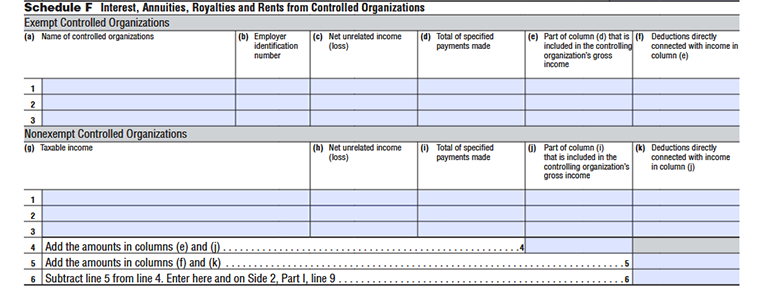
Schedule F Interest, Annuities, Royalties and Rents from Controlled Organizations
Exempt Controlled Organizations:
(a): Name of controlled organizations
Enter the legal name of each controlled exempt organization from which income was received.
(b): Employer identification number
Enter the EIN of the controlled organization.
(c): Net unrelated income (loss)
Enter the controlled organization's net unrelated income or loss related to the reported transaction.
(d): Total of specified payments made
Enter the total payments made by the controlling organization to the controlled organization, including interest, annuities, royalties, rents, or other specified payments.
(e): Part of column (d) that is included in the controlling organization’s gross income
Enter the portion of payments from Column (d) that must be included in the controlling organization's gross income.
(f): Deductions directly connected with income in column (e)
Enter expenses directly connected with the income reported in Column (e).
Nonexempt Controlled Organizations
(g): Taxable income
Enter the taxable income of the nonexempt controlled organization.
(h): Net unrelated income (loss)
Enter the net unrelated income or loss reported by the nonexempt controlled organization.
(I): Total of specified payments made
Enter the total amount of specified payments made between organizations.
(j): Part of column (i) that is included in the controlling organization’s gross income
Enter the portion of payments included in the controlling organization's gross income.
(k): Deductions directly connected with income in column (j)
Enter deductions directly related to the income reported in Column (j).
Line 4 – Total Included Gross Income
Add the amounts reported in:
- Column (e) for exempt controlled organizations
- Column (j) for nonexempt controlled organizations
Enter the combined total on Line 4.
Line 5 – Total Directly Connected Deductions
Add the amounts reported in:
- Column (f)
- Column (k)
Enter the total deductions directly connected with the reported income.
Line 6 – Net Income from Controlled Organizations
Subtract Line 5 from Line 4.
Enter the resulting amount on: Side 2, Part I, Line 9
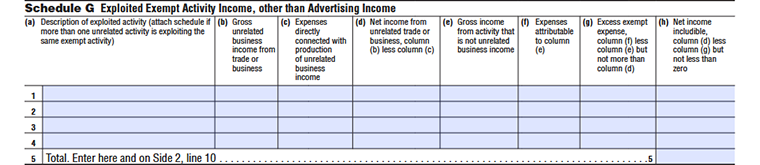
Schedule G - Exploited Exempt Activity Income, Other Than Advertising Income
Column (a):
Enter a description of the exempt activity that is being exploited through an unrelated trade or business. If more than one unrelated activity exploits the same exempt activity, attach a separate schedule identifying the additional activities.
Column (b):
Enter the gross income from the unrelated trade or business that exploits the exempt activity.
Column (c):
Enter the expenses that are directly connected with producing the unrelated business income reported in Column (b).
Column (d):
Subtract Column (c) from Column (b). Enter the resulting net income from the unrelated trade or business.
Column (e):
Enter the gross income generated from the activity that is not treated as unrelated business income.
Column (f):
Enter the expenses attributable to the income reported in Column (e).
Column (g):
Subtract Column (e) from Column (f). Enter the excess exempt expense, but do not enter an amount greater than Column (d)
Column (h):
Subtract Column (g) from Column (d). If the result is less than zero, enter zero rather than a negative amount.
Line 5:
- Add the amounts reported for each activity and enter the applicable total on Schedule G, Line 5.
- The amount from Schedule G, Line 5, is carried to Form 109, Side 2, Part I, Line 10.
Schedule H - Advertising Income and Excess Advertising Costs
Use Schedule H to report advertising income and determine whether the organization has net advertising income or excess advertising costs from its periodicals.
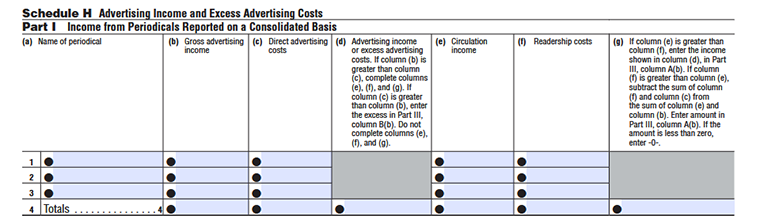
Part I - Income from Periodicals Reported on a Consolidated Basis
Complete Part I when the organization reports income from multiple periodicals on a consolidated basis.
Column (a):
Enter the name of each periodical whose advertising income is being reported.
Column (b):
Enter the total gross advertising income received or earned from the periodical.
Column (c):
Enter the expenses directly related to producing the advertising income reported in Column (b).
Column (d):
Compare Column (b) with Column (c). If gross advertising income is greater than direct advertising costs, subtract Column (c) from Column (b) and enter the advertising income. If Column (c) is greater than Column (b), report the excess advertising costs in Part III, Column B and do not complete Columns (e), (f), and (g).
Column (e):
If Column (b) is greater than Column (c), enter the income received from circulation of the periodical.
Column (f):
Enter the costs attributable to producing or maintaining readership for the periodical.
Column (g):
If circulation income in Column (e) is greater than readership costs in Column (f), enter the amount from Column (d). If Column (f) is greater than Column (e), calculate the amount using the formula provided on the form and enter the result. If the result is less than zero, enter zero.
The 2025 form specifically directs taxpayers to move excess advertising costs to Part III, Column B, while net advertising income is carried to Part III, Column A.
Line 4:
Add the amounts reported in the applicable columns for Part I and enter the totals on Line 4.
Part II - Income from Periodicals Reported on a Separate Basis
Use Part II when income from a periodical is not reported on a consolidated basis.

Line 5-7:
Complete Lines 5 through 7 for the applicable periodicals.
Part III - Column A: Net Advertising Income

Column (a):
Enter “consolidated periodical” and/or the names of the non-consolidated periodicals whose net advertising income is being reported.
Column (b):
Enter:
- The total amounts from Part I, Column (d) or Column (g), as applicable; and
- The applicable amounts from Part II, Column (d) or Column (g).
The total from Part III, Column A is carried to Form 109, Side 2, Part I, Line 11.
Line 4:
Add the applicable net advertising income amounts reported in Part III, Column A. Enter the total on Schedule H, Line 4 and also carry the same amount to Side 2, Part I, Line 11.
Part III - Column B: Excess Advertising Costs
Column (a) – Periodical Name
Enter “consolidated periodical” and/or the names of the non-consolidated periodicals for which excess advertising costs are being reported.
Column (b) – Excess Advertising Costs
Enter the total excess advertising costs from:
- Part I, Column (d), when direct advertising costs exceed gross advertising income; and
- Applicable amounts from Part II, Column (d).
- The total from Part III, Column B is carried to Form 109, Side 2, Part II, Line 27.
Line 5:
Add the applicable excess advertising costs reported in Part III, Column B. Enter the total on Schedule H, Line 5 and also carry the same amount to Side 2, Part II, Line 27.
Schedule I - Compensation of Officers, Directors, and Trustees
Use Schedule I to calculate the portion of compensation paid to an organization's officers, directors, and trustees that is attributable to its unrelated business activities.
The total from Schedule I is entered on Form 109, Side 2, Part II, Line 14.

Column (a):
Enter the name of each officer, director, or trustee who received compensation that is attributable to the organization's unrelated business activities.
Column (b):
Enter the person's title or position within the organization, such as President, Treasurer, Director, or Trustee.
Column (c):
Enter the percentage of the individual's working time devoted to the organization's unrelated business activities. Enter the percentage as shown on the form.
Column (d):
Enter the portion of the individual's compensation that is attributable to the unrelated business activity.
Line 6:
- Add the amounts reported in Column (d) for all listed individuals.
- Enter the total on form 109, Side 2, Part II, Line 14 - Compensation of officers, directors, and trustees.
Schedule J Depreciation (Corporations and Associations only. Trusts use form FTB 3885F)
Schedule J is used by corporations and associations to report depreciation expenses related to property used in an unrelated trade or business. Trusts should use FTB Form 3885F instead.
Use the applicable row and columns to report depreciation by type of property. The final depreciation amount from Schedule J is carried to Side 2, Part II, Line 21a.
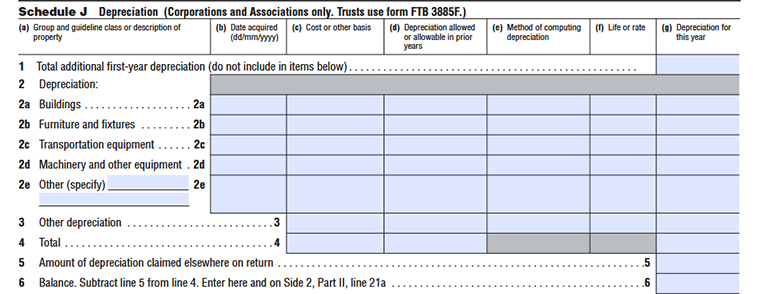
Column (a):
Enter the type or description of the depreciable property. Use the applicable category, such as buildings, furniture and fixtures, transportation equipment, machinery and other equipment, or specify another type of property.
Column (b):
Enter the date the property was acquired, using the (dd/mm/yyyy) format shown on the form.
Column (c):
Enter the property's cost or other applicable tax basis used to calculate depreciation.
Column (d):
Enter the total depreciation allowed or allowable for the property in prior tax years.
Column (e):
Enter the depreciation method used to calculate the property's depreciation, such as the applicable method under the tax rules.
Column (f):
Enter the applicable recovery period, useful life, or depreciation rate used for the property.
Column (g):
Enter the depreciation deduction for the current tax year for the property.
Line 1:
- Enter the total additional first-year depreciation for the tax year.
- Do not include this amount in the individual property amounts reported on the lines below.
Line 2:
Report depreciation for the applicable categories of property
Line 2a:
Enter depreciation for buildings.
Line 2b:
Enter depreciation for furniture and fixtures.
Line 2c:
Enter depreciation for transportation equipment.
Line 2d:
Enter depreciation for machinery and other equipment.
Line 2e:
Specify the type of property and enter the applicable depreciation amount for other depreciable property.
For each applicable property category, complete the required columns from Column (b) through Column (g).
Line 3:
Enter depreciation that does not belong in the property categories listed on Lines 2a through 2e.
Line 4:
Add the applicable depreciation amounts reported above and enter the total depreciation for Schedule J.
Line 5:
- Enter any depreciation amount that has already been claimed elsewhere on the return.
- Do not include the same depreciation amount twice.
Line 6:
- Subtract Line 5 from Line 4.
- Enter the resulting balance on Schedule J, Line 6, and also enter the same amount on Side 2, Part II, Line 21a.
Calculation: Line 4 ˆ’ Line 5 = Line 6.
Ready to File Your CA Form 109?
This guide provides step-by-step instructions for completing CA Form 109 and explains the applicable filing requirements and due dates.